6 Best Low Code No Code Platforms for Web and Business App Development
Published: – Updated:

What’s the key to building a successful application? Is it timing, a great marketing strategy, or massive investments? While all these factors play their roles, none of them matter without the very product.
Traditional development methods demand time, technical expertise, and upfront investment in licenses, and other luxuries most teams can’t afford. This is why a low code no code (LCNC) approach is taking over, changing not only the cost and time of development but also the tools companies can use to build their solutions.
With intuitive drag-and-drop interfaces and pre-built templates, low code no code platforms eliminate the barriers between having an idea and bringing it to life. And numbers prove that point. The global low code market is expected to reach $376.92 billion by 2034, according to Fortune Business Insights.
But since there are dozens of platforms available, finding the right fit takes time, which your competitors use for their own growth. As an AI consulting company, we’re here to offer our guidance and assist you in this process.
Low code vs no code: What’s the difference?
Both low-code and no-code solutions are designed to simplify and speed up application development. The main difference lies in the level of complexity and customization.
For example, low-code platforms usually include a user interface with pre-built components, drag-and-drop elements, and code snippets. These snippets allow users to add features using simple HTML or JavaScript components and implement custom logic that isn’t included in the platform’s standard functionality.
The main audience for such platforms is developers, or people with a tech background, who want to build or customize an application without having to code everything from scratch. Popular use cases include internal tools (admin panels, HR portals, reporting dashboards) and customer-facing products (self-service portals, booking systems, marketplaces).
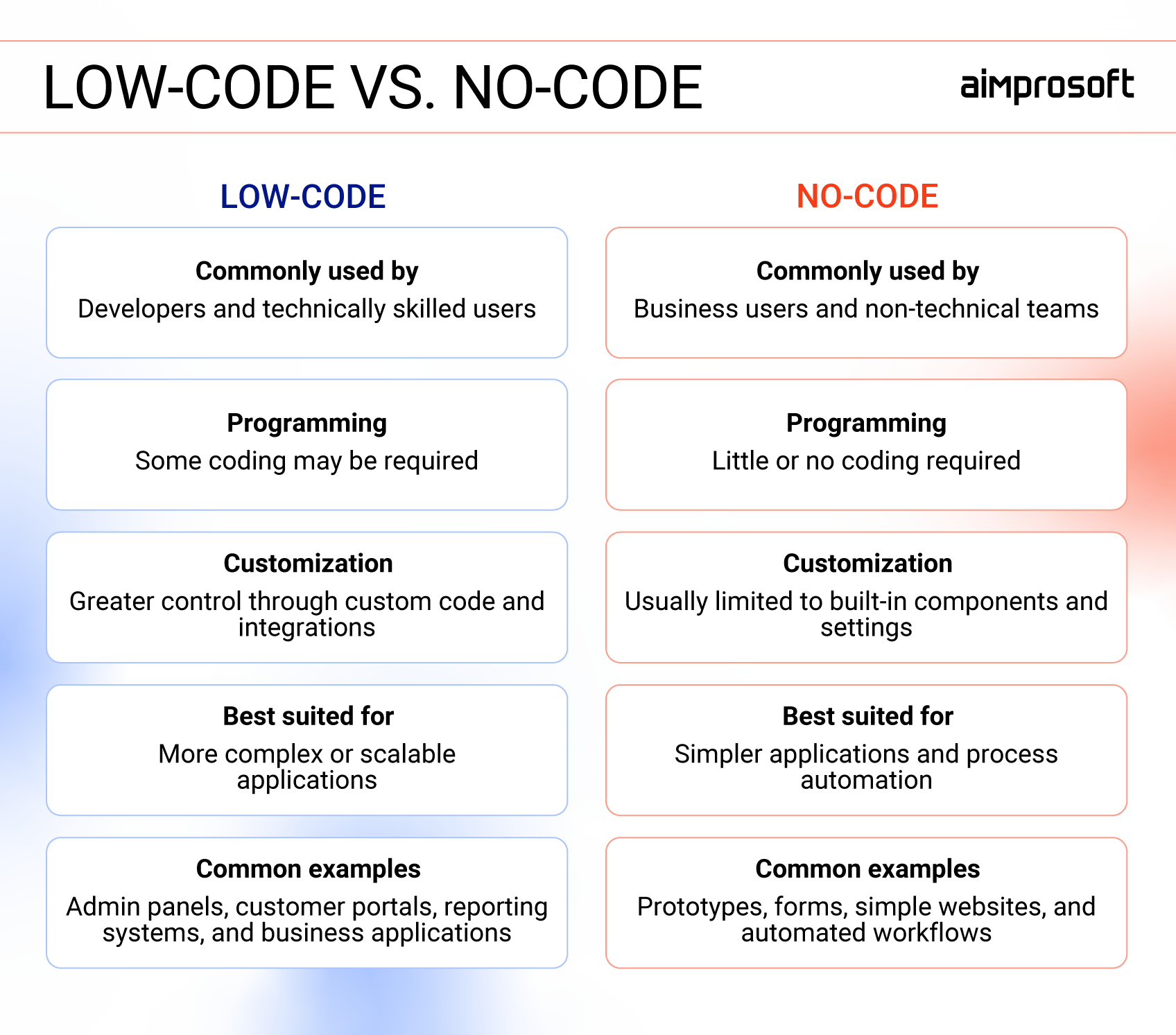
No-code development platforms mainly consist of drag-and-drop interfaces and templates. Here, users often don’t need to have a tech background, as such solutions enable app development by replacing lines of code with architectural blocks. Generally, they are best suited to prototypes, simple websites, internal tools, forms, and workflow automation.
It’s important to clarify that neither approach is universally better than the other. The choice between a no-code and a low-code platform should come down to these three things: Who will build it, how complex the app needs to be, and who will maintain it once it’s live.
The best low code no code platforms
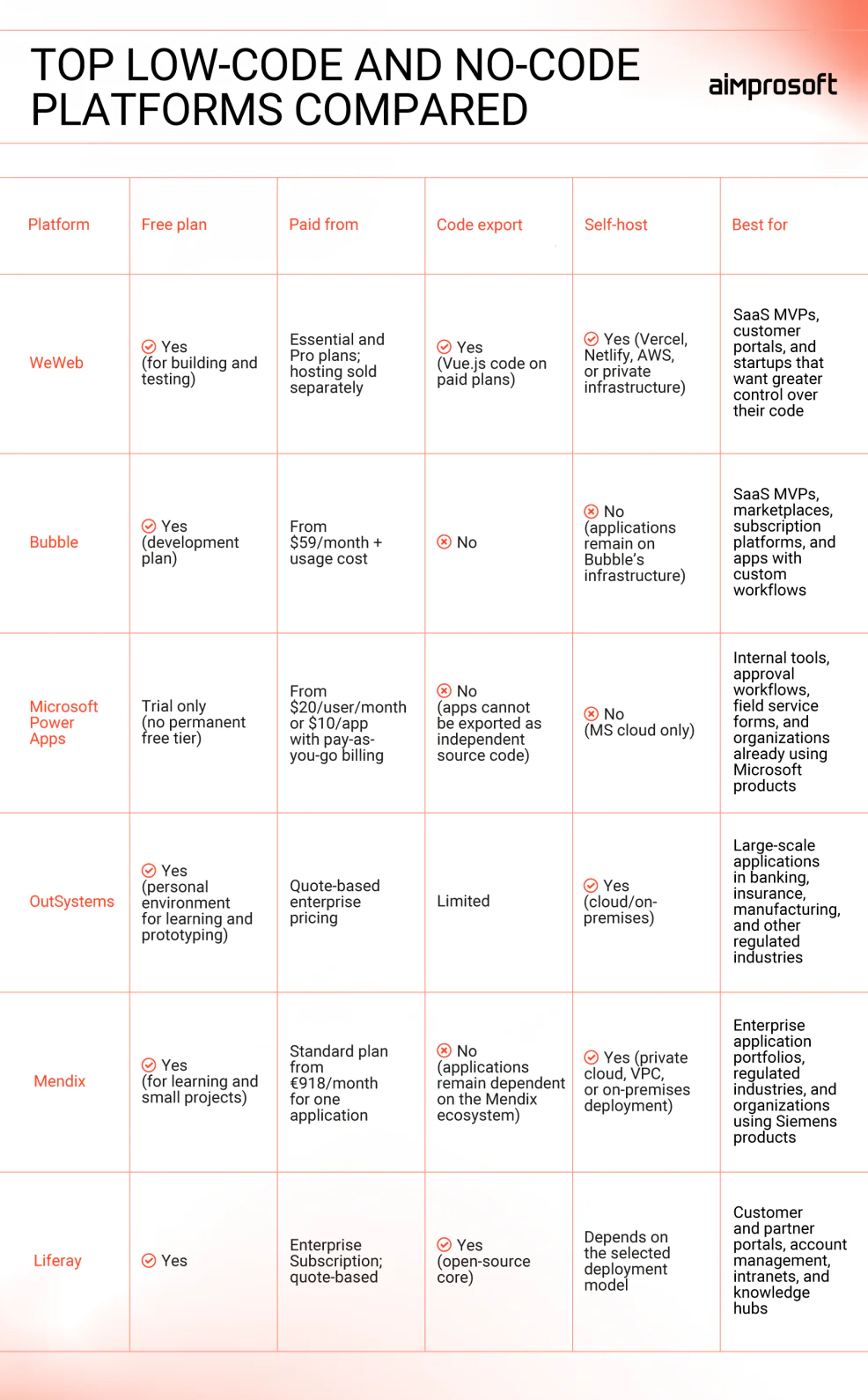
Since there are multiple platforms available to businesses, researching and testing them takes lots of effort. You need to find, select, check reviews, and maybe even try them out yourself. To save you time on the first three steps, we’re happy to share our no and low code platform comparison.

WeWeb
WeWeb is a no-code web application development platform built around a visual drag-and-drop interface and intuitive workflow tools. In addition to traditional no-code features, it offers an AI assistant that lets you generate layouts with prompts rather than manually moving elements.
WeWeb offers both frontend and backend services, but you can also connect your existing backend or database through APIs. Comfortable pricing plans also allow code export and self-host, giving businesses more control over deployment and reducing vendor lock-in.
Core strengths
- Bring your own backend. Since WeWeb offers native integrations with Supabase, Xano, Airtable, and any REST/GraphQL API, you can connect or switch your backend without impacting the frontend.
- Code export and self‑hosting. Paid plans enable you to export production-ready Vue.js code, so you can download and host your application on Vercel, Netlify, AWS, or your own infrastructure.
- Team collaboration. Pro plan lets multiple people work on the same project simultaneously, track every change, and sync with a code repository. This feature is a must-have for teams who plan to work long-term.
- Security and compliance readiness. The platform offers role‑based access, SSO via auth providers, and standard cloud security practices which makes it easier for businesses to meet compliance requirements.
Works best for SaaS MVPs and customer portals. The platform provides tools such as user auth, subscriptions, and dynamic data from a separate backend. It’s also a smart choice for startups that want to ship fast now and keep the option to export code and continue development outside the platform personally.
Cost. WeWeb offers a free plan for building and limited cloud deployment. Paid tiers include Essential and Pro, with hosting sold separately.
Skill level: Medium. As a no-code platform powered by AI, WeWeb provides customer support during the free trial, which helps non-tech users successfully build and deploy their apps. Yet more complex work requires a technical background or an in-house tech team.
Key limitations
- More decisions to make. Since WeWeb offers built-in backend options, it enables users to focus only on visible parts of the app, but it also requires basic architectural knowledge. This point can become truly overwhelming for non‑technical users.
- Publishing requires a paid plan. The free tier is a great opportunity for a business to try and test the application in a sandbox, but to make it live, it requires a paid tier.
- US hosting. WeWeb is a French company with a Data Processing Agreement (DPA), but default hosting runs on AWS US (Virginia). Teams with strict EU data residency requirements will need to export code and self-host on EU infrastructure, which requires a paid plan and tech assistance, in-house or external.

Bubble
Bubble no code builder offers tools for web and native mobile app development. It combines an AI agent, a visual interface editor, a built-in database, hosting, user authentication, and API integrations — all in a single place.
Unlike template-based builders, Bubble offers customization options, including the ability to build unique workflows. The platform is also designed to handle growing traffic. Which makes it a perfect tool not only for individual entrepreneurs testing prototypes but for startups and SMBs alike.
Core strengths
- Web and native mobile support. Most application builders focus primarily on the web. With Bubble, businesses can build web, browser-based, and mobile solutions without changing tools or databases.
- Production-ready environment. In addition to the tools needed for application development, Bubble supports custom domains, version control, server logs, collaboration, and workload scaling on paid plans. These elements prove to be essential for those who wish to build not only demos but scalable applications.
- Vast knowledge base. The platform has a large marketplace for plugins, templates, and tutorials, as well as an active forum. With this knowledge, businesses can efficiently develop by themselves rather than relying on external engineers or agencies.
- Flexible design without code. Thanks to visual building blocks, you can create custom logic for your application without writing code. This feature gives control over the app’s layout, access control, privacy rules, and data mirroring your actual work process instead of adjusting to standard templates.
Works best for SaaS MVPs, marketplaces, subscription platforms, and other applications that require database and custom user workflows. It is particularly suitable for founders who want an all-in-one platform rather than managing separate frontend and backend tools.
Cost. Bubble offers a free development plan. Paid web-and-mobile plans start at $59 per month when billed annually. Collaboration features and high workload usage can drive up costs, which means that applications with heavy traffic or resource-intensive tasks might need more capacity.
Skill level: Medium to High. No traditional programming is required, but builders need to understand data structures, workflows, responsive design, and application logic. Complex applications may still require an experienced software engineer.
Key limitations
- Platform dependence. Bubble applications can’t be exported or moved to another hosting provider. You can publish mobile apps to the App Store and Google Play using Bubble’s native mobile builder or third-party wrappers, but the app’s logic and data will remain hosted on its servers.
- Usage-based costs. Unlike flat monthly pricing, Bubble’s billing scales with usage. The more users, data, and logic your app handles, the higher the bill gets, which can catch fast-growing startups off guard.
- Learning curve. Since the platform offers more flexibility, concepts, and configuration options than simpler template-based no-code tools, it also requires a certain level of technical background for the builder.

Microsoft Power Apps
Microsoft Power Apps is a low-code development platform. As part of the Microsoft ecosystem, it’s often used for building internal tools that work with an organization’s existing data, workflows, and security controls.
Power Apps offers a visual designer, prebuilt connectors, and optional code snippets for advanced scenarios. Among its use cases, you can find approval workflows, employee onboarding, inventory tracking, field inspections, and other internal processes.
Core strengths
- Spreadsheet-style logic. Because Power Apps uses Power Fx, a formula language based on spreadsheet logic, users familiar with Excel can write app rules, filters, and workflows without needing a developer.
- Apps where your team already works. The platform integrates directly into Microsoft Teams, SharePoint, and Outlook. Because your team uses these apps daily, adopting a new solution based on Power Apps will be easier.
- Unified IT management. Another benefit of the Microsoft environment is that apps built with Power Apps inherit your company’s existing security and user permissions. As a result, you don’t need a separate access management layer to configure and maintain it.
- Different app development options. The platform lets you build different apps using both drag-and-drop visual designs and structured, data-focused business tools. This combination covers both custom UI designs and structured business workflows without needing multiple tools.
Works best for building internal tools like approval workflows and field service forms across departments. It’s a natural choice for companies already using Microsoft tools, as any app would easily integrate with Dynamics 365, SharePoint, or Azure services.
Cost. Power Apps pricing starts at $20 per user per month and also offers pay‑as‑you‑go billing at $10 per app. Features like Dataverse and premium connectors add extra costs, and licensing rules vary by region and channel, so it’s worth checking Microsoft’s current pricing before committing.
Skill level: Low to Medium. Thanks to Power Apps’ familiar logic, users can quickly build basic tools using templates, pre-built connectors, and Excel-like formulas. However, more complex solutions that require performance tuning and data governance would need assistance from your in-house IT team or external engineers.
Key limitations
- Limited technology portability. While existing apps move easily between Power Platform environments, you can’t export them as independent source code to run outside Microsoft’s stack. Switching platforms usually means rebuilding the application.
- Complex external integrations. Microsoft integrations are a major benefit for users already in the ecosystem. But connecting external systems can require additional integrations and licenses, making the setup more complex and expensive.
- Need more technical expertise. Power Fx helps non-technical users build simple applications, but more complex logic, integrations, permissions, and data models usually require support from IT or an experienced Power Platform developer.

OutSystems
OutSystems is an application development company that offers a low-code platform called OutSystems Developer Cloud (ODC). It combines a visual modeler, an AI app builder, DevOps automation, and architecture governance, primarily for enterprises.
Unlike lighter no-code development platforms, OutSystems is best suited for software developers and IT teams building complex, business-critical applications. Since such projects often require technical expertise, the platform may be less practical for individual entrepreneurs who want to test an idea.
Core strengths
- Text-to-app generation. The platform’s AI assistant (Mentor) can turn a simple text prompt into a functional business workflow as well as a mobile and web application. Instead of starting from scratch, developers receive a ready-made application structure and logic that they can further edit in the visual workspace.
- Isolated environments. OutSystems isolates the environment where you create applications from the one where users run them. This clear division between testing, development, and production prevents accidental changes from affecting the live application.
- Built-in deployment pipelines. ODC integrates deployment directly into its cloud architecture, which includes one-click deployment, impact analysis before deploying, and revision tracking across stages. This feature frees developers from manually managing complex, multi-stage release processes.
- Enterprise-grade security and governance. The platform supports role‑based access, environment isolation, security scanning, and auditability across the application lifecycle. These controls help businesses manage multiple applications consistently and meet industry-regulated requirements.
Works best for high-scale applications like core banking, insurance, or manufacturing, where governance and security are essential. Since the platform is developer-friendly, it’s also a natural choice for companies with in-house tech teams.
Cost. OutSystems uses enterprise pricing based on the number of applications and environments, deployment model, and support level. It also offers a free personal environment for learning and prototyping. Since exact costs are quote-based, check with OutSystems for current pricing.
Skill level: Medium to High. ODC’s primary audience is software developers and IT teams. Business users can participate in requirements and testing, but as the application grows and becomes more complex, it may need technical support.
Key limitations
- Enterprise-oriented. Because OutSystems focuses heavily on large-scale governance and architecture, its licensing and operational overhead can be too expensive for startups or simple MVPs.
- Steeper learning curve. Even though the platform offers visual development, it is designed for software engineers. So, businesses without relevant in-house expertise may need to train their developers or work with an external software development partner.

Mendix
Mendix is an enterprise application development platform that provides low-code (Mendix Studio) and more advanced development capabilities (Mendix Studio Pro). Acquired by Siemens, it emphasizes governance and scalability and allows users to extend low‑code features with manual code when needed.
One of its distinguishing features is deployment flexibility. Along with public cloud deployment, Mendix supports private cloud/VPC environments and on-premises infrastructure through containers. This feature makes the platform particularly beneficial for businesses working in regulated industries, like fintech or healthcare.
Core strengths
- Real-time portfolio tracking and governance. Mendix offers a Control Center where business and IT leaders can view existing apps across their organization. With a shared dashboard, they can track progress, status, and the number of applications developed. Thanks to this complete picture, both parties can shift their priorities and govern the apps consistently.
- Built‑in automated testing framework. Mendix provides not only tools for development but testing as well. Here you can run unit tests for microflows and custom code, UI tests that simulate user actions, and even visual regression testing. This feature allows your team to check solutions before they reach production.
- AI assistant Maia. Unlike basic AI tools found in many low-code platforms, Mendix’s Maia acts as a development co-pilot. It recommends application logic, workflows, and relevant best practices. Trained on patterns from millions of community-built applications, Maia provides context-aware guidance while leaving the final decision to the builder.
- Secure deployment. The same application built with Mendix can be deployed in different environments depending on the company’s security and compliance requirements. It can run on the provider-managed Mendix Cloud, in a private cloud, or as a fully air-gapped on-premises installation with no external connectivity.
Works best for enterprises building and managing a portfolio of internal applications. It is also a strong fit for organizations with strict security and deployment requirements or those already operating within the Siemens ecosystem.
Cost. Mendix offers a free tier for learning and small projects, with paid plans for professional and enterprise use (cloud hosting, advanced governance, support). The pricing plan is usage-based, but before purchasing, we suggest checking their website for any updates.
Skill level: Medium to High. Business users can create prototypes and basic workflows using Mendix visual tools. But production applications that involve custom logic, system integrations, security controls, or complex data models usually require an experienced developer or architect.
Key limitations
- High total cost. While Mendix has a free tier, the Standard plan starts at €918 per month for one application. Enterprises building a portfolio may also need to account for additional users, cloud infrastructure, and premium capabilities, increasing the platform’s total cost of ownership.
- Steep learning curve. Having low-code features and an AI co-pilot doesn’t mean users won’t need any technical background. Compared to other platforms, Mendix is much more complex, and to get the most out of its enterprise features, you’ll need qualified developers.
- Risk of vendor lock-in. Since Mendix offers not only tools for development but also testing and hosting, it creates a risk of lock-in. Once live, your app becomes highly dependent on Mendix’s ecosystem and, as a result, can’t be migrated to a completely independent technology stack.

Liferay
Liferay is an open-source-based digital experience platform (DXP) for developing portals, intranets, and complex web experiences. Its low-code capabilities allow business users to build processes visually, while developers can extend the platform’s features with custom Java modules and client extensions.
While not being a pure low-code development platform, Liferay combines content management, digital asset management, commerce, personalization, search, security, and process automation. This makes it a strong fit for enterprises looking for more customized digital solutions.
Core strengths
- Connecting existing software. Since Liferay has built-in APIs and connectors, it can pull data from your current CRM, ERP, and security tools. This gives you a single, centralized workspace without rebuilding or migrating the existing tech stack.
- Data management without IT. Users can define everyday business items, like customer cases or inventory records, by setting up fields directly in the interface. These records automatically link to workflows and display cleanly on portal pages, allowing business teams to manage their own data structures without developers’ help.
- Precise user permissions. Liferay helps you control who can see specific information by allowing you to set up roles, sites, and user groups. This means that customers can only view their own records, while business partners have their own secure workspace.
- Clean custom coding. When low-code tools aren’t enough, developers can use standard frameworks like React, Angular, Java, and Node.js to build custom features. Because Liferay keeps custom extensions in a separate layer from the core system, updates are less likely to overwrite or conflict with them.
Works best for organizations that want to bring different backend systems together into a single, managed portal experience. It’s more suited for enterprises than SMBs. Liferay’s best use cases are customer self-service, account management, and B2B partner portals, as well as employee intranets and knowledge hubs.
Cost. Liferay offers a free tier, but for full-featured development, businesses will need an Enterprise Subscription. Pricing of the latter depends heavily on project scope, number of users, and deployment model.
Skill level: Medium to High. Basic site and content management are easy to handle by non-tech users, but advanced customization and integrations usually require the presence of software developers.
Key limitations
- Not a pure LCNC app builder. Liferay is primarily a DXP platform with low‑code features. It’s less suited for rapid, standalone app building compared to dedicated no‑code/low‑code platforms.
- Implementation complexity. Full‑featured deployments often require significant setup, customization, and ongoing maintenance by skilled teams.
- Higher total cost of ownership. While the platform provides a free tier, an Enterprise Subscription can involve substantial costs for licenses, infrastructure, and specialized development.
How to pick a low-code/no-code platform
Start with who will build the application. A non-technical founder will likely be comfortable in Bubble or WeWeb, while Mendix and OutSystems are designed for developers and IT teams who already know their way around application architecture.
The second question matters as much as the first: Who updates the app once it goes live? A more developer-oriented platform can quickly become a bottleneck if the person responsible for day-to-day changes doesn’t have the same background.
Next, define what you’re building. A prototype, an internal approval tool, a customer portal, and a portfolio of enterprise applications have different requirements regarding customization and governance. Choosing an enterprise platform for a basic MVP adds cost and process overhead you’ll spend months working around.
Then look at your existing technology stack. Power Apps is a natural fit for organizations already running Microsoft 365 and Azure, while Mendix works closely within the Siemens ecosystem. If your goal is to connect several ERP, CRM, or identity systems through one managed portal, Liferay can be a better fit than a dedicated app builder.
Also consider hosting. Check which cloud regions and deployment models the platform supports before committing. This point is extremely important for teams with EU data residency requirements or air-gapped environments.
Also, check what happens if you decide to leave. Some platforms let you export production-ready code and self-host it elsewhere, while others keep your application tied to their infrastructure.
Finally, compare total cost rather than starting price. User licenses, usage-based billing, hosting environments, additional integrations, and developer support all affect what you’ll actually pay after twelve months. A free or low-cost plan is a reasonable way to test an idea.
Sum up
Low code and no code platforms have become a natural choice for many businesses looking for quick development. Yet the number of these solutions available can be quite intimidating. If you’re hesitant or want to learn more about our experience in low-code no-code app development, request a free consultation with our experts via the contact form.