Enterprise AI Integration: Why Most Pilots Fail to Reach Production (And How to Fix That)
Published: – Updated:


A working pilot proves less than most teams think. Yes, it demonstrates that the solution can deliver a useful result for a defined use case. Even with real users, representative data, and relevant workflows involved, a pilot may still work separately from the company’s production systems and data flows. This means surprises can still happen in production.
The distance from pilot to fully operational system is much greater than it may seem. That’s a massive scope of work behind enterprise AI integration services and a big part of why 80% of AI projects fail.
So how do you spot the early signs and, most importantly, avoid the most common production failure modes? This guide answers these questions and provides a checklist to help you understand what your project lacks to become a stable enterprise solution that yields ROI.
The hidden risks across the AI delivery path
An AI project typically passes several validation stages to test different technical and operational assumptions. Let’s see what each stage confirms and where the hidden risks lie.
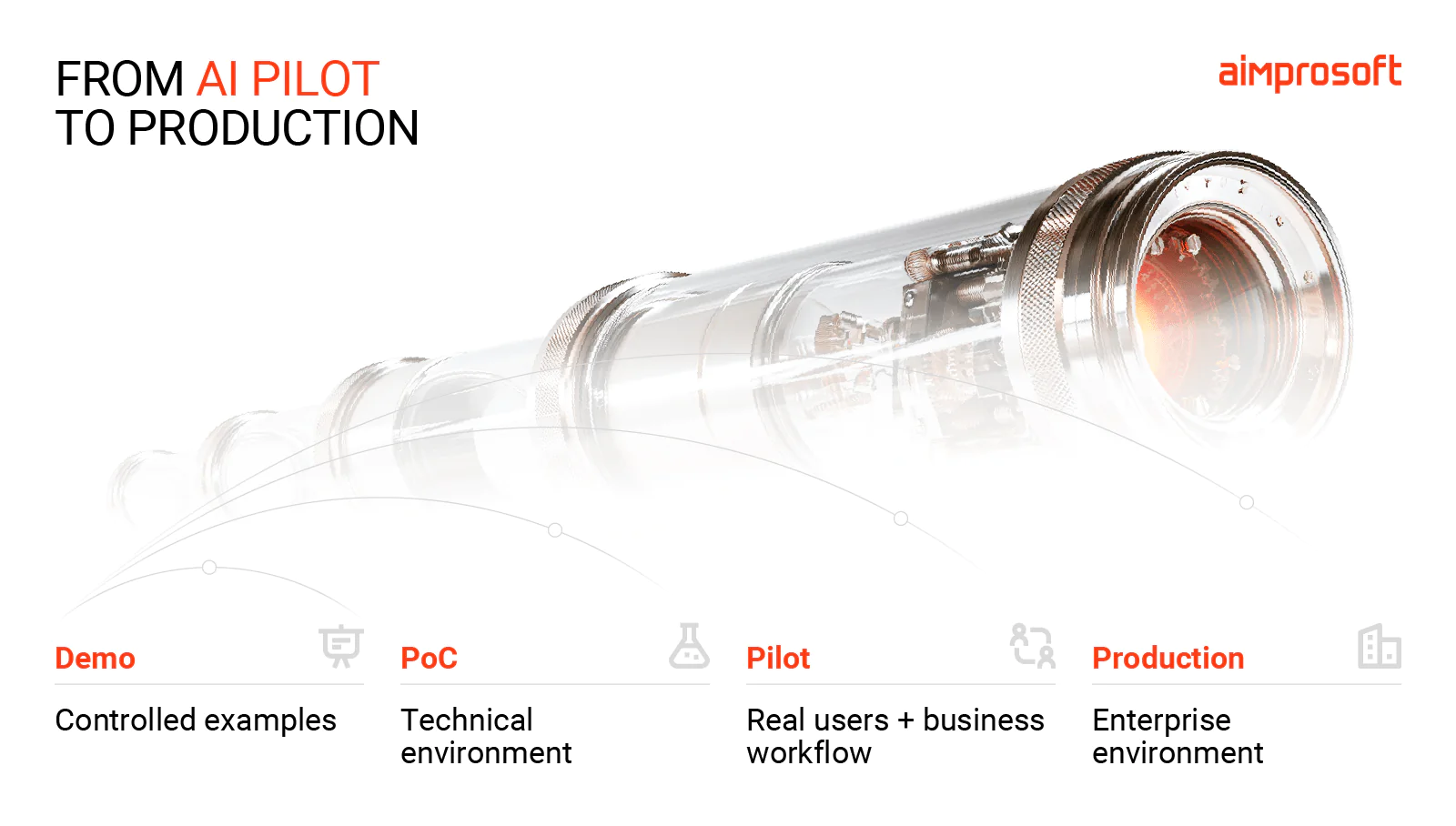
What a demo proves
It shows that AI can deliver the desired result in a controlled environment. You can use representative examples to test core capabilities, but don’t mistake convincing outputs or a smooth user experience for readiness for enterprise AI integration.
Common mistake: Assuming that because the AI works on selected examples, the use case is ready for proof of concept (PoC).
Before moving on: Check whether your business problem is clearly defined, you have measurable success criteria, and your solution can access the required data.
What a PoC proves
A PoC validates the solution’s technical feasibility. In other words, it helps avoid AI implementations that are more complex than the problems they solve. Thanks to AI-assisted development, it’s possible to build a PoC in a few days that looks like a finished product. But that’s hardly a reason to consider it ready for production.
Common mistake: Reusing a quick-and-dirty PoC architecture as the solution progresses towards a live rollout.
Before moving on: Understand which parts of the PoC need redesign, refinement, or replacement, and which can handle real user demand and production workloads.
What a pilot should prove
A pilot is the closest to a production project state. Its main purpose is to confirm whether the solution delivers expected value and whether its projected production costs make sense for the business. In addition to technical accuracy, it has to connect AI performance to business outcomes. In rough terms, a pilot validates the economic viability of the AI solution before you commit to full-scale generative AI integration services.
Common mistake: Taking high adoption, positive user feedback, or good model metrics as evidence of business value.
Before moving on: Track at least one KPI tied to the process being improved to be able to compare the results before and after AI introduction.
What a production has to prove
In production, everything changes. An AI system has to process massive data volumes, cope with unexpected edge cases, and interact with live infrastructure with all its constraints. On top of that, you want your cost model to remain stable as usage grows and to have a clear fail-safe for AI errors.
Common mistake: Viewing launch as the end of the project. In fact, that’s the transition to an operational lifecycle involving day-to-day oversight and system tuning to keep it in good shape.
Before moving on: Confirm your cost model has been validated against production-scale usage and that you have a defined fail-safe for when the AI gets it wrong.
Why cost overrun catches teams off guard
The main difference between the pilot that hits its benchmarks and a production system is the required foundation. You can’t increase the capacity of a simplified pilot setup that works for 20 users and expect it to serve thousands in the same way. Well, hypothetically you can. But this workaround will most likely fail because you’re forcing an architecture built for a limited experiment to carry production workloads.
An allegedly simple AI solution hides a substantial amount of engineering work: security controls, architecture rework, integration work, and the list goes on. These are easy to overlook when budgeting for production. For example, a $20k PoC can turn into a $100k+ production project even when the core AI functionality stays the same.
Here’s where that additional cost comes from:
| Cost category | Pilot | Production |
| Architecture | Proves the idea works, often disposable | Redesigned for scale and failure handling |
| Security | Minimal or none | Access controls, encryption, audit logging, compliance review |
| Testing & QA | Manual, spot-checked on curated examples | Automated test coverage, edge cases, real production data |
| Documentation | Little to none | Technical docs, handover material |
| Monitoring & observability | None | Logging, alerting, performance tracking |
| Integration work | Often mocked or skipped | Real connections to ERPs, CRMs, legacy systems, with auth and rate limits handled |
| Compliance & legal review | Skipped | Required before go-live |
| Support & maintenance | None | Ongoing ownership, incident response, updates |
| Compute & API costs | Small, often absorbed as a rounding error | Scales with real usage volume |
| Change management | Not needed | Training, rollout, adoption support |
5 traps between a successful pilot and production
A successful workflow automation at the controlled-test stage creates a dangerous kind of confidence. It seems the pilot has been tested up and down, and you have enough evidence to justify further scaling. What many teams miss, though, is that it doesn’t equal being prepared for what production entails.
Failure mode 1. Model performance ≠ business performance
Trap
Enterprise AI integration can work exactly as intended and still fail to improve a business process.
Let’s take a sales team wanting to accelerate buyer research for a sales call as an example. Developers can build an AI assistant that gathers information from CRM, emails, and other sources and creates a call brief. As a team owning the AI pilot, they are interested in technical metrics such as response time, retrieval accuracy, answer quality, and others.
They can report that the assistant generates 2,000 call briefs a month, with a line going up and to the right, labeled “adoption,” and presented to a board as proof that the investment is working. It proves people are using it. It says nothing about whether it benefits business in any way. Or a team can present an impressive 97% model accuracy rate, while reviewing and correcting 3% of errors takes employees longer than doing the task themselves.
What to measure instead
Connect technical performance to the process and the business result. Following our example, those metrics could be
| AI metrics: retrieval accuracy coverage response latency failure rate | Process metrics: research time per account brief usage rate edit rate time-to-brief prep consistency across the team | Business metrics: deals influenced or closed at a higher rate on calls where a brief was used vs not sales cycle length win rate by rep or by segment pipeline velocity revenue per rep, or per hour of prep time saved |
What to do differently
You can’t expect an effective AI implementation in business without having a baseline for the process you want to automate. That’s your starting point. From there, set the target KPIs for the expected business impact. Only after you have concrete business metrics, choose technical and process ones that help explain whether you’re moving in the right direction.
Failure mode 2. Available data ≠ usable data
Trap
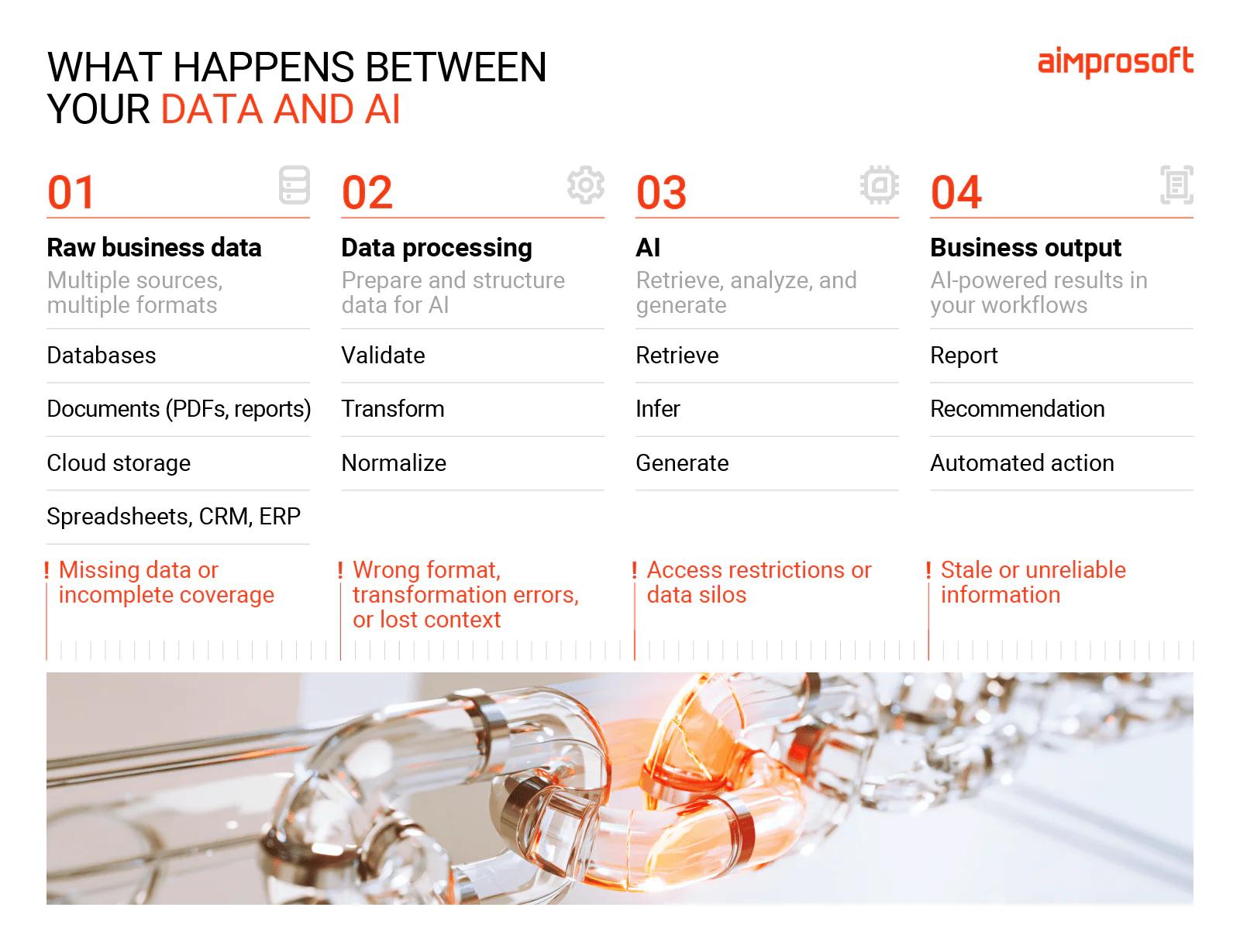
Having data and having data ready for AI integration are two completely different things. In one fintech project at Aimprosoft, the client had years of financial documents on file. But the system lacked a proper data pipeline, so it could not work with raw data.
They tried to force unstructured files like PDFs into a standard relational database, but the approach didn’t fit the nature of the data. Because of this, the tool produced extraction errors that went unnoticed until they showed up in the final reports.
The moral of the story is that the wrong data architecture can undermine an otherwise promising AI business solution.
How do you know if your data is ready for AI integration?
There are five qualities that define AI readiness:
Quality. Is data accurate, complete, consistent, and up-to-date?
Coverage. Does it contain diverse information the AI needs, including exceptions and less common cases?
Access. Can AI retrieve the required data with the right permissions and acceptable latency?
Structure. Can information from different systems and storage be normalized for AI to ingest?
Governance. Do you know who owns the data, where it came from, and who can access or modify it?
Make sure your real production data and live workflows pass the test on these criteria as well, not only a handpicked pilot dataset.
What to do differently
Beyond data readiness, it’s critical to ensure the entire route from the source to the AI and back, including all processing steps, is fail-safe. To do that, find every point of data transformation and loss, delays and restrictions. Fixing them removes data problems from the list of AI failures.
Failure mode 3. Working AI ≠ integrated AI
Trap
An AI pilot can look production-ready and still be a ‘science project’ if it can’t write its outputs back into the systems employees already use. The absence of native integration forces people to leave their normal workflow to check the AI or run the old process in parallel just in case.
When we talk about enterprise AI integration, it’s rarely a matter of just one connection. It’s usually a dozen unnamed ones: the ERP, a custom ticketing platform, an undocumented on-premises database, and so on, each with its own data formats, security policies, and rate limits. Left unscoped, any one of these can become a surprise project right when you’re ready to deploy, adding costs and delaying deployment.
Case in point
In one UK fintech project, the client needed AI routing across 60+ acquirers alongside their existing C#/.NET payment engine. Since replacing the rules engine was out of the question, we integrated AI using a clean API, allowing both approaches to co-exist. The updated architecture handled real-time inference across 600k+ monthly API calls without human involvement.
Where integration tends to break down
- Legacy APIs built for batch exports and completely ignoring real-time calls
- Authentication siloed per system, with no single identity the AI can operate under
- Data formats that don’t line up across systems
- No agreed rule for what happens when the AI’s decision conflicts with the existing system’s own logic
What to do differently
Don’t leave AI for the end of the enterprise data integration project. Put it through the same conditions it will face in production and use representative live data wherever possible. This makes it much easier to spot weak points in the setup. And fix them while the project is still in scope and on budget.
Failure mode 4. Model validation ≠ governance readiness
Trap
Poor governance is a ticking time bomb waiting at the finishing line. Since the pilot’s main goal is to prove the AI can work, teams too often fixate on model performance alone. Ignoring data governance and other compliance rules may not backfire immediately. Until legal and security teams see it the first time, usually right before go-live, and hit the brakes.
Attempting to retrofit an AI governance framework late in the AI implementation process is much more expensive than designing it from the start.
Where governance gaps show up
- No named accountable person to be responsible for incident response when something breaks in production
- No audit trail to reconstruct model reasoning and decision chain
- Validation happens once before launch, and is successfully forgotten after retraining
- Discovering your business intelligence tools are subject to GDPR or industry-specific rules after go-live
- Assuming AI can operate autonomously
What to do differently
However obvious it may sound, you should engage legal and security stakeholders during the pilot to figure out potential constraints early. From the technical side, it’s important to design data governance rules and create guardrails and logging. AI system integration services can take the technical part off your plate.
Failure mode 5. Project ownership ≠ production ownership
Trap
The responsibility of a team building an AI pilot ends at proving AI works.
If there is no named owner to lead the handoff, the project sits on the shelf.
And if there is no one accountable for scaling AI automation, things quickly go sideways. Nobody knows who is supposed to respond to issues when they arise, approve changes to the system, or track performance metrics, so no one does. Not to mention the difficult change management for AI rollout, which demands rethinking daily work habits.
The responsibilities that need a clear owner
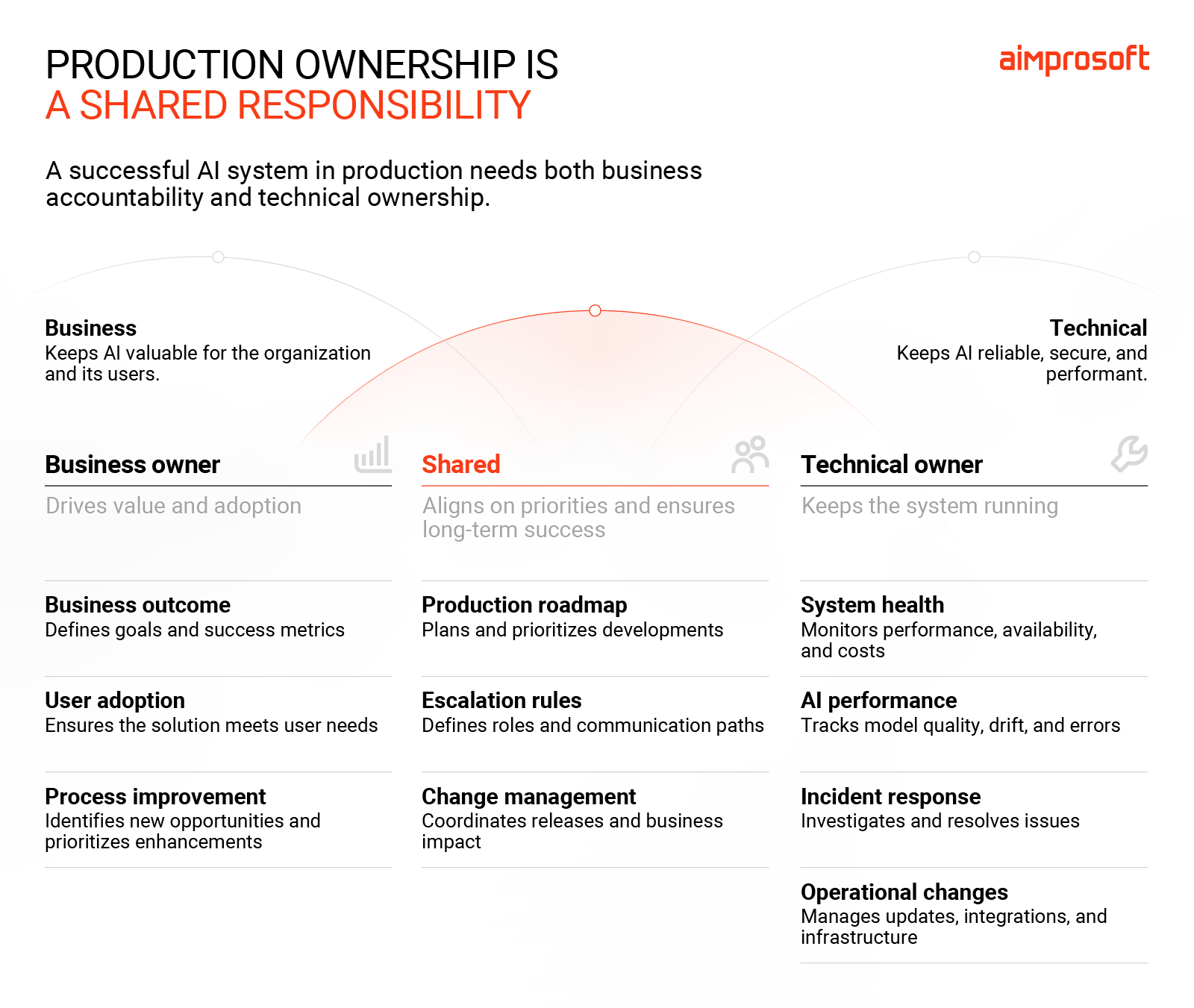
Ensuring system availability and stable performance is just one side of the ownership coin. The other business side is as, if not more, important as the technical one. To cover both, assign ownership for:
- System health: responding to incidents and maintaining the system’s functional health
- Business outcome: checking AI relevance and value for business over time
- AI performance: monitoring model behavior and the quality of data it receives
- User adoption: helping teams switch to new ways of working with AI
- Improvements: defining what needs improvement and prioritizing the execution
What to do differently
Choose the production owner at the beginning of the pilot and clarify who owns what once the pilot lands. Pair the business owner with a dedicated engineer to shorten issue resolution times and strengthen stewardship. If you opt for enterprise AI integration services, you should also clarify what your team will operate themselves and where the partner stays in the loop.
How ready is your AI pilot for production?
Imagine taking the AI out of your pilot for a second. Then ask yourself what elements are core for the process to run. The answer tells you more about how to incorporate AI into your business than assessing model accuracy.
You can also use these five areas as your initial diagnostics:
| Area | How production-ready system looks like |
| Data | Production data is accessible, reliable, governed, and suitable for the AI workflow |
| Infrastructure | AI is integrated with the systems it needs and can handle expected production workloads |
| Governance | Security, compliance, access, oversight, and auditability requirements are addressed |
| Team | Business and technical owners are assigned, with the skills and support needed after launch |
| Process | AI is embedded into the real workflow, with measurable business outcomes and a plan for adoption |
An overlooked detail in any of these areas can become a production blocker, even if the pilot itself performs well. To be sure you have addressed major risks, make a more detailed assessment using our AI readiness checklist. It will show how close you are to production realities and whether you need enterprise AI integration services. Or you can move ahead with your own team.
Want a more detailed readiness check you can share with your team?
Download your full checklist
Need help closing the gaps?
You don’t have to rebuild a successful pilot from scratch if there’s a viable path to production. We can help you audit your existing set up to sort out what’s working well, what needs adjustments, and what’s missing.
Our generative AI integration services include this audit by default. We follow a four-stage approach — Compass, Assess, Pilot, Scale — which gives you clear exit criteria and an evidence-based decision. So you only expand your budget when production readiness is proven. If it’s no-go, we’ll say so. We’d rather give you a hard truth than a bad rollout.
Would you rather find the gaps now or after you’re live?
FAQ
What is enterprise AI integration?
Enterprise AI integration connects AI models to your business systems, data, and workflows, so they can work in sync. At Aimprosoft, enterprise AI integration services cover every aspect needed for reliable operation, including: data pipelines, system connectivity, governance, and production support. Done well, it changes how your business processes function day-to-day.
What does data readiness mean for AI integration?
Data readiness means that all your enterprise data, not just a clean pilot sample, can be used by the AI. More specifically, the data should be complete, accurate, accessible with the right permissions, and structured so the model can access it. It’s one of the first things to check when figuring out how to incorporate AI into your business.
How long does enterprise AI integration take from pilot ot production?
A well-scoped enterprise AI integration with several target platforms and data sources can take 2-4 months on average to get to production based on our experience. More systems to integrate with, or stricter compliance requirements, can extend the project to 6 months or more. Since AI implementation timelines vary based on numerous factors, assessing your readiness will give you a better idea of approximate timelines.
How do I choose an enterprise AI integration partner?
Look for a partner with experience integrating AI into enterprise systems, not just building prototypes. Review relevant case studies and ask how they would approach your current architecture and data. Also ask how they ensure security and governance. A good AI integration consulting services provider should have a proven framework for taking use cases from scope to production.