Modernize Your WMS or Implement a New One? How to Decide
Published: – Updated:

A warehouse management system (WMS) can work reliably for decades. One warehouse, steady order volumes, and a fulfillment model simple enough that the system could handle everything it was designed to do.
But once returns start to grow, the system can’t process them as fast as it was designed to. Warehouse staff struggle to keep up with logging and inspecting returns, inventory records fall behind, and customers order products the warehouse can’t ship.
When a WMS can’t handle this new business reality, logistics and fulfillment companies often have three choices: WMS modernization, component replacement, or a complete replacement. While each option has its benefits, it also comes with its own costs, timelines, and risks.
This article breaks down the signals that your warehouse management software is struggling, how to assess your options, and how to choose the right path for your situation.
5 signs your warehouse management system needs an upgrade
One missed shipment doesn’t necessarily mean you need to replace your entire management system. But when small errors repeat across the workflows, they distort your inventory and drain your resources. Over time, the cost isn’t just a single re-ship, but a constant rework, lost profit, and customers who stop trusting your delivery promises.
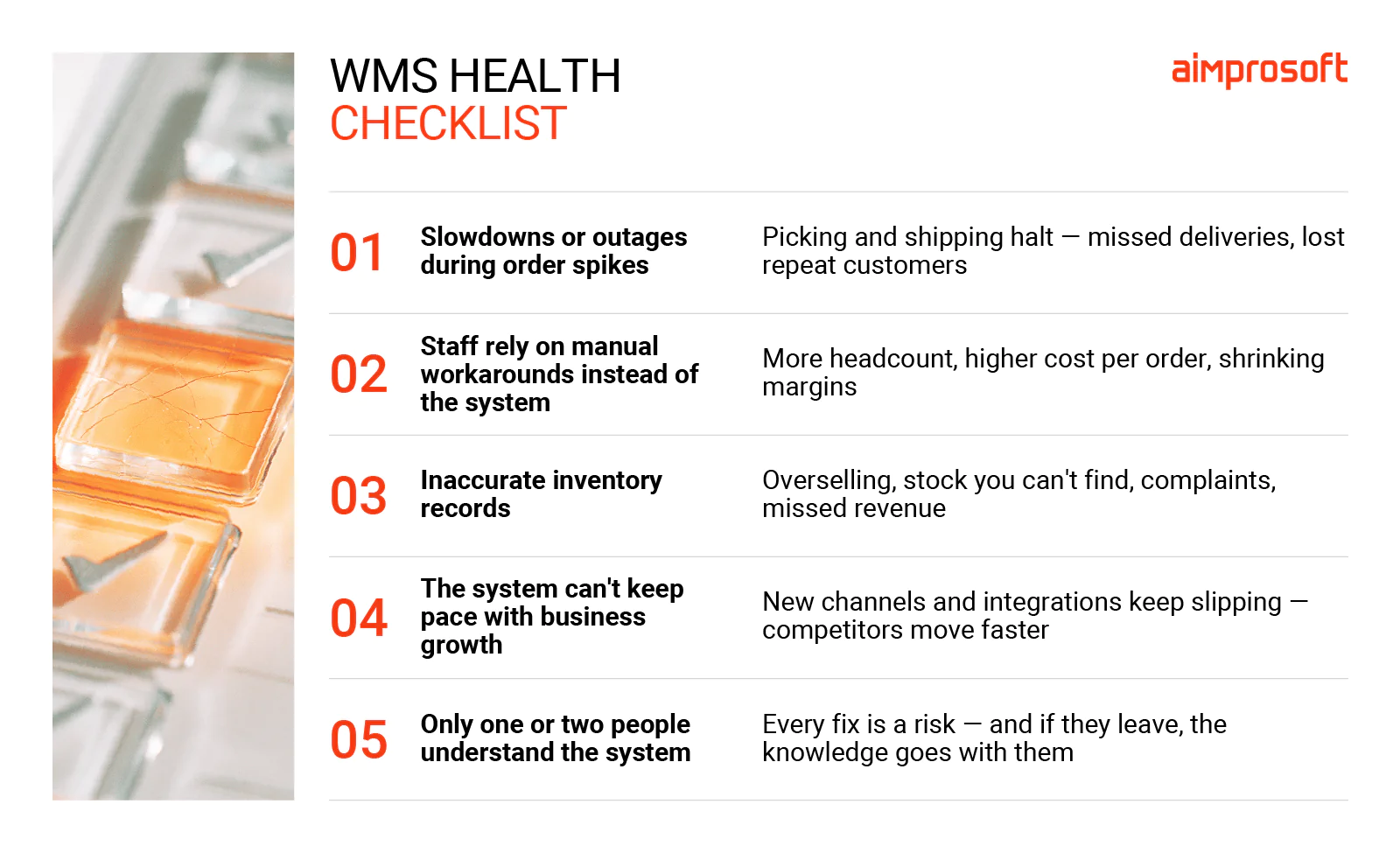
In our work with warehouse management systems, we’ve seen the same five problems appear when a WMS can no longer keep up with the operations.
- Order volume spikes can cause a real slowdown or outage for an unprepared system and, as a result, halt picking and shipping. When orders don’t go out on time, the company risks missing delivery deadlines and losing customers’ trust, since they are less likely to reorder from the same company.
- Employees rely more on manual workarounds than software for receiving, packing, or stock checks. As order volume increases, these workarounds take employees more time to complete, so the warehouse needs more staff to keep up. Eventually, your payroll goes up, but the output stays the same, making each shipment more expensive and shrinking your margins.
- Inaccurate inventory records can cause real business problems. When records aren’t in order, online stores sell items that aren’t in stock, products that are there never get sold, and the company buys more of the wrong items. As a result, you have canceled orders, customer complaints, and money spent on products you didn’t need.
- When a warehouse system can’t keep up with your business ambitions, it becomes a bottleneck. With every integration that takes months to build, or every new channel launch that keeps slipping, the gap between your business and competitors widens.
- Relying on one or two skilled engineers who know how the system works is not the best strategy. When those specialists are unavailable, fixes and changes take much more time. Worse, if these engineers leave, that knowledge walks out with them, leaving the business with no clear path to recovery.
None of these signals necessarily mean a new WMS implementation. But they do mean the current system is holding the business back and needs attention, whether through modernization, component replacement, or full replacement.
WMS modernization, partial replacement, or full replacement?
Once you understand where your WMS system struggles, the next question is how much of it needs to be fixed. Depending on the root issue, you can opt for partial replacement, modernization, or a new WMS implementation. Sure, changes do come at a cost, but in the long run, workarounds become harder and more expensive to maintain.
Modernization
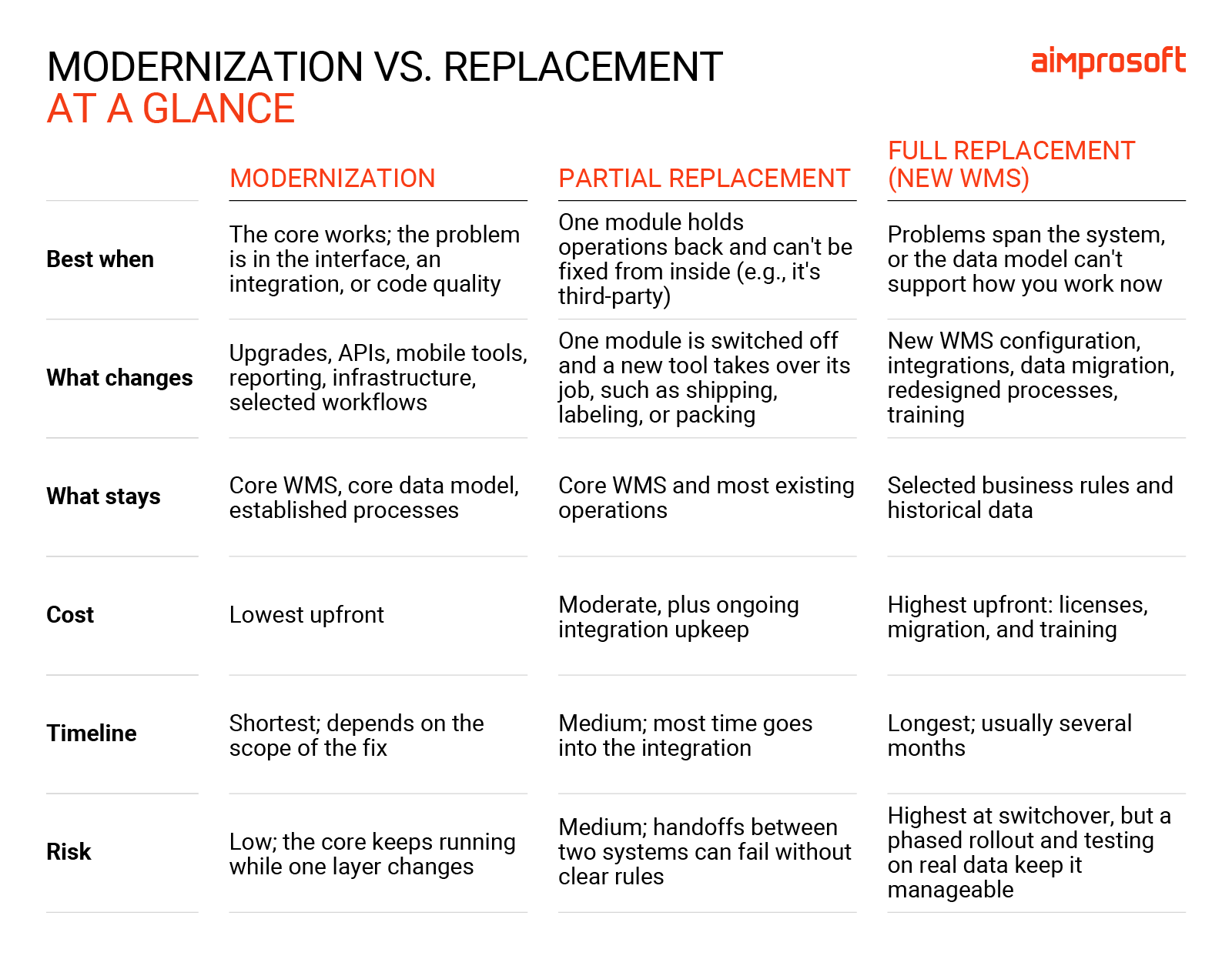
WMS modernization refers to upgrading selected parts of the existing solution. Modernization can include refactoring legacy code, improving integrations, or adding new capabilities. The core of warehouse management software remains intact, with all its inventory logic and workflows, only thing that changes is what needs to be fixed.
For example, a WMS can manage inventory well, but staff still use paper clipboards and desktop terminals to confirm picks. Instead of replacing the working system, the company can add a mobile scanning interface connected to the WMS. This way, the system continues its work, and the scanning layer helps reduce manual recording and gives staff faster inventory updates.
WMS modernization is a rather cost-effective approach, with the timeline tied mainly to the issue holding back your system. However, if it was initially designed to support a single warehouse and its core data model can’t distinguish inventory by location, no amount of code cleanup fixes that. It’s a structural problem that requires full or partial replacement.
Partial replacement
Partial replacement means changing a specific component that no longer works well, while preserving most of your WMS software. Unlike modernization, which improves what’s already inside the platform, partial replacement uses a separate tool that connects to the WMS via APIs or an integration layer.
For example, you keep your WMS inventory and picking features but replace its shipping module with a separate shipping tool.
Partial replacement has a lower initial cost than full replacement, but it’s no less demanding. A person advocating this approach needs to understand how the affected process works today, where it breaks down, and what the new tool must do differently. The company also needs to establish clear rules on which system handles each step and what information they need to share.
Full replacement (new WMS implementation)
Full replacement means selecting and implementing a new WMS to take over core warehouse management functions. Depending on your needs, it can include inventory, orders, employees, and connections to carriers, ERP software, and sales channels.
This approach makes sense when problems within an existing system span across the whole WMS and fixing one element would require changing several others. At that point, full replacement may be more practical and cost-efficient than continuing to repair it piece by piece.
Implementing a new WMS for a logistics company starts with two key steps: Documenting requirements and selecting a new system. You also need to decide who will execute it, whether it’s an in-house team or an external product engineering team.
Once the delivery team is in place, a WMS implementation checklist should cover current processes, data cleanup, integration mapping, staff training, and the final switchover. For a midsize operation, this process, in general, can take from four to nine months. However, WMS implementation costs depend on the number of facilities, integrations, and customization the new system requires.
How to evaluate the current WMS
The choice between modernization, partial replacement, or a new WMS implementation shouldn’t come down to back up the right horse. Each approach offers its benefits, but only when paired with the right problem.
That’s why we recommend starting with the evaluation of the existing management system. What works, where it falls short, and what do you need the system to do in the future? This way, you’ll know whether you need a minor replacement or a full reboot.
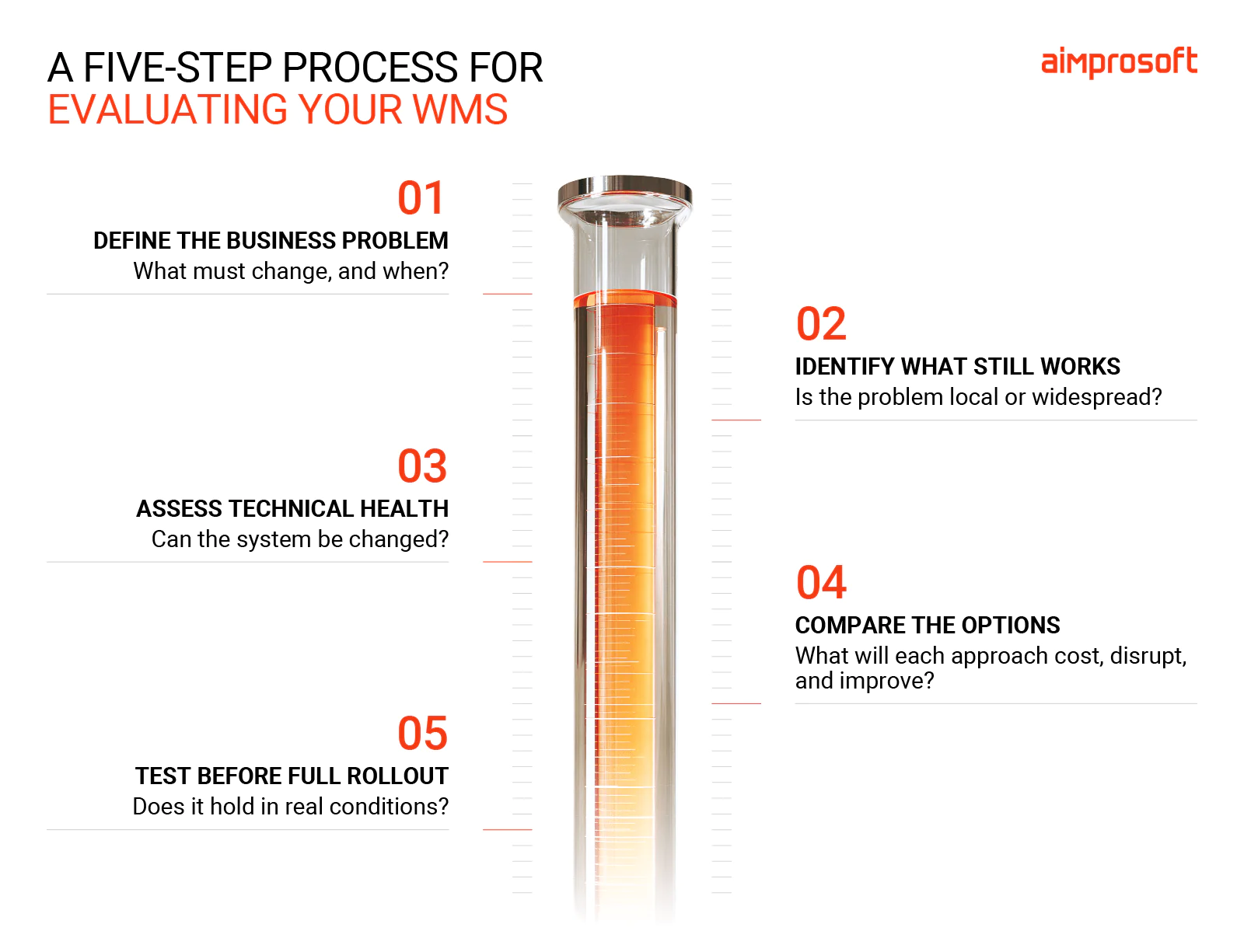
1. Start with the business problem, not the software
Missing software features aren’t always the reason your operations slowed down. So start with what is happening in the warehouse and what it costs your business. Maybe orders miss carrier cutoff times during seasonal peaks, leading to penalties or missed deliveries. Or the warehouse can’t onboard a new customer, carrier, sales channel, or facility without months of custom software development, delaying planned revenue.
This turns a vague “oh it’s a legacy WMS” into a practical decision: what must change, by how much, and by when?
2. Identify what still works well
Just because there’s an issue in the system doesn’t mean nothing else is working. It may still manage inventory accurately, support established picking and packing workflows, and contain business rules the team relies on. So replacing these working parts would only add cost and cause more disruption than fixing the actual bottleneck.
Talk to the warehouse and IT teams about what still works reliably. Where do people rely on spreadsheets, paper records, repeated checks, or specialist knowledge? The goal here is to pinpoint the scope of the problem. Whether it’s localized to one specific task, tied to a few related steps, or impacting operations across the entire warehouse.
3. Assess the system’s technical health
Once you know where the WMS falls short, the next question is: can you update your current system safely, or is it too rigid?
Start by confirming your vendor’s support and security status. Then assess the core capabilities. Can it handle the volumes you expect? Does it offer practical integration options, such as APIs? Can your team make changes without lasting custom development?
This shows whether the problems you’ve found can be fixed within the current system, like updating an outdated interface or rebuilding a weak integration. Or if the system itself is the obstacle, making every next change slow and costly.
4. Compare the options
It’s easy to focus solely on price tags, but the initial quote rarely reflects the true cost over time. So when comparing modernization and replacement paths, consider also the effort and risk involved in each option. Pay attention to:
- The upfront work. That includes configuration, integrations, data migration, testing, and training.
- The ongoing cost. Costs of licenses, maintenance, outside specialists, integration support, and internal IT time.
- The disruption. Ask how much each option will affect warehouse operations and staff.
- What the benefit looks like. Will it mean fewer fulfillment errors, less rework, faster onboarding, better inventory accuracy, improved throughput, or a lower cost per order?
The numbers can look intimidating. But then again, so does another two or three years of manual workarounds, missed revenue, and delayed growth.
5. Test the decision before committing at full scale
Even if you’ve made up your mind on an approach, it doesn’t have to start with a large contract or company-wide rollout. Test your preferred option on a small scale.
For modernization, that could be a new mobile scanning workflow in one warehouse zone. For partial replacement, a new shipping tool connected to one carrier or facility. For a new WMS selection, a trial run of the platform on your real data and scenarios.
A test environment doesn’t mean only perfect cases. That includes the situations causing trouble now, such as short picks, inventory discrepancies, label failures, returns, and peak volume. It’s also important to involve warehouse supervisors and frontline staff from the start, so they can quickly tell you whether the solution makes work easier or just moves the complexity elsewhere.
Just because your WMS is slowing down doesn’t necessarily mean it needs a total replacement. Sometimes minor, targeted changes are enough, and we’ve proven it in our work.
Partial replacement of WMS: Zenfulfillment case
When it comes to warehouse management systems, it’s important to implement the changes without disrupting existing processes. We’ve seen how important this is in our work with logistics and fulfillment companies. So when our partner Zenfulfillment faced a challenge with its packing module, our team helped address it with a partial replacement.
Zenfulfillment is a German logistics company that stores, packs, and ships products for eCommerce and retail. Its largest clients, some shipping 10,000–20,000 items a month, often have their own packing rules, from box types to how certain products should be packed. But packing ran on a costly, non-customizable third-party module, which limited Zenfulfillment’s ability to meet these requirements.
Since the rest of the system worked well, there was no need for full replacement.
Together with Zenfulfillment’s team, we built a separate packing app that works alongside the existing WMS. It supports barcode scanning, batch handling, and automatic label printing, as well as the packing steps specific clients require.
Warehouse staff now use the app at 14 packing stations. Zenfulfillment no longer pays for a packing license, and it can adapt the app to clients’ packing rules and adjust it based on feedback from warehouse staff.
Learn more about the Zenfulfillment case
Need a second opinion on your WMS?
Every warehouse is different, and so is the right approach to its WMS implementation. The evaluation steps above give you a clear direction, but if you’d like help applying them to your operations, our team is ready to help.
Contact us anytime that suits you, and our experts will provide a clear roadmap and the key points needed for successful WMS modernization.