How AI Agents Are Fixing Mobile QA’s Biggest Bottleneck
Published: – Updated:

A test fails after a new app version goes live in QA. Is there a regression? Did a developer change an element’s identifier? Did the test run too early, before the screen finished loading?
Someone must find the cause before the team can close the incident and move forward. Multiply that by dozens or hundreds of tests, and failure analysis can become a bottomless pit that swallows your team’s time. And mobile QA teams end up spending most of their time diagnosing past test runs.
Autonomous testing is hardly a brand-new concept. It’s an old ambition finally catching up with the right technology. And the one capable of breaking the cycle by taking on much of the work that follows a failed test.
Here’s a closer look at how agentic QA changes the release equation for good.
Why mobile QA testing becomes a bottleneck at a larger scale
Web teams can fix a bug and deploy a change as soon as they find it. Mobile teams should take into account that users have different app and OS versions. Even after the App Store approves a fix, some users may take weeks to install it. That’s why mobile teams need to retest existing functionality with every release, even when a change affects only one part of the app.
Now let’s do some math. Say your team tests 30 critical workflows across Android and iOS, with three OS versions per platform. That’s 180 checks per release. The more often you ship, the faster the testing load compounds.
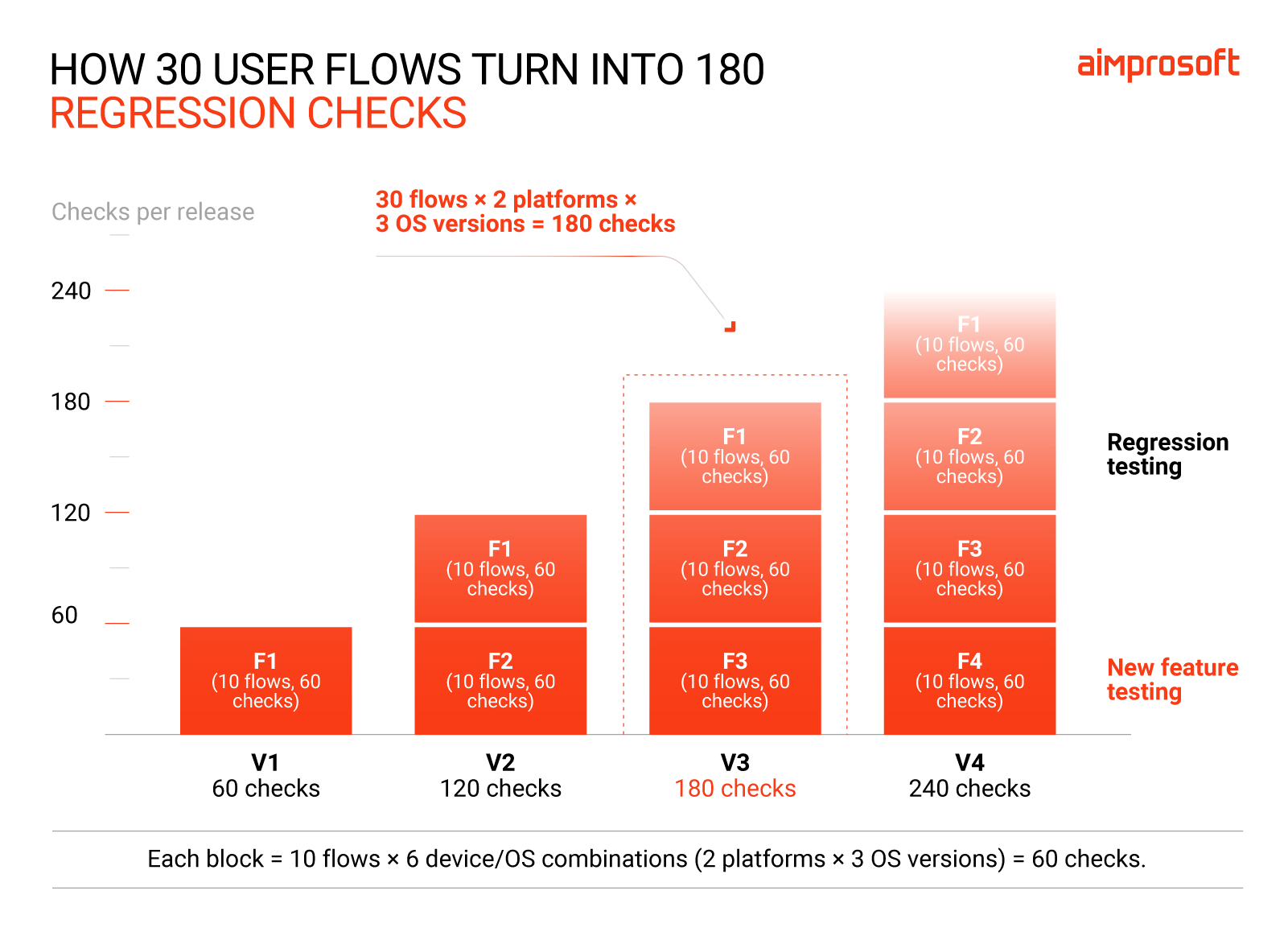
A few mobile-specific factors complicate it further:
- Frequently changing interfaces. New screens and updated components can break UI tests and require engineers to rewrite broken test steps.
- Unpredictable mobile conditions. A dropped connection or permission prompt can interrupt a flow. Unless your suite accounts for these conditions, tests may pass in QA but fail on users’ devices.
- Regression maintenance. Every release stacks new features on top of old ones, and QA manual testing has to cover all of them again, prolonging your time-to-market.
More test executions don’t guarantee better coverage, either. Hundreds of automated tests can still miss a critical user journey or a bug that appears only on one device.
That’s the scaling problem. Hiring more testers or outsourcing to manual QA testing services adds temporary capacity, but doesn’t solve the growing need to repeat and maintain regression checks. Every increase in release frequency or features will drive up your testing budget.
What autonomous testing is in plain terms
Autonomous testing uses AI agents to carry out multiple testing stages with little hands-on effort from your team. They manage test workflows end to end, from mapping screens and writing test scenarios to analyzing failures and maintaining supported parts of the test suite.
However, agents can’t decide what the application should do or whether it meets your product rules. AI in QA scales test creation and execution, letting QA engineers spend less time on repetitive tasks and focus more on product vision. Your team remains the ultimate decision-maker who makes the final call on whether a build is ready to ship.
Autonomous testing vs. traditional test automation: Who does what
Autonomous testing is an upgraded version of traditional test automation that uses familiar tools like Appium or RestAssured. The main difference is that traditional automation needs an engineer every time a test breaks. With autonomous testing, agents find out why it was broken, fix what they can verify, and pass the rest to your team.
| Autonomous testing | Test automation | |
| Test creation | Agents generate scenarios and code; engineers review them | Engineers write scripts |
| Execution | Agents initiate and manage test runs | Scripts follow predefined steps |
| Failure analysis | Agents analyze evidence and classify failures | Reports show failures; engineers analyze |
| Maintenance | Agents can repair supported issues and verify changes; engineers approve them | Engineers maintain scripts |
How AI agents change the mobile testing workflow
Say your team redesigns the login screen for the next release. The “Sign in” button gets a new identifier, and a new “Remember me” toggle appears. In a classic testing environment, that single tweak can take down half your regression suite. With agentic QA, here’s what happens instead:
- An agent explores the new build and updates its map of the app, noting the changed button and the new toggle.
- It sees that the toggle creates a new path through login and suggests a scenario for it.
- It writes that scenario in plain-English Gherkin, along with the automation code to power it. An engineer reviews both and decides what goes into the regression suite.
- The suite runs on Android and iOS, on real and cloud devices, along with the backend logic of the sign-in flow.
- The old login test fails because the button’s identifier changed. The agent recognizes the cause, updates the locator, reruns the test, and confirms it passes. An engineer reviews and approves it.
- If the failure had been a real bug, for example, the API rejecting valid credentials, the agent would hand it to your team. It also attaches screenshots, device logs, the UI hierarchy, and other details when available.
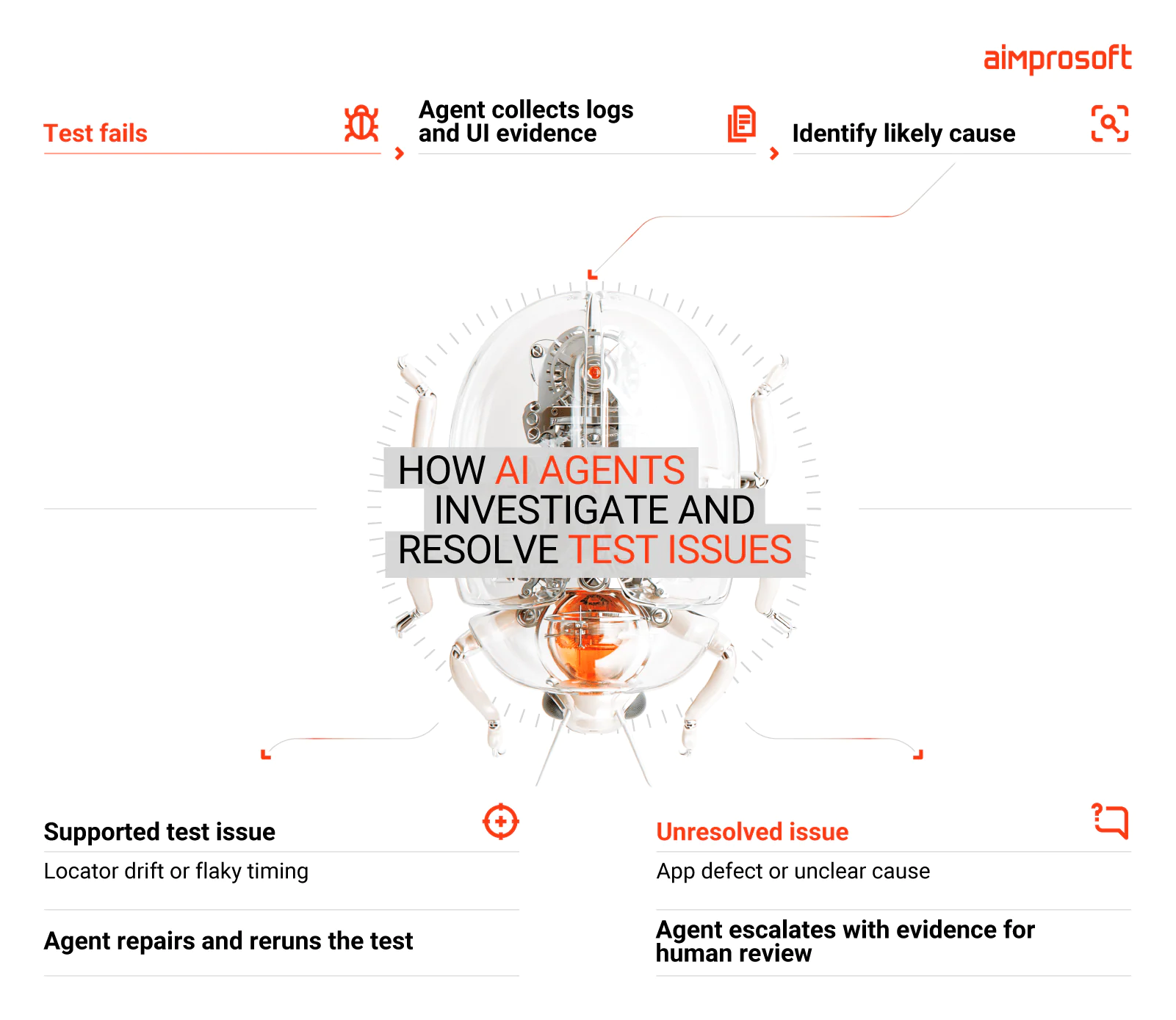
The suite adjusts flow logic from one build to another, saving your team hours of routine maintenance. Every failure that reaches your team arrives classified, complete with the evidence. At the same time, release decisions belong to your team. That’s the core idea of AI-powered mobile test automation.
How far can you delegate testing to AI agents?
AI in QA won’t replace your testers, but it will change where they spend their time.
Agents need clear rules and instructions to tell a pass from failure. Yet in many teams, this knowledge isn’t documented. It lives in testers’ heads and ad hoc discussions, built up through months of trial and error. Building agentic QA gives teams a reason to note that experience down and make it accessible for the entire team to reuse.
By now, you’ll be wondering how AI agents and testers share the work. Here’s what that looks like.
| Testing activity | What AI agents do | What your team does |
| Mapping app screens | Identify screens, UI elements, and identifiers | Review uncertain or incomplete mappings |
| Generating regression tests | Suggest scenarios and write the test code | Validate expected behavior and scenario coverage |
| Running regression | Run established checks across devices | Review the exceptions |
| Analyzing failures | Classify failures and collect evidence | Resolve ambiguous cases |
| Maintaining locators | Suggest updates, rerun, and verify | Approve every change before merge |
| Exploratory testing and UX | Not covered. Agents only run defined checks | Explore unexpected behavior and assess usability |
| Release | Prepare the report | Make the go or no-go call |
In short, agents cover the functional baseline. For example, they can check whether tapping ‘Pay with Apple Pay’ triggers the correct checkout sheet. Whether that checkout flow feels intuitive and effortless to a first-time user is a question only a human can answer.
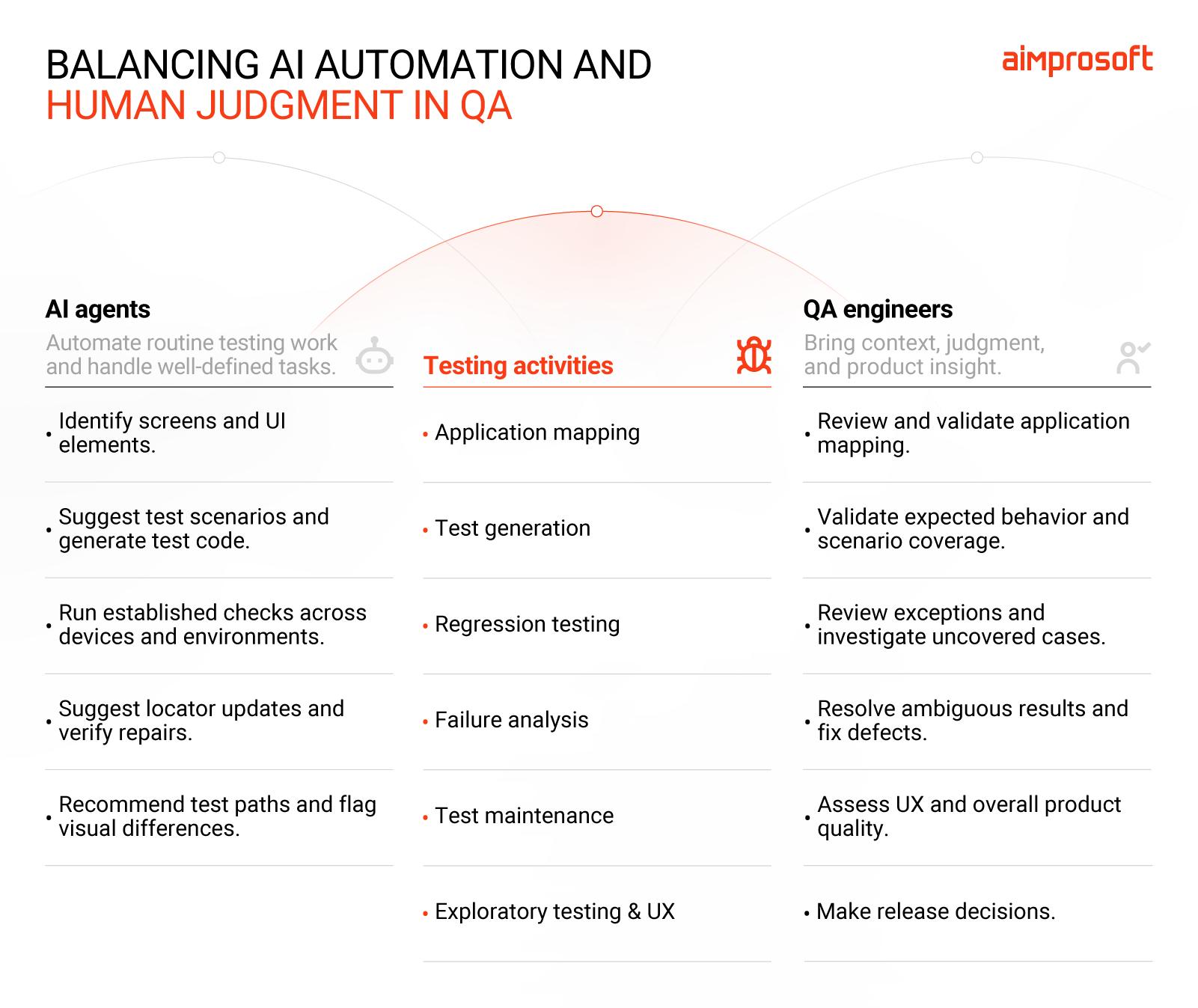
So what can you safely hand over to AI? Processes where your team can describe what “working” means. Well-understood flows like login or checkout regression with few grey areas are the best candidates.
When is your mobile app ready for autonomous testing?
If your team sometimes skips full regression or delays releases to finish testing, it’s time to consider autonomous testing. These signals will help you assess your situation.
- Your app has multiple user flows and integrations, coupled with a growing number of device or OS combinations.
- You release every one or two weeks.
- Core user journeys are stable, but screens change frequently.
- Your regression suite grows with every sprint.
- You have a stable QA environment with test accounts and representative data.
- Someone on your team has regular time to review agent outputs. The bigger the suite, the more of it they’ll need.
How to read your results:
- 5-6: You’re ready. Start with the flow that breaks most often after the release.
- 3-4: Run a pilot first, and fix the gaps it reveals.
- 0-2: Conventional automation, or even manual testing, is enough for now.
Is it worth the investment?
Yes, if the time spent repeating and maintaining regression checks outweighs the effort of setting up and supervising AI agents. What you need is a count of hours spent on regression and fixing broken tests each month, and a pilot on one flow. A few weeks of real runs will tell you more about the payoff than any estimate, and at a fraction of the cost.
Get more from the QA process you already have
High-velocity mobile teams shouldn’t spend half their sprint fixing broken locators when QA’s real value lies in understanding product usability for users. Autonomous testing with proper human oversight lets your team make regression a background task you only review. Just as important, you don’t lose in quality as your release pace speeds up.
Getting there is faster and easier than you think, even if you don’t have a single automated test yet. When the UBIDEX team, an AdTech company, came to us, they tested their web platform by hand. Within a few weeks, an AI-assisted framework was running smoke tests. Writing a new test now takes 2.5 hours instead of 4, saving around 30 hours per sprint.
It took about a week to set up the framework that replaced a manual testing process. And the longer you wait to automate, the more regression scenarios your team has to work through manually. Starting with a few workflows now is easier than tackling an ever-growing backlog later.
Find out how much of your mobile regression AI agents can take over.
TALK TO OUR TEAMFAQ
Is QA being replaced by AI?
No, and the companies getting the most from agents are the ones that kept their testers close. AI in QA picks up mechanical execution related to test maintenance and the first round of sorting failed runs, but it doesn’t replace QA strategy or your team. QA specialists not only stay in the loop, but decide where the loop begins and ends.
What’s the difference between automated and autonomous testing?
Automated testing removes the work of running checks an engineer wrote, but the scripts break every time the app changes. Autonomous testing also takes on most of the work of fixing them. Once you start the agent, it goes through the failed tests, figures out the likely cause of each, and reports back. Then it suggests fixes and waits for an answer from your team.
Do I need a proof of concept before adopting AI QA agents?
Not necessarily, but it’s the fastest way to prove the value on your own pipeline. By deploying agents alongside a single flaky flow or a critical regression suite, you can evaluate test repair and failure analysis on real app behavior. The risks and costs of a targeted PoC are tiny compared to a complete overhaul.
Can autonomous testing work with existing automation frameworks?
In most cases, yes, because AI agents work on top of code-based frameworks. They integrate with tools like Appium and RestAssured, plugging right into your CI/CD pipeline to run regression whenever you ship. The tests stay in your repository as readable code you can maintain yourselves.