5 RAG-as-a-Service Platforms Compared: Features, Pricing, and Best Use Cases in 2026
Published: – Updated:

If you’ve ever watched your team waste hours searching for that one crucial document, you’re not alone. Slack threads, misnamed PDFs, outdated folders, or files locked away on someone’s vacationing laptop-modern businesses are overflowing with information. The irony is painful, as finding what you need remains one of the biggest productivity killers across organizations.
You might think AI tools would solve this problem. And they can, but traditional AI models often hallucinate, providing plausible but completely incorrect information. When your clients are counting on accurate answers, that’s not just embarrassing — it’s business-threatening.
Retrieval Augmented Generation (RAG) has become the silver bullet for this exact problem. Instead of letting AI models guess or pull from their training data, it connects them directly to your proprietary information. It’s like handing your AI a map of everything your company knows, so it can retrieve facts and eliminate those costly hallucinations.
But here’s where most companies hit a wall: Building custom systems requires time, resources, and specialized skills that aren’t exactly lying around. RAG as a service platforms have stepped in to fill that gap, offering production-ready retrieval systems you can deploy in weeks rather than months.
Yet, how do you choose the right platform when the market keeps evolving? Many vendors that started as pure infrastructure providers have expanded into broader AI, agent, and enterprise knowledge platforms. At the same time, others have changed their positioning or been replaced by newer alternatives.
That’s why we’ve updated this guide to reflect the current AI landscape, revising both the platforms we compare and the information we provide about them.
But before we dive into the platforms themselves, let’s clarify exactly what we mean by RAG as a Service.
What is RAG as a Service?
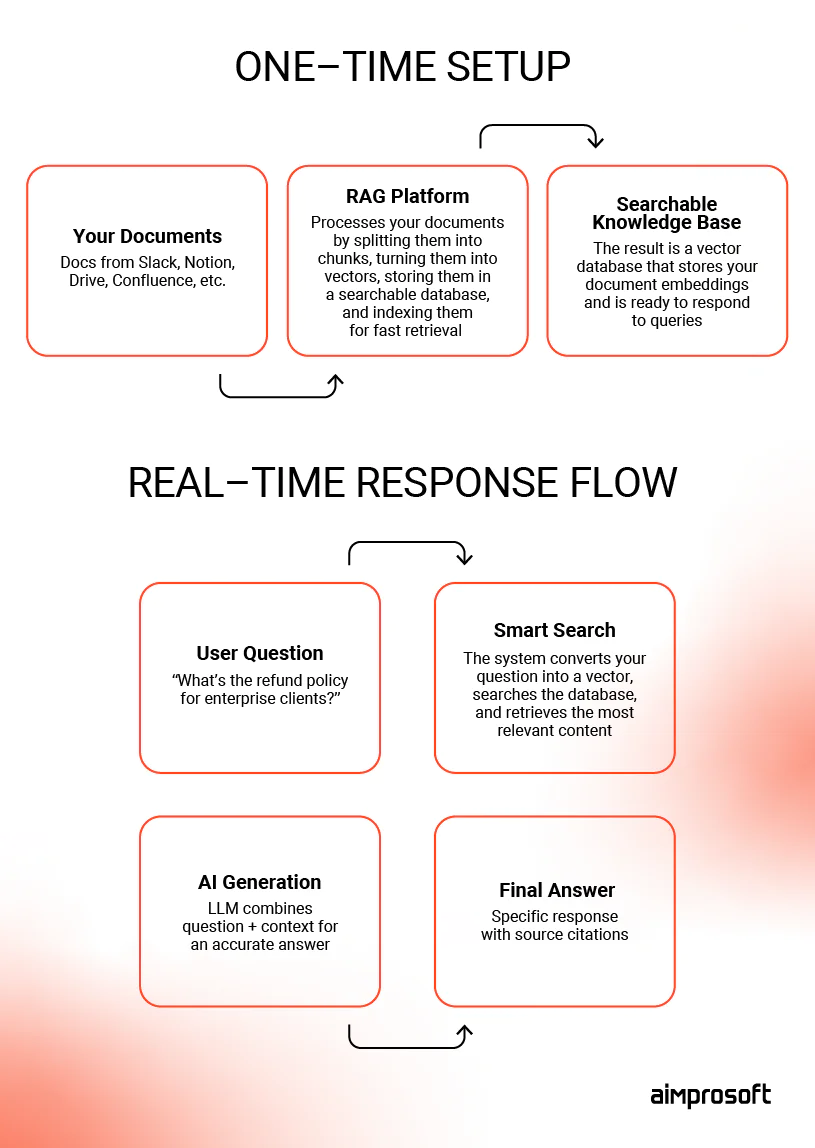
Retrieval augmented generation as a service combines AI search with generative models to deliver direct, context-aware answers instead of just links. Rather than returning a list of documents to dig through, the system extracts the relevant data from your content and feeds it to a large language model that generates grounded, trustworthy responses. Yet, even when the system works perfectly, having domain experts validate accuracy remains essential for catching errors automated systems can miss.
What makes it “as a service” is that someone else runs the hard part for you (vendors). Building a production-grade pipeline means setting up vector databases, retrieval logic, and ongoing maintenance — infrastructure most teams don’t have specialists for. RaaS providers own that layer, offering ready-to-use solutions that turn messy documents into a searchable knowledge system in weeks. You’ll still want technical people on your side to integrate and tune it, but it’s easier when you’re building on top of a managed foundation than from scratch.
Want to learn the difference between custom RAG and RAG-as-a-service? Our article breaks down key differences.
So why not just pick one and get started? Fair question. But here’s the thing: Not all RAG-as-a-Service platforms are built the same way. Some prioritize rapid deployment with minimal setup, while others give tech teams greater control over retrieval pipelines and security. As vendors continue to expand beyond traditional retrieval, many platforms now combine AI agents, workflow automation, and enterprise knowledge capabilities — making comparison less straightforward.
That’s why we’ve re-evaluated five retrieval augmented generation platforms our engineers have used while building AI solutions. For each platform, we cover its key features, ideal use cases, strengths, limitations, and our developers’ practical takeaways to help you understand where each fits.
The goal isn’t to declare a single winner, but to help you choose the platform that covers both your technical and business needs.
RAG platforms comparison
1. Vectara
In finance, legal, or healthcare, “mostly accurate” isn’t good enough — you need bulletproof reliability, or you risk regulatory violations, or lawsuits, or worse. Vectara is the enterprise-grade fortress of RAG as a service platforms. It’s designed to reduce hallucinations and simplify scaling. The platform handles ingestion, search, and generation. Plus, it integrates with a wide range of LLMs and file types.
You can easily focus on powering your RAG for enterprise search, building internal copilots, or adding AI features inside customer-facing apps, while Vectara manages the infrastructure.
Key features:
- Built-in safeguards flag and block inaccurate responses before they reach end users.
- The API supports 100+ languages without extra setup.
- SOC 2, HIPAA, and GDPR compliance are built in, not bolted on.
- Hybrid search combines semantic understanding with keyword matching to improve precision for technical or domain-specific queries.
- Auto-scaling handles traffic spikes without manual intervention.
Vectara works best for:
- Enterprises in regulated industries that need traceable, citation-backed AI responses.
- Product and platform teams building customer-facing features that require multilingual, high-precision output.
- Global organizations with large content repositories across multiple formats and languages.
- Companies that want managed reliability without the overhead of running their own infrastructure.
Our Vectara review takeaway:
This is the platform for when failure isn’t an option. You’ll pay premium pricing for enterprise-grade reliability, but if incorrect information could cost you clients, lead to compliance violations, or damage your reputation, that’s a bargain. If you’re running a lean operation, it might make sense to explore more affordable alternatives, unless reliability is your top priority.
Starting free with their Standard plan, you can test the waters before moving to Pro or Enterprise levels — making it easier to explore what a RAG pipeline with Vectara AI looks like before committing to long-term usage. While smaller teams might find it more than they need, the pricing structure makes it accessible for testing enterprise-grade reliability.
2. Progress (formerly Nuclia)
Progress is a managed RAG as a service platform that works best for mid-to-large tech teams who’ve outgrown basic search. Progress is designed to be modular. It allows you to plug in your own LLMs, embedding models, and chunking strategies while the platform manages the infrastructure. Meaning, you are not locked into a fixed pipeline.
It also provides full control over ingestion, chunking, and indexing. This functionality enables you to apply domain-specific strategies for highly relevant results, even when dealing with messy or technical documentation.
Key features:
- Works as a no-code tool for fast setup or a fully configurable pipeline for technical teams.
- Supports Progress’s own model instances or your own API keys, so you’re not tied to one LLM provider.
- Indexes text, PDFs, audio, video, slides, and emails into a unified knowledge layer.
- The REMi evaluation model provides built-in scoring for answer relevance, context relevance, and groundedness.
- Permission-aware retrieval, RBAC, and end-to-end audit logging.
Progress works best for:
- Mid-sized and enterprise organizations managing large volumes of documentation.
- Engineering teams that need greater architectural control without building RAG pipeline from scratch.
- Businesses working with diverse content formats and enterprise knowledge bases.
- Companies that want a balance between ease of deployment and pipeline customization.
Our Progress review takeaway:
Progress strikes a good balance between convenience and control. Unlike managed platforms that hide much of the process, it lets technical teams fine-tune key components without taking on the operational overhead. If your AI roadmap is likely to evolve, that flexibility can save significant rework later.
3. Ragie AI
If you’re racing against time, Ragie AI is the kind of retrieval-augmented generation tool that helps product teams deliver AI-powered features fast. Platform helps product teams launch AI-powered features like support search, document Q&A, or internal copilots in weeks.
Ragie AI is fully managed and API-first, making it easier to integrate multimodal data, such as video, PDFs, and chat logs, without building infrastructure from scratch. Whether you’re building AI copilots into your app or powering internal tools across departments, Ragie gives you production-grade RAG features without heavy lifting.
Key features:
- Quick launch. Go from sign-up to live product in 2-3 weeks.
- Handles PDFs, videos, Slack messages, and more.
- Native integrations with Notion, Google Drive, and Confluence automatically sync your existing content.
- LLM-based reranking prioritizes relevant answers over noise.
- SOC 2-ready. Built with security in mind, even for lean teams.
Ragie AI works best for:
- Small to mid-sized product teams (10–50 people) under deadline pressure.
- Startups needing MVP-ready AI features.
- Product teams with AI goals but no time to build infrastructure from scratch.
- Companies with diverse content types in their support libraries.
Our Ragie review takeaway:
Perfect for “we need this working by demo day” scenarios. You can opt for Ragie’s free tier for testing, then $100 monthly for 10k pages up to $500 for 60k pages, with Enterprise options available. You’ll trade some flexibility for speed, but the predictable pricing makes it easy to budget for prototyping and mid-size deployments.

4. Haystack Enterprise
Haystack Enterprise (by deepset) is a managed platform built on top of the open-source Haystack framework. Unlike RAG-as-as-service platforms that focus mainly on speed, it is designed for teams developing AI applications in environments with strict security, governance, and compliance requirements. Its “glass box” architecture keeps the entire pipeline transparent and adjustable, making it easier to understand, refine, and troubleshoot RAG and agent workflows.
With Haystack Enterprise, teams can build domain-specific, document-based AI assistants and advanced agentic workflows. Whether you’re operating in a highly regulated industry or simply need deep customization, the platform gives you the architectural control to build it right from the start.
Key features:
- A transparent, adjustable pipeline that’s easier to understand, refine, and troubleshoot.
- Supports doc-based AI agents and multi-step decision engines tailored to your workflows.
- Suited for environments with strict security and governance needs.
- Designed to evolve alongside growing orgs and complexity (no need to rebuild when your needs change).
Haystack Enterprise works best for:
- Organizations with complex AI requirements and room to grow.
- Teams facing regulatory constraints on internal search and AI usage.
- Businesses that need deep customization and architectural control.
- Organizations that view RAG as a long-term capability, rather than a one-time project.
Our Haystack Enterprise review takeaway:
A strong fit for organizations treating AI as a long-term capability rather than a single project. Haystack Enterprise RAG as a service platform requires more technical involvement than plug-and-play platforms, but the tradeoff is greater customization and architectural control. Pricing is custom, so plan on a direct conversation with their sales team. Expect a steeper learning curve and more implementation effort. If your team needs a lightweight, DIY solution or fast delivery, alternatives like Ragie might be a better short-term fit.
5. Agentset
Agentset is a developer-first platform for building RAG applications. In addition to retrieval, it provides Retrieval Augmented Generation tools for agent orchestration, reasoning, and workflow automation. Its open-source architecture and self-hosting options give teams managed convenience without vendor lock-in — you can start hosted and move to self-hosted later.
With full access to source code and support for agentic workflows that extend beyond traditional Q&A use cases, Agentset fits teams that want modular control over their stack without committing to a fully custom build.
Key features:
- Provides full source code access and mitigates vendor lock-in.
- Supports both managed hosting and self-hosted environments, allowing for migration between models as requirements evolve.
- Native support for agent orchestration, reasoning chains, and workflow automation.
- Enables independent configuration of LLMs, embedding models, and chunking strategies.
- Offers a free tier for initial development with usage-based scaling for production environments.
Agentset works best for:
- Teams building secure internal R&D tools and high-volume document search.
- Teams building private customer support bots.
- Businesses that want managed convenience without vendor lock-in.
- Organizations that need AI agents, workflow automation, and retrieval applications.
Our Agentset review takeaway:
From an engineering perspective, Agentset offers a good balance between speed and control. Teams can build quickly without giving up ownership of their architecture, making it a strong choice for organizations that expect their AI applications to become more complex over time.
5 common missteps to avoid when choosing a RAG-as-a-Service platform
Even after thorough research, selecting a RAG platform is only one of many steps. What most companies discover later is that outsourcing the infrastructure doesn’t remove the hard work. You still have to prepare and curate your content — decide what gets indexed, how it’s classified, and what must be excluded. While the vendor is responsible for platform security and availability, your team remains responsible for privacy assessments, access controls, logging, retention policies, and e-discovery readiness.
And before you sign anything, map the full cost model. That includes things like indexing, storage, queries, embeddings, egress, and support tiers, all of which add up in ways that can surprise your finance team.
After years of working with companies that have chosen a retrieval-augmented generation service, we see these missteps most often, so keep them in mind.
1. Underestimating setup complexity
Even “plug-and-play” RAG-as-a-Service platforms typically need 2-4 weeks of content prep, testing, and integration. These aren’t magic. Platforms still require upfront work, and in some cases a team to function properly.
2. Ignoring content quality
If your documents are messy, outdated, or inconsistent, your AI answers will be too. RAG systems retrieve what’s already there – they don’t rewrite it for clarity.
3. Skipping security requirements early
It’s painful to discover compliance gaps after you’ve integrated. Make sure the platform meets your industry’s security and data governance standards from the start.
4. Choosing based on polished demos
Demos often use ideal content. Always test the platform using your actual documents and real-world use cases before committing.
5. Overlooking long-term costs
Usage-based pricing might look affordable upfront, but it can grow quickly as adoption scales. Model out your expected growth scenarios before signing on.
Choosing a retrieval augmented generation platform isn’t always straightforward. What works for a 10-person startup might create bottlenecks in a regulated enterprise, and vice versa. So base your choice on team capacity, budget, and expected AI growth.
Not sure where to start? Start small. Most RAG-as-a-Service platforms offer free trials or affordable entry plans that let you learn as you go. And if you need a second opinion or want to talk through your use case, we’re happy to share what’s worked (and what hasn’t) across the retrieval augmented generation services we’ve delivered.