Software Performance Optimization: How to Improve Existing Systems Without Rebuilding Them
Published: – Updated:

After months of development, seeing your application go live, start serving its purpose, and generate revenue can feel like the finish line. While it’s a major milestone, it also reminds you that an application’s lifecycle is a marathon, not a sprint. Over time, performance declines and operating costs rise, even as the core logic still meets the company’s needs.
Sounds like a wake-up call for a rebuild.
But replacing an existing, working system also requires additional investment and can introduce new business risks. In contrast, software performance optimization offers a less absolute path. It’s a systematic approach to finding what actually prevents your application from meeting its performance targets.
In this article, we’ll talk about how to optimize software performance in a mature system: When it’s the right call, how to approach it, and what it can deliver.
Optimize or rebuild: How to choose the right path
Deciding whether to optimize or rebuild starts not with weighing options, but with a question: What exactly needs to improve, and why? Because an application’s age alone tells you very little. It could be a freshly released app where the chosen architecture no longer fits the roadmap, so it needs a rebuild. Meanwhile, a decades-old app may need only targeted fixes to handle increasing traffic.
The right choice depends on where the limitation lies and what the business needs next.
Application performance optimization is the right call when the bottleneck has a specific address. Meaning the app still serves its business purpose, but something is slowing it down. For example, data processing takes too long, or operations consume too many resources. If your team can find, name, test, and isolate the issue from the rest of the system, fixing that single area is a straightforward engineering task, not a reason to start over.
Depending on the issue, engineers use software profiling to pinpoint bottlenecks and fix them. This can include optimizing data searches, replacing a slow program routine, updating infrastructure, or refactoring the code.
A rebuild makes sense when the issues are more structural than local. Here, we no longer talk about old code, but the architecture that can’t support where the product is going. The issue may be that the technology stack is outdated, or relevant specialists are impossible to hire, or the fact that there are only one or two people who understand how critical parts of the system work.
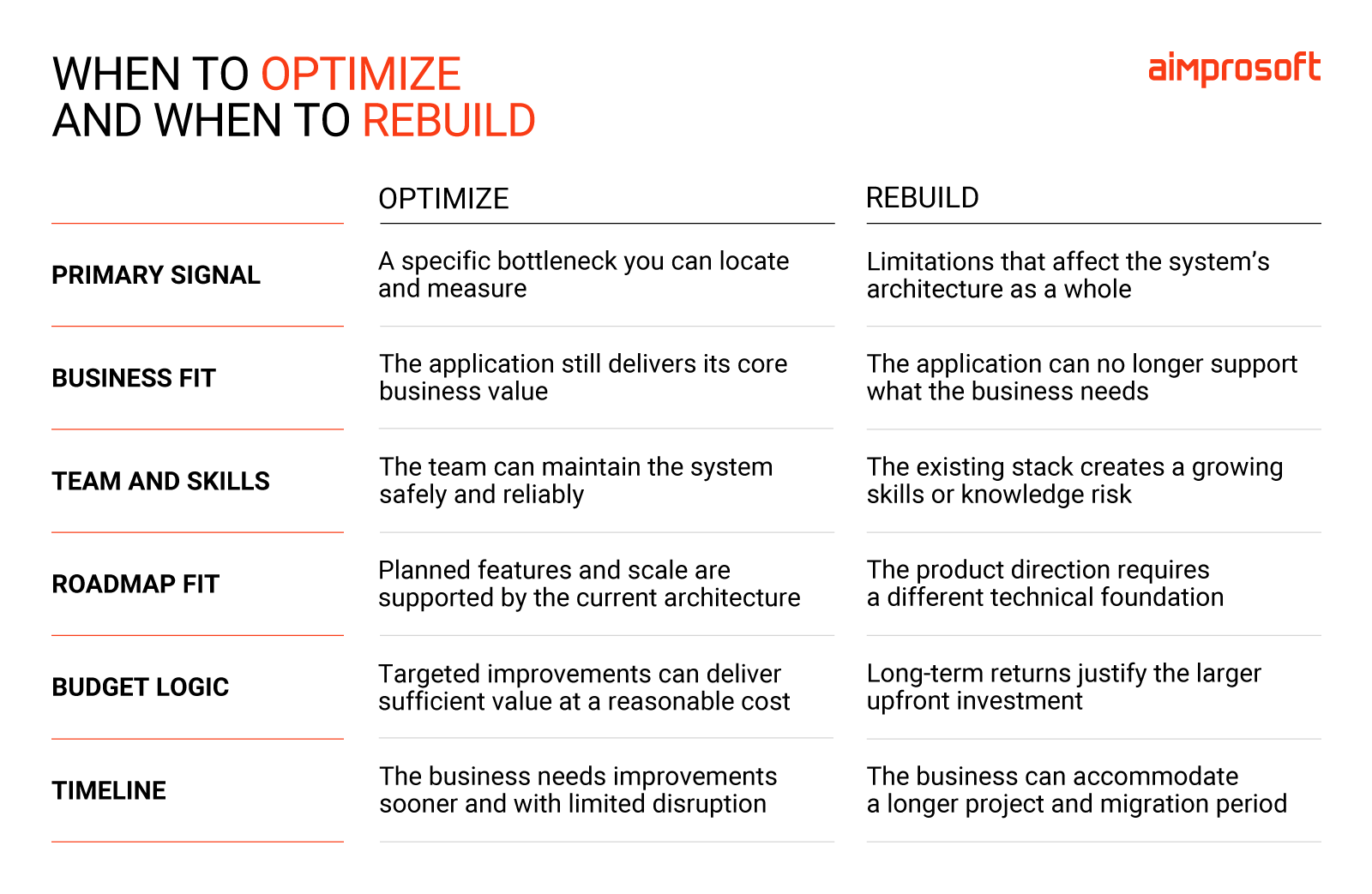
Yet the technical side is only part of the equation. Because if you ask a developer whether it’s better to optimize or rebuild, the answer will probably lean towards software modernization. New architecture, modern stack, proper test coverage, and a better understanding of the domain and application. It’s a legitimate tech position, but it doesn’t necessarily answer business needs.
If the roadmap is short and includes only a few additional features while the system is otherwise doing its job, hypothetical 1000 hours of engineering work is hard to justify against what the system actually needs. In this case, application performance optimization makes more business sense, even if rebuilding would leave the team with a cleaner codebase.
But if every new feature requires a messy workaround, patching the old system may eventually cost more than building a new one. Here, we’re not just talking about a cleaner codebase, but a new foundation that can support your next plans and decisions. This makes investment in legacy system modernization easier to justify both technically and financially.
Let’s look at your system together.
How to approach software performance optimization
Once you’ve made up your mind to optimize, you want to do it right. There’s always a temptation to start implementing changes early in development based on assumptions about where the app might fall short. Although well-intentioned, this premature optimization usually wastes engineering time on areas that have little effect on overall performance.
Performance engineering becomes possible once the application works correctly and can be tested under realistic conditions. To start this process, you’ll need four steps.
1. Establish a baseline
Before getting under the hood, define what “better performance” means. For example, customers complete checkout faster, the platform handles peak demand effectively, and infrastructure costs no longer rise with every increase in traffic.
Once the target is clear, establish a baseline: A record of how the system performs today under realistic conditions. At the same time, define the guardrails that must stay within, things like output accuracy, error rates, reliability, or compliance requirements. With both goals and boundaries defined, the engineering team has a steady benchmark to measure progress and know when they’ve hit the mark.
2. Profile the system
Now that you have a baseline, the next step is to identify what’s causing the system’s lag. Is the reason inefficient code, a slow third-party service, heavy concurrency traffic, or a lack of server capacity? At this step, your team’s job is to provide a clear, testable outcome of the issue and the exact fix needed to resolve it.
Here, engineers use monitoring tools, code profiling, and system logs to find the answer. This distinction matters because each cause needs a corresponding fix, and treating the wrong symptom is a complete waste of time and money.
For example, you can add more servers to improve the application’s performance. But if the root issue is an overloaded external API, it won’t help. Instead, that flawed process will just consume all your new resources without fixing the slowdown.
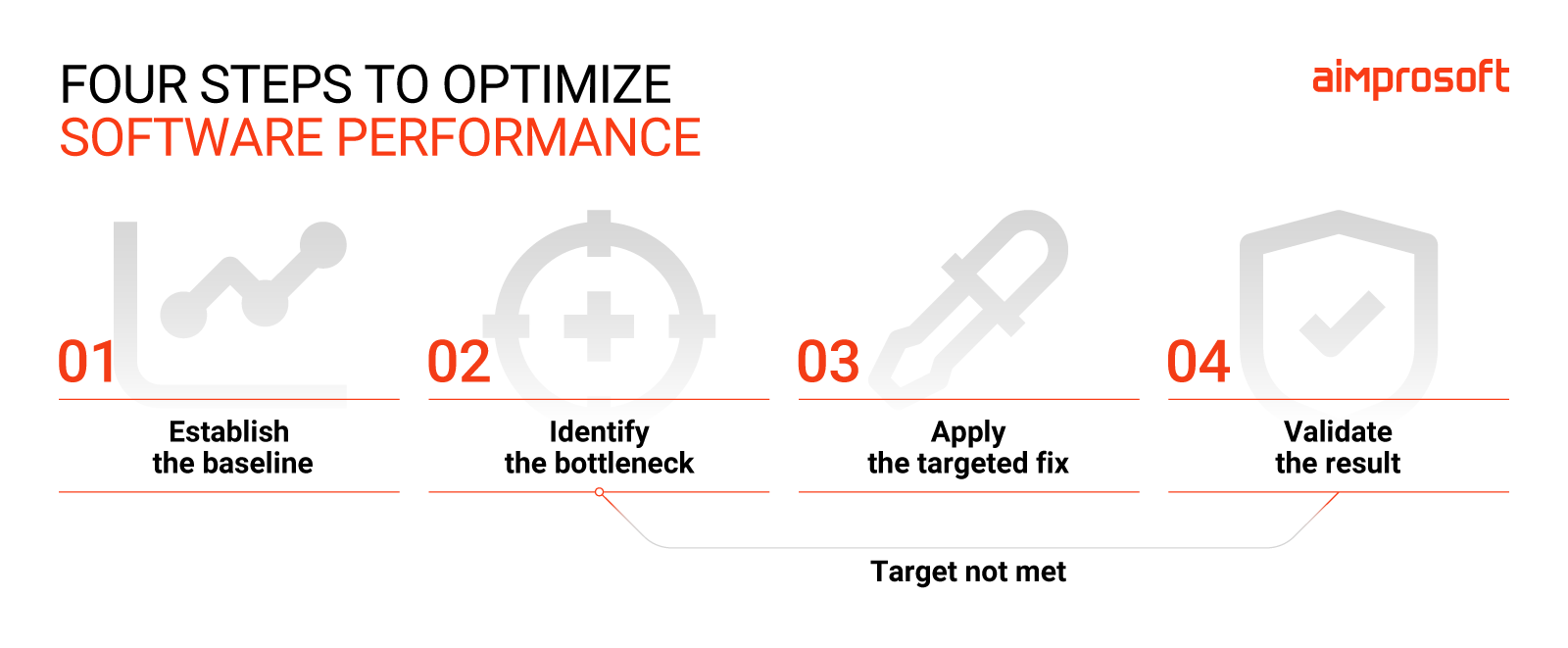
3. Choose the right optimization level
Depending on the outcome of step two, the engineering team will need to fix the issue they found.
If the performance bottleneck is data and storage, the best approach is to optimize database queries or cache frequently used results. If it’s the system’s logic or algorithms, replace inefficient routines or improve how the application processes information. If the root cause is infrastructure, the team can adjust server configurations, upgrade hardware, or swap out a lagging third-party service.
It’s important that engineers make changes based on their findings, not just the area that is easiest or most familiar to change. If you need help in identifying the issues preventing your system from working efficiently, you can always book a call with our technology consulting team.
4. Validate against the baseline
After implementing the change, test the system under the same conditions used to establish the baseline. Check the relevant metrics and confirm that the improvements are consistent across different traffic levels, workloads, and input types.
Software performance optimization is not just about raw speed. The team must also confirm the system produces correct results, remains stable, and hasn’t simply shifted resource consumption or delays to another component. For an optimization to count, it must deliver measurable, repeatable gains without breaking your initial guardrails.
Software performance optimization in practice: SIMD example
Over the years, we’ve completed many legacy system modernization projects for our clients. Recently, we took that expertise further by collaborating with Nokia on NNVC (Neural Network-based Video Coding). Unlike traditional solutions, this open-source codec uses AI to improve video compression and decompression.
Since the solution was live and in active use, our task was to provide improvements while preserving identical output.
Using software profiling, our team identified a performance bottleneck in mathematical operations performed during neural network inference. The decoder repeatedly ran identical operations over large data sets, draining CPU resources.
We used SIMD vectorization, allowing a processor to apply the same instruction to several data points simultaneously rather than processing them one by one. During implementation, we also discovered another issue—a 16-bit value range was causing extra instructions in every calculation, which held back performance. By correcting the range, we removed that overhead.
Once done, Nokia validated our implementation against predefined test conditions (baseline). The optimized build produced the exact output, and the decoder ran about 40% faster than before.
Sum up
Just because the application starts working slowly doesn’t mean it’s over. Application performance optimization has repeatedly shown our clients that with expert help, you can find that specific bottleneck and fix it without a rebuild.
Take our NNVC case, for example. By profiling the software and applying SIMD optimization, we accelerated the decoder by about 40% while preserving exact output quality.
If your app is falling short of its performance goals, connect with our team. After a thorough assessment, we will provide you with a clear path, whether it’s targeted improvements or a complete legacy modernization strategy.
FAQ
Software performance optimization is a systematic approach to finding and fixing what prevents an application from meeting its performance targets.
Software performance optimization is the right call when an application still serves its business purpose, but something is slowing it down. If you can find, name, test, and isolate the issue, you can optimize it and thus fix it without rebuilding the whole system.
Rewriting, or rebuilding, makes sense when the application can no longer perform its intended business purpose. For example, its tech stack prevents it from evolving, or you can’t find specialists to maintain it.
Start by establishing a baseline — a record of how the system performs today under realistic conditions. Then use monitoring tools, code profiling, and system logs to find what’s causing the lag. The goal is to confirm a clear performance bottleneck: not just that something is slow, but exactly what is slow and why.
Define baseline and non-negotiable guardrails before making changes. That includes output correctness, reliability, error rates, security, and compliance requirements. After finding a bottleneck and implementing an optimization, test the output against your baseline. Optimization only counts if it delivers measurable gains without crossing those guardrails.
SIMD stands for Single Instruction, Multiple Data. It’s a CPU-level technique that allows a processor to apply the same instruction to multiple data points simultaneously, rather than processing them one at a time. It is particularly useful for repetitive mathematical operations in areas such as video processing, AI inference, and scientific computing. During our work with Nokia, we used it to optimize the software performance of a video decoder.