AI-Assisted vs. Traditional Software Development: What Actually Changes (and What Doesn’t)
Published: – Updated:

Why would businesses want to adopt AI-assisted development? For starters, industry estimates suggest AI in software development can give 20-40% productivity gains. That can translate into fewer hires needed to deliver, quicker prototype testing, and less time spent on manual work. In other words, more for less.
But that’s hardly the full picture.
Just because AI can help you generate code x10 faster, someone still has to review it, maintain it, and make sure the final product works as expected. And that’s a fact most tend to forget when considering AI-driven software development.
So what really changes in software development with the adoption of AI? And what still depends entirely on the people behind the product? Let’s look at what pitch decks often leave out.
AI in software development lifecycle
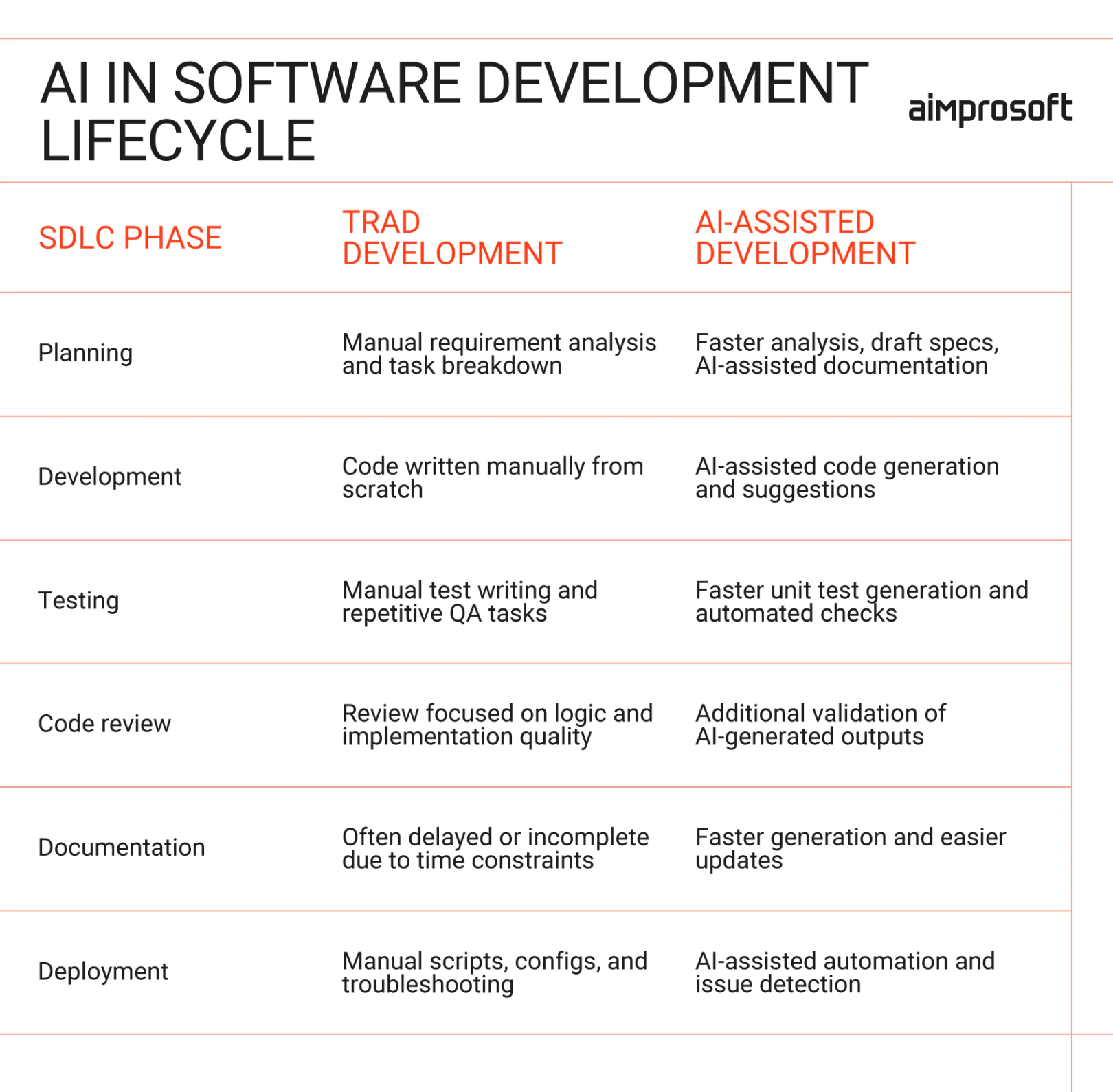
Traditional development has a well-defined process: Developers write and test code, designers handle interfaces and user flows, DevOps manages infrastructure, and PMs coordinate delivery and priorities. All manually.
The introduction of AI tools for software development doesn’t remove people from this process but definitely changes how they spend their time in it.
A software developer is a good example of this shift. If previously their main job was to write and test code, now it’s more about guiding — defining what needs to be built, how it should behave, and what constraints it needs to respect, before AI generates a single line of code.
The better the direction is, the better the output.
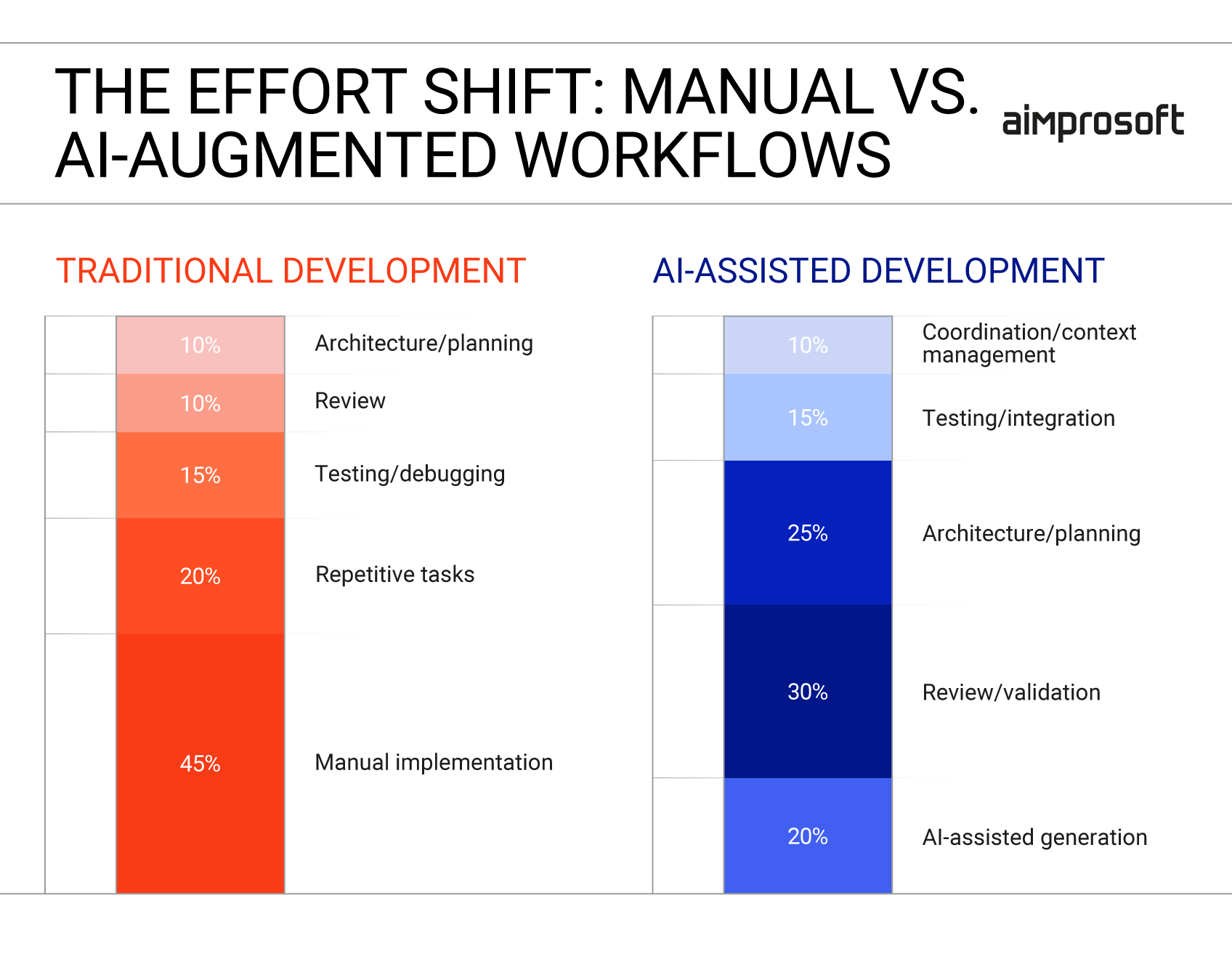
But that doesn’t mean developers are doing less work. Instead of writing everything from scratch, they now spend more time reviewing, editing, and validating AI-generated code to make sure it fits the product and works as expected. Less manual coding, more technical decision-making.
Yet even the most promising technology shifts come with trade-offs.
Where AI-driven development genuinely speeds things up
AI doesn’t transform every part of the development process equally. Some tasks that used to take hours now take minutes, while others still require the same level of effort, just with different steps involved.
Based on our developers’ experience across projects, there are three areas where AI software development consistently delivers the biggest impact.
#1 Unit testing
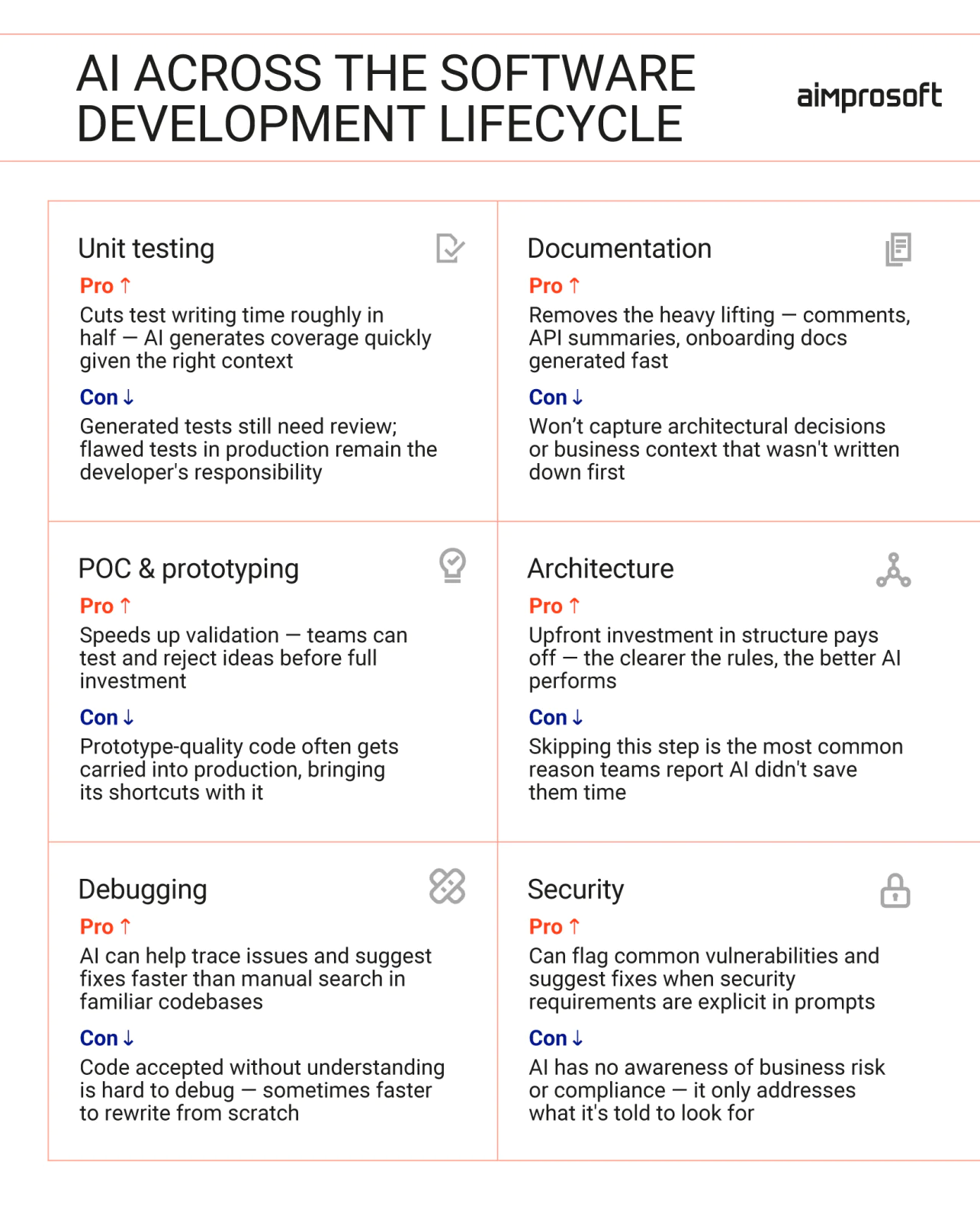
Nobody likes writing unit tests. They’re repetitive, time-consuming, and honestly, they don’t feel like real progress, but skipping them isn’t an option. In traditional development, test coverage takes roughly as much time as writing the feature itself. Meaning if the developer spends two hours creating a feature, two hours will go for unit testing. AI halves that ratio — given the right context, it can generate unit tests both quickly and thoroughly.
But it doesn’t mean that the developer gets to sit idly while the AI tool does all the work. Generated tests still require review and validation. If flawed code reaches production, the responsibility sits with the AI software engineer, not the tool.
#2 Documentation
Every team knows documentation matters. Every team also knows it’s the first casualty when a deadline moves closer. Because of this imbalance, documentation either gets rushed or left completely unfinished. Over time, this creates a messy codebase where nobody remembers how things work, new hires take forever to get up to speed, and crucial project knowledge vanishes the moment an engineer leaves.
One area where AI in software development works surprisingly well is documentation, especially when writing quick code comments, summarizing API endpoints, and handling basic technical explanations. While AI won’t replace human thinking or explain the big architectural decisions, it removes the heavy lifting that makes people avoid writing docs in the first place.
For new team members joining a project, having an AI-generated foundation provides a much faster starting point than digging through a codebase with little context. Based on our engineers’ experience, onboarding times for some projects dropped from about 5 months to just 1 week. Of course, the exact timing depends on the project’s complexity and the quality of the documentation. Still, it’s a significant improvement for both teams and businesses.
#3 POC and prototype speed
The most expensive mistake in software development is building the wrong thing at full scale. A proof of concept (POC) exists to address that issue before a significant budget is committed. But even quick POCs still depended on how fast developers could build them.
AI shifts that constraint. It speeds up all the repetitive, standard work at the start of a project — like setting up the basic project structure, writing predictable code, connecting different systems, and building simple layouts. That means teams can validate ideas, reject weak concepts, or adjust direction at a speed that wasn’t possible in a manual setup with the same number of engineers (e.g., 2 engineers only).
What are the downsides of AI assisted software development?
Just like there are benefits of AI in software development, there are downsides. Not dealbreakers, per se, but valid trade-offs worth understanding before you invest in.
#1 The upfront architecture investment
The biggest misconception about AI development is that you hand it a problem and instantly get good-quality code. In practice, the real work happens before AI generates anything that can be considered a useful output.
On our projects, that means days of upfront investment: defining architectural documents, establishing coding standards, specifying patterns, and setting explicit rules for what AI should and shouldn’t do. Business requirements need to be detailed. Edge cases need to be anticipated. The clearer your boundaries are, the better the AI performs.
Teams that skip this step are usually the ones who report that AI didn’t save them any time. When, in fact, it did, but they just spent it fixing mistakes at the end instead of planning properly at the start.
#2 Debugging AI-generated code
The real issue isn’t that AI writes bad code, because human devs do too. The issue starts when code gets created faster than a developer can realistically understand it.
When developers write code themselves, they naturally learn how the system works as they build it. That deep understanding is exactly what helps them fix things when they break. With AI doing the heavy lifting, it’s tempting to accept large amounts of generated code. And that creates a different kind of bottleneck. Sometimes, developers spend more time untangling messy, AI-generated code than they would have spent just writing it from scratch in the first place.
As one of our engineers put it: “In some cases, it’s faster to find a bug manually than to feed the whole codebase back to the model, have it review every file, and wait for an answer. When you’re chasing multiple issues, those review cycles add up fast, and so the time and token costs start eating into the savings upfront.”
That’s not a warning to avoid AI. It’s a reminder that AI-assisted software development can speed up generation, but it doesn’t automatically speed up comprehension.
#3 Security issue
As we said earlier, accepting AI outputs unquestioningly is never a winning strategy, even if it looks faster and cheaper than hiring developers. A CSET research report found that nearly half of the code samples they tested had serious bugs that hackers could easily exploit.
We were once brought in to fix an application built almost entirely with AI and minimal developer oversight. On the surface, it looked functional: Buttons worked, transactions went through, and the product appeared stable. But underneath, the issues were severe. Exposed API keys, unauthenticated webhooks, and a flaw in the Stripe integration that could lead to duplicate or fraudulent payments.
The main problem wasn’t AI software development itself, but the lack of a proper security review. Vibecoding can produce results that look convincing while still carrying insecure patterns or flawed assumptions underneath. Since these models learn from massive public codebases containing both strong and weak engineering practices, their output should never be trusted blindly.
AI does not automatically understand business risk, compliance requirements, or payment logic unless those constraints are explicitly defined by an engineer who understands the system and the risks behind it. In such cases, we recommend a vibecode clean up, with this procedure in place, you can be sure your AI software works reliably.
How AI-assisted development changes development teams
It is true that AI can help companies reduce their headcount, but “fewer people” doesn’t automatically translate to lower costs or a lighter workload. In traditional development, to speed things up, teams add more hands: Seniors for architecture, middles for implementation, and juniors for repetitive tasks. AI changes that balance. In some cases, a single senior developer with the right tools can cover what used to require a full team.
But once again, there has to be someone to define architecture, review outputs, catch mistakes, and understand how the system works. That’s why experienced developers have become more important, not less.
It becomes especially noticeable with junior developers. When a junior developer writes a thousand lines of code over a whole week, problems pop up slowly and are pretty easy to catch and fix. With AI software development tools present, a junior can produce the same number in 15 minutes. Without supervision, errors appear just as fast.
At the same time, replacing all juniors with AI doesn’t make financial sense. In certain task volumes, hiring a junior is cheaper than running the equivalent workload through a model, which some companies are already discovering.
But AI is supposed to make things easier, isn’t it?
It does, just not in the way many expected. Instead of large implementation-heavy teams, companies are moving toward smaller teams led by experienced AI software engineers and supported by tools. Juniors do not disappear either. Their role changes too: Less repetitive manual work, more testing, validation, support tasks, and learning under senior guidance.
The result is not “AI replacing developers.” It is a different team structure where fewer people can deliver more — but only with strong technical oversight, solid architecture, and proper review.
Which project types does AI-assisted software development benefit most
Not every project is an equally good fit for AI-assisted development. The tools are powerful, but where they work well depends heavily on the context — the stakes, the codebase, the team, and the level of review built into the process.
Best fit: Fast-moving, lower-risk projects
AI tools deliver the most value on projects where teams need to move quickly, requirements change often, and the cost of mistakes is relatively low. This includes:
- Proofs of concept (POCs)
- MVPs and greenfield products
- Internal business tools
- Test automation
AI-powered software development works particularly well in these environments because the goal is usually to validate ideas and iterate quickly. Not to build something permanent. So, generated code that needs cleanup later is an acceptable trade-off here. Greenfield projects are another strong fit because they let developers set clean architecture upfront and use AI to accelerate implementation within that structure.
AI also works for internal and developer tooling. The user base is small and usually technical, tolerance for rough edges is higher, and shipping fast often matters more than building perfectly. Test suite generation is also a natural use case: AI is good at producing repetitive, pattern-based code, and tests fit that profile well.
Okay, and what about live projects?
Moderate fit: Production systems
AI-assisted development can still provide value in production systems, but the approach to work here changes significantly. By production systems, we mean:
- Customer-facing platforms
- Enterprise systems
- Infrastructure and backend-heavy systems
- Large legacy codebases
Here, generative AI software development becomes less about “generating as much code as possible” and more about supporting engineers with drafts, automation, documentation, and faster testing.
Since production systems are already live and serving real users, the stakes are higher, so speed is only one part of the equation. Stability, maintainability, security, observability, and compliance matter just as much.
Legacy codebases sit in a category of their own. Over time, they accumulate undocumented decisions, fragile integrations, and technical debt that AI tools don’t fully understand from the code alone. As a result, AI can generate changes that look correct but unintentionally break functionality elsewhere in the system. That doesn’t make AI useless here, but it does mean legacy environments require much more careful oversight.
AI vs traditional software development: Key takeaways
AI-assisted development is not traditional development, just faster. No. It’s a different approach that rewards experience, demands structure, and only delivers its promise when the fundamentals are already in place.
While AI tools for software development reduce a large number of repetitive tasks, the main shift in jobs happens in oversight. Developers spend more time planning, reviewing, debugging, and decision-making, which raises the bar for who belongs on the team. The result is not just leaner teams, but teams that take ownership of what gets built.
Not every project benefits equally. AI-powered software development excels on POCs, MVPs, and internal tooling, where speed and iteration matter most. Production systems and legacy codebases still benefit from AI assistance, but the impact looks different: Less rapid generation, more review, stabilization, and architectural oversight.
For businesses, the key takeaway is straightforward: AI delivers the most value when paired with strong engineering practices, not used instead of them.
FAQ
Does AI replace traditional software development?
Not entirely. AI-assisted development still relies on traditional programming fundamentals like architecture, debugging, security, and system design. AI primarily reduces repetitive implementation work, allowing developers to focus more on review and technical decision-making.
Does AI-assisted development reduce development costs?
The savings depend heavily on the project, the tools, and how AI is being used. The most direct savings come from headcount — AI enables smaller teams to deliver what previously required more people.
Which projects benefit most from AI-assisted development?
AI works best for POCs, MVPs, internal tools, test automation, and fast-moving products where rapid iteration matters more than long-term maintainability.
Can AI-generated code be used in production systems?
Yes, but production systems require significantly more review, testing, security validation, and architectural oversight than early-stage prototypes or internal tooling.