The Most Common Cloud Migration Risks and the Ways to Avoid Them
Published: – Updated:

Companies migrate to the cloud for lower costs and faster releases. Ironically, along the way, they often lose both — time and money. According to a McKinsey study, 38% of companies said their on premise to cloud migration took at least 25% longer than planned. On average, companies also spent 14% more than expected each year. Why does this happen?
Mainly because businesses overlook the same cloud migration risks. They try to move different systems in the same way, underestimate how messy their data is, or overlook cloud migration security. Add hidden connections between systems, tight budgets, and teams that aren’t ready for the change, and it’s easy to see why migrations go off track.
In this article, we break down seven common risks, explain why they happen, and share practical ways to avoid them, including through cloud migration risk assessment.
What Is a Cloud Migration Risk Assessment and Do You Need One?
A cloud migration risk assessment helps you spot potential problems before they disrupt your business. In some cases, you can skip it, especially if you’re:
- Moving a few standalone applications that don’t handle sensitive data;
- Setting up a test or development environment in the cloud;
- Migrating systems your team has already worked with before.
Things, however, get more complicated when you’re moving systems that handle payments, store regulated data, or connect to several other applications. In these cases, an on-premises to cloud migration leaves more room for things to go wrong. A formal assessment focuses on various risks; let’s move directly to them.
7 Most Common Cloud Migration Risks
1. Starting Without a Migration Strategy
Moving every application to the cloud in the same way might seem like the quickest option, but it comes with risks. Some applications may run slower or cost more in the cloud than they did on your own servers. Existing technical debt won’t disappear, either. And if you discover systems you’ve overlooked halfway through the migration, the whole project could stall.
Before you start, decide what to do with each app. Can you move it as it is, or does it need to be changed? Would it make more sense to keep it on your own servers, rebuild it, or even retire it? Once you’ve decided, split the migration into stages based on business priorities and risks. Each stage should have a responsible person, a deadline, and clear completion criteria.
A good example is our work with a European distributor that ran eight B2B stores on a heavily customized on-premise SAP Commerce system. Instead of rebuilding everything, we moved the custom extensions to SAP Commerce Cloud without changing the business logic. Migration risk was lower, and the company still had the option to modernize the system later.
2. Underestimating Your Data
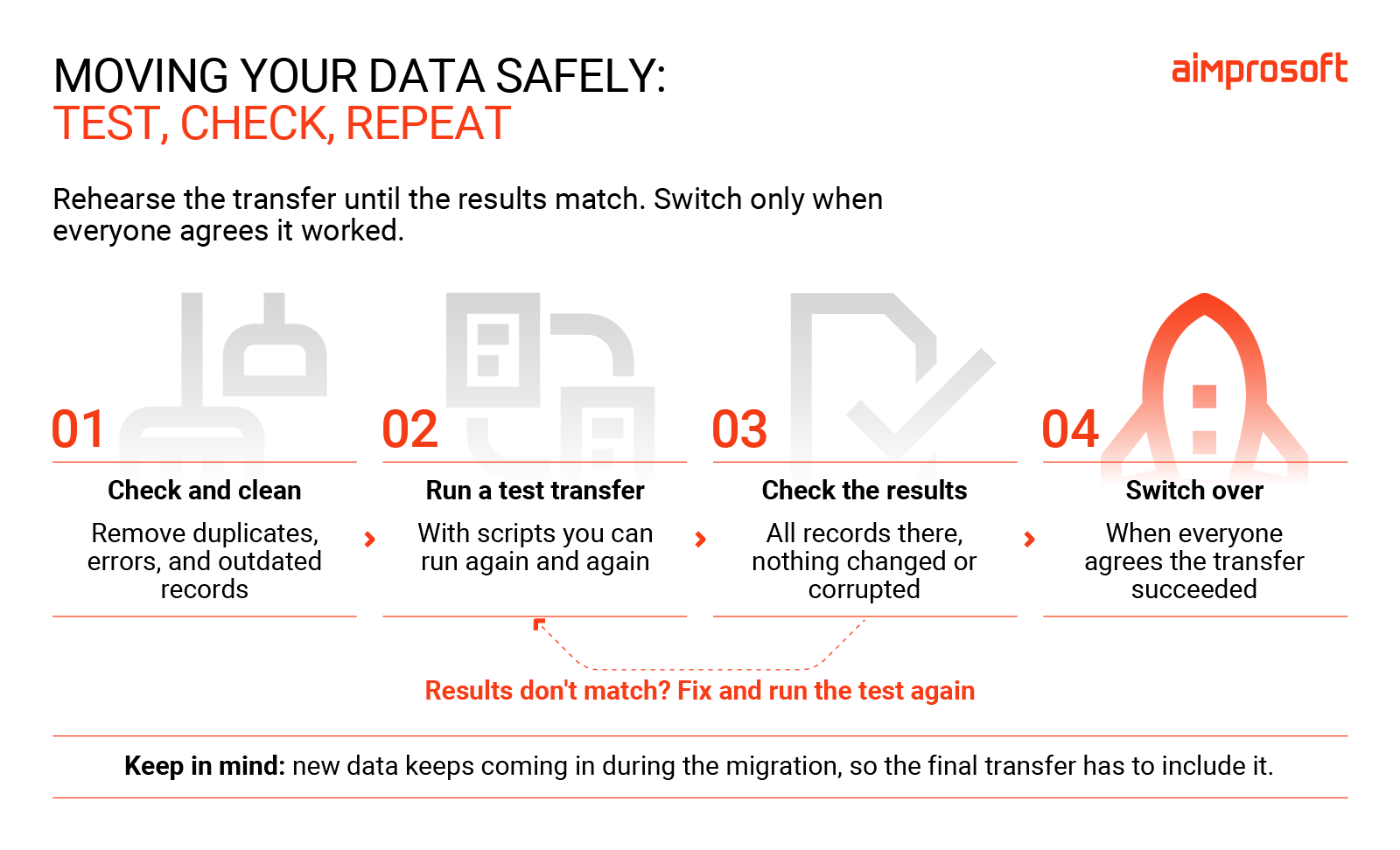
From a data perspective, your business is a mixture of records stored over years in different formats across different places, with duplicate entries, outdated information, errors, and unaddressed comments. To make things harder, new data keeps coming in during the migration.
Without proper testing, some records may go missing or link to the wrong information. You won’t notice until the new system goes live and customers start complaining about incorrect invoices, for example.
Always start by checking and cleaning your data. Only then can you create transfer scripts. You can run them multiple times to test the process before the actual migration. After each test, check that all records have been transferred and that the data hasn’t changed or become corrupted. Make sure everyone agrees on the definition of a successful transfer before switching to the new system.
3. Missing Connections Between Systems
In older applications, you might discover connections that no one even knew were there. The problem usually comes to light when you move an application to the cloud, and part of the system stops working (for example, a payment provider stops responding).
Before the migration, use automated tools to find these connections and talk to the systems managers. Check which third-party APIs the apps use, what licenses they depend on, and which network rules they use to communicate. If two systems depend heavily on each other, it’s usually better to move them together. If it’s not possible, set up a temporary connection so they can still exchange data during the migration.
4. Overlooking Cloud Migration Security Challenges
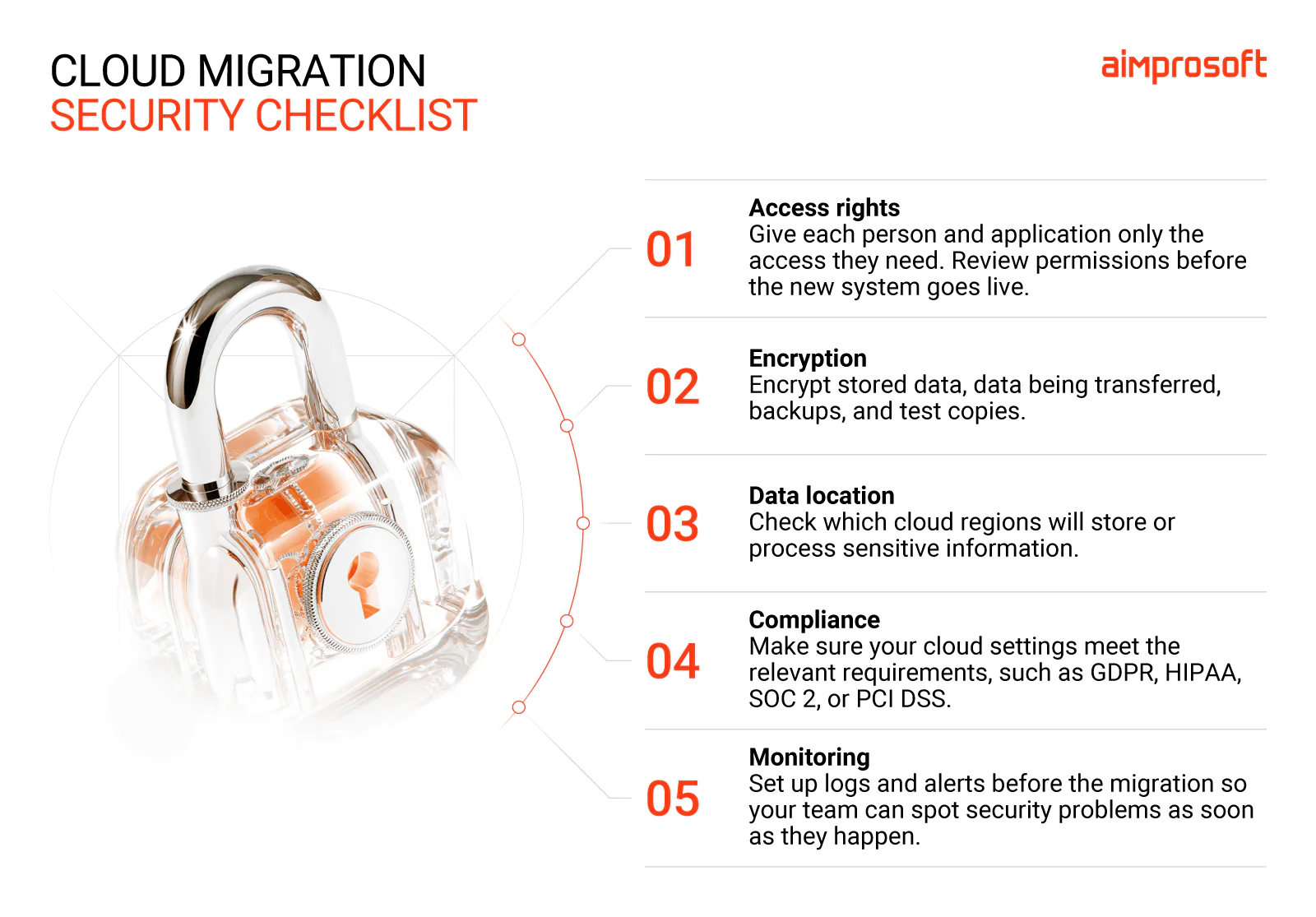
Your cloud provider handles security for its infrastructure, including data centers, servers, and networks. But you decide who can access your data and how to set up your cloud systems. Mistakes here can expose sensitive information.
Cloud Security Alliance points to incorrect security settings as the biggest cloud threat, followed by problems with managing user access. During a migration, teams sometimes want to accelerate the process and give employees or applications more access than they need. Those temporary permissions often stay in place long after the migration is finished.
Make sure your data is encrypted during the transfer, but don’t forget about temporary storage and copies used for testing; these can include sensitive information, too. Also check the future data storage, because different countries have different rules, and regulations like GDPR may affect where and how you can store and process personal data.
5. Cost Overruns
Moving your applications is only part of what you’ll pay for. Some of them may need code changes to run properly in the cloud. You might also have to pay for your old servers and new cloud services at the same time for several months. And if you move applications without adjusting their server sizes, you could end up paying for more cloud resources than you need.
To keep cloud migration cost under control, account for code changes and the period when both environments will be running. Set spending limits and cost alerts beforehand. After each stage of the migration, check how much computing power and storage your applications use, and adjust resources.
When working with Zenfulfillment, we moved the infrastructure to Google Cloud and introduced autoscaling, which automatically adjusts computing resources based on demand. This helped the company cut its infrastructure costs by nearly 50%.
6. Lack of Agreement On Change Management
Even when the cloud migration finishes on time, your team may struggle with the new system and stick with doing things the old way. This often happens when the people responsible for running the systems aren’t involved early enough or don’t get enough training. As a result, you see more and more human errors.
Before the migration kick-off, agree with company leaders on what you want to achieve, how long it should take, and how much you expect to save. Make sure the people who will manage the new cloud platform receive training while the migration is still underway.
7. Not Having a Rollback Plan
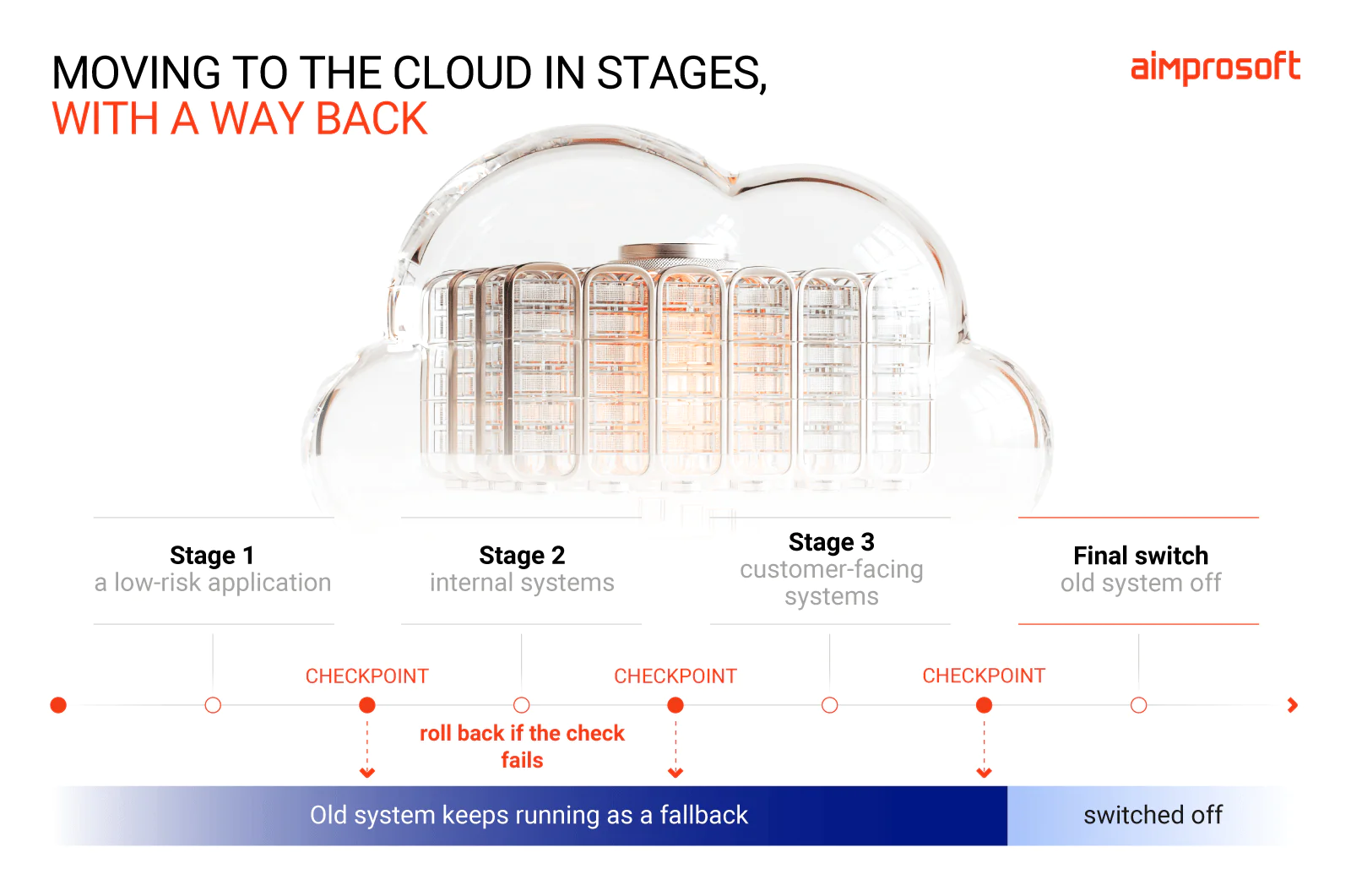
If you move everything to the cloud at once and things don’t go as expected, you need a way to switch back to the old system. Without a rollback plan, your whole business could be put on hold while you wait for the problem to be fixed. You lose time and money. According to an Uptime Institute survey, 57% of respondents said their most recent major outage cost more than $100,000.
To reduce the risk, move applications in smaller stages and keep the old system running until you’re sure the new one works properly. Before each stage, agree on what needs to work to move forward and what problems would mean switching back. Test the rollback process in advance, too.
How to Keep Cloud Migration Risks Under Control
Even with a solid cloud migration plan, you can’t avoid every cloud migration risk; something can come up unexpectedly. But the problems we’ve covered in this article don’t appear out of nowhere. A plan that treats every application the same, data that’s messier than expected, weak access settings, no way to switch back — all of these can be spotted long before the migration starts.
The earlier you find them, the cheaper and easier they are to fix.
A cloud migration risk assessment helps you understand these risks and decide how to handle them before they become a problem. It shows which ones apply to your systems, what needs urgent fixing, and how to plan the move so your business keeps running and, eventually, benefits.
FAQ
It’s a check of your applications, data, system connections, security, and costs before the migration starts. You learn which risks apply to you, what to fix and in which order, and also get a step-by-step plan for the move.
According to the Cloud Security Alliance, the biggest threats are wrongly configured settings and weak control over who can access what. During a migration, watch out for unencrypted data transfers, unprotected test copies of customer data, and data stored in the wrong region.
Find out which risks apply to you before the move. Then migrate in small stages and check your data after every test transfer. Set up security before anything goes live, and keep the old system running until the new one works.
It’s a list of security measures to put in place before your systems move. It includes access rights, encryption, instructions for storing sensitive data, compliance requirements, and monitoring. It helps you catch gaps while they’re still easy and cheap to fix.
Cloud migration failure statistics and our own experience point mostly to planning. Problems usually come from custom code that doesn’t work in the new environment, pipelines that need rebuilding, messy data, and technical debt that moves to the cloud with everything else.
Not necessarily. If you migrate in stages, the old and new systems run side by side while data stays in sync. The final switch happens at a quiet time, and a rollback plan lets you switch back if something goes wrong.