Internal Knowledge Base vs RAG: Choosing the Right Enterprise Knowledge Management Solution
Published: – Updated:

On a random Tuesday, an urgent task appears on your screen: “Add RAG to our knowledge base.” It has no budget details, no requirements, not even a link to the very knowledge base.
Your first instinct? Google it.
But in our experience, it’s actually step number two.
Before searching for different types of AI and ML services, there’s a more important question to answer: Does your internal knowledge base need AI on top of it, or is it already doing the job?
Because in many cases, not every problem requires a new system. And jumping straight into popular technology without understanding that difference can cost you both time and money.
That’s why we prepared this article — not to pit one against the other, but to help you understand when internal KB is enough, and when RAG becomes necessary.
Let’s get started.
What is internal knowledge base and what does it do?
An internal knowledge base is where companies store and organize the information their teams rely on every day. This includes documentation, internal processes, product knowledge, and operational guidelines. It can look like either a folder with multiple documents in SharePoint or Google Drive, or a wiki page in Confluence, or something else. The goal remains the same: ensure the right information is accessible to the right people without needing to ask others.
What is RAG and how does it work with your knowledge base?
RAG (Retrieval-Augmented Generation) is a technology layer that sits on top of your existing knowledge base and makes it searchable through natural language. When a user needs to find information, they type in their question and the system checks it to find the best parts of your content, and uses it to create a clear, cited answer. Instead of roaming through dozens or hundreds of files, employees can get a response based on the information your company already has.
Want to learn more about the technical side of RAG development? Read our article.
What’s the difference between RAG and a knowledge base?
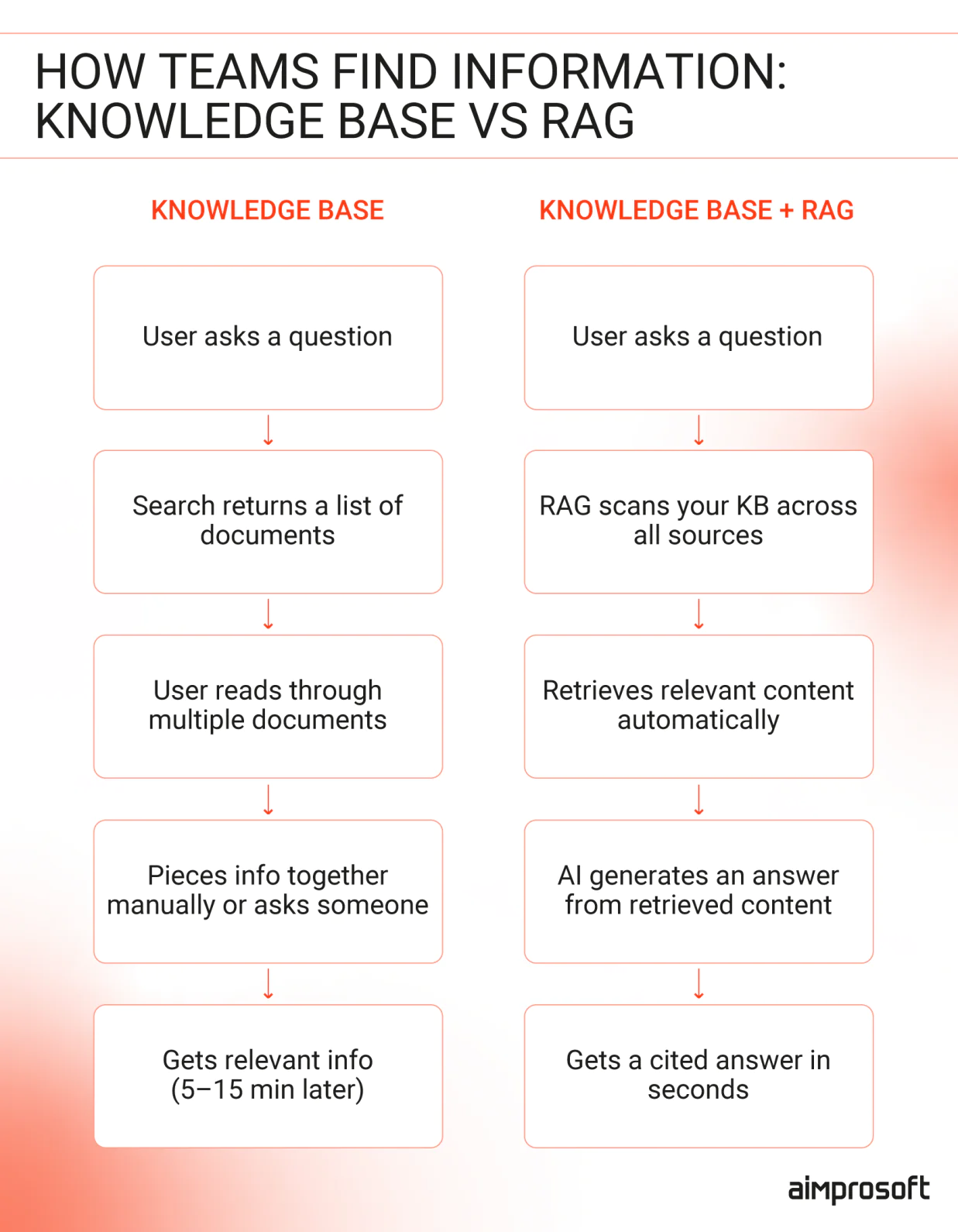
RAG doesn’t add new enterprise knowledge, nor does it replace your existing one. As a layer, it connects your existing documents, wikis, and internal systems.
To process your data, engineers need to handle preparations, like chunking, cleaning, embedding into vectors, and indexing in a vector store – but RAG itself doesn’t change your data. It simply makes your existing information usable in real time.
What does it mean in practice?
- Shorter task cycle times – Work moves faster because teams don’t get blocked by missing or hard-to-find information.
- Lower operational overhead – Less time spent searching, asking, and clarifying means fewer hours lost across teams.
- More predictable execution – Decisions are based on the same relevant data, reducing variation and unexpected outcomes.
- Ability to scale without adding headcount – As knowledge grows, teams can still access and use it efficiently without increasing dependency on key individuals.
How teams use internal knowledge base
The enterprise knowledge is more than just storage. When gathered right and updated regularly, it helps support day-to-day tasks like the following.
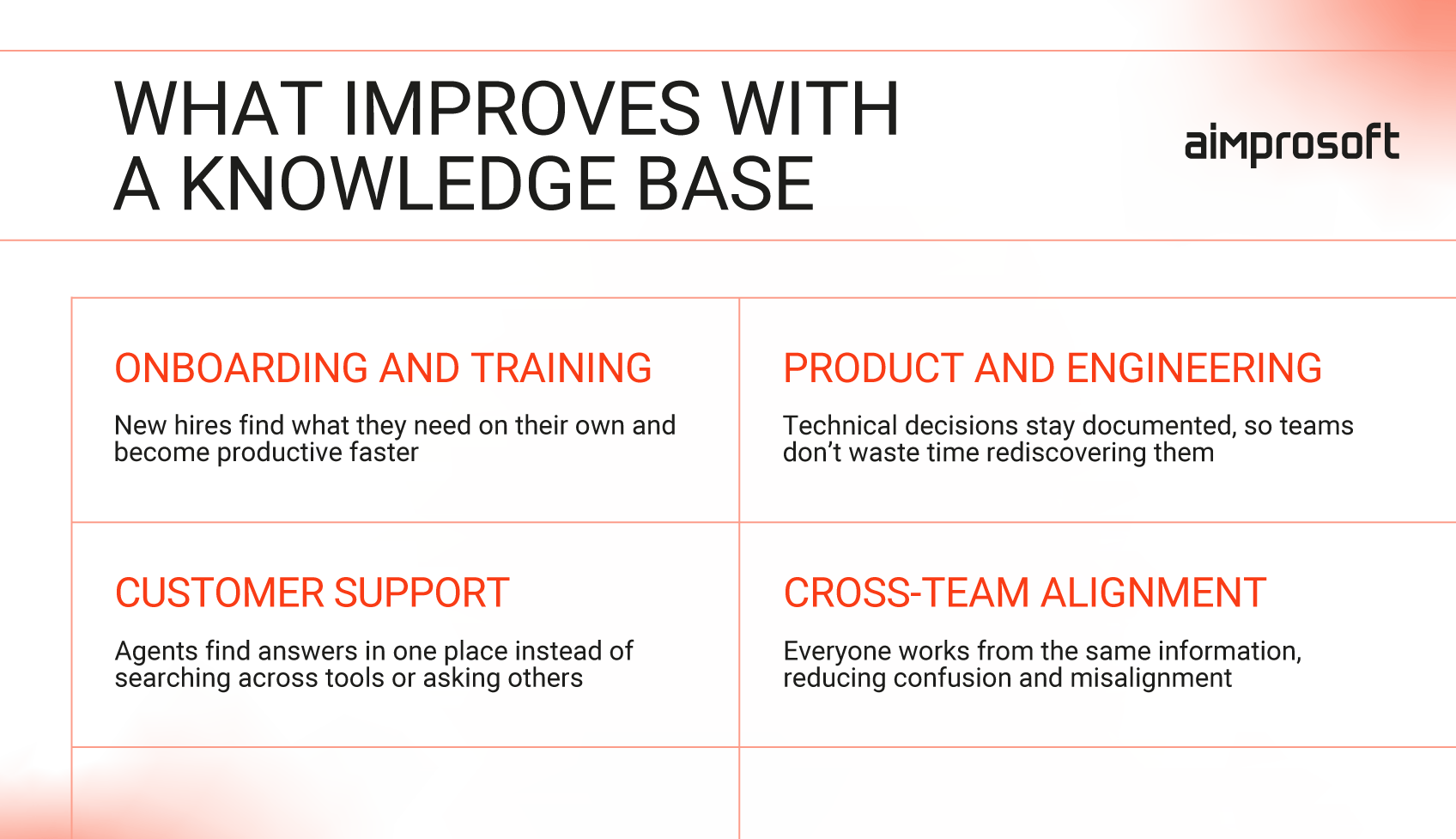
#1 Onboarding and training
A knowledge base helps make onboarding self-sufficient. Instead of relying on colleagues to walk them through each process, tool, and company guideline, new hires can find what they need at their own pace. This approach benefits both sides as the new employee gets up to speed faster, and senior team members aren’t pulled away from their own work to answer the same questions. The quicker someone learns the process, the sooner they can add value, which improves your hiring ROI.
#2 Product and engineering knowledge
When technical decisions aren’t documented, teams end up rediscovering the same things over and over again. Which results in wasted time and missed deadlines. An internal knowledge base keeps technical context accessible – what was built, why it was done that way, and how systems are connected. That means faster development cycles and less risk of repeating mistakes that have already been made and learned from.
#3 Customer support enablement
Support teams lose time every time they have to search across multiple tools to answer a basic client question. Internal KB gathers all the info in one spot: Product details, troubleshooting steps, pricing, and escalation procedures. This helps agents find what they need and respond faster. Plus, when everyone works from the same source, answers stay consistent no matter who handles the ticket. Customers get faster resolutions. Support teams spend less time searching and more time actually helping.
#4 Cross-team alignment
When different teams work with different “current” versions of the same information, things often go south. A sales rep promises something engineering hasn’t planned for. A manager follows a process that was updated two months ago. In the end, you get a mess and lose the client’s trust. An internal knowledge base prevents that by giving every department access to the same current information. The same roadmap, the same policies, the same procedures.
The outcome is clear: Fewer delivery failures, more reliable execution, and a reputation that your clients can count on.
But even if information is crucial for business decision-making, finding it – and finding it quickly – is another challenge. That’s why many businesses consider enterprise search AI by adding a RAG layer to their KB.
What are business use cases for RAG?
RAG isn’t a cure for everything. But it’s a strong fit for organizations dealing with time-sensitive decisions, fragmented knowledge across systems, or situations where mistakes carry real business risk. These are the things that knowledge base alone struggles to handle, no matter how well it’s maintained.
Here’s where that gap shows up most and where RAG delivers the most noticeable results.
Customer support
An average support agent handling a billing dispute opens multiple tools and can spend up to 30 minutes piecing together an answer. And still be unsure if the policy is current. With RAG, they ask one question and get a source-backed answer in seconds.
This isn’t just theoretical. Companies report up to 45% faster responses and around 30% shorter resolution times, as agents no longer need to search across multiple systems.
Internal operations and HR
According to industry benchmarks, HR teams spend roughly 15-25 hours weekly answering repetitive questions about leave policies, expenses, and onboarding. Most of this information already exists in the internal knowledge base, but finding it quickly is still a challenge.
With RAG added on top, employees can get instant, policy-accurate answers, reducing routine queries by up to 60% and cutting response time from minutes to seconds.
Engineering teams
New hires often spend weeks navigating codebases, tools, and internal processes. In many companies, basic setup alone can take around 6 weeks, with meaningful contributions taking 3-9 months.
A recent study by JetBrains and Delft University shows how RAG can compress that curve. Developers using a RAG-powered assistant completed complex setup and implementation tasks with near-perfect accuracy – on a codebase they had never seen before – rating the experience 3.26 out of 4 for helpfulness and 3.0 out of 4 for ease.
What it takes to run a RAG vs. an internal knowledge base
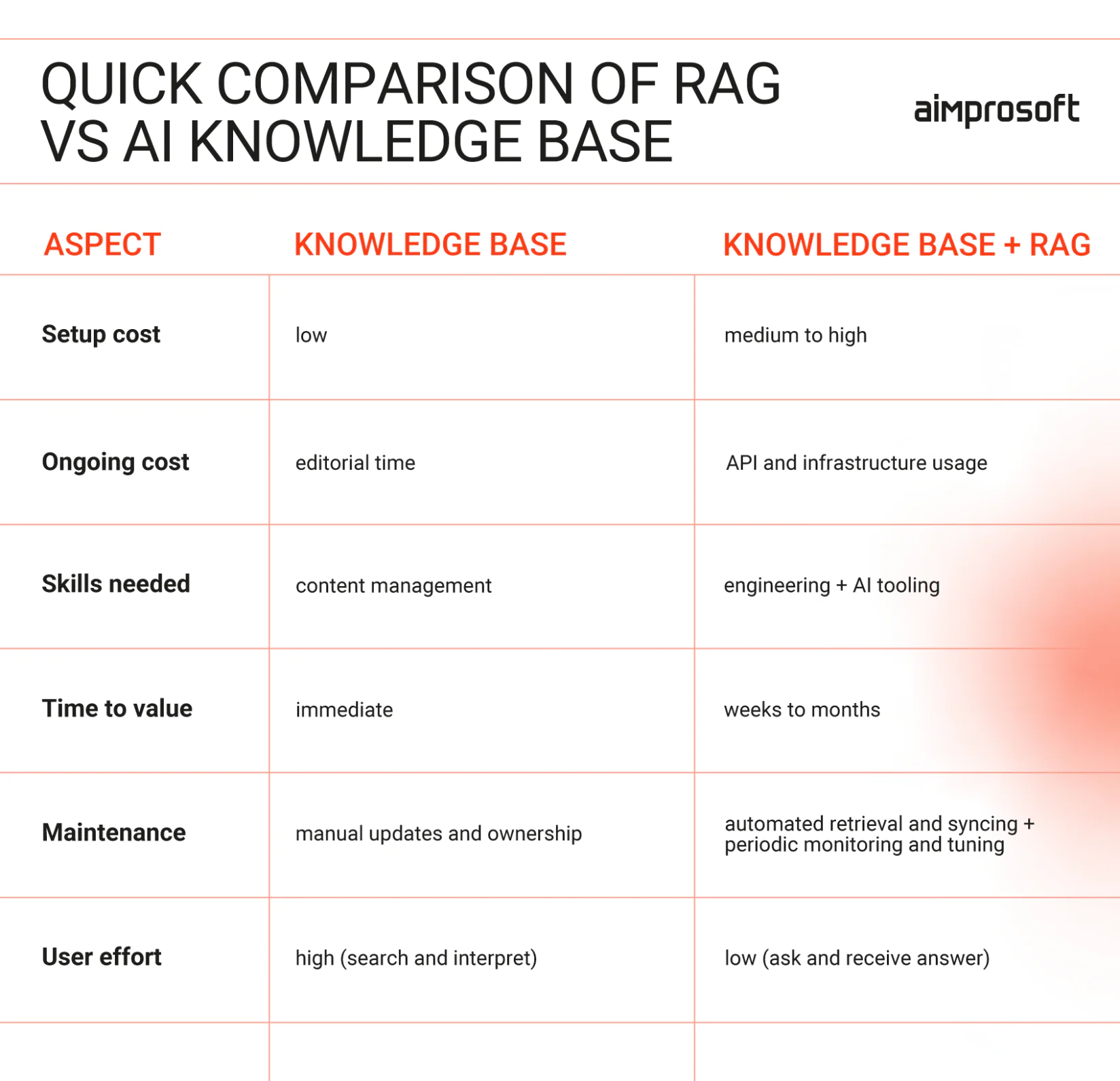
A traditional knowledge base is relatively straightforward to set up. Most companies already have one in some form, and its ongoing cost is mostly editorial. This tooling is moderately priced and doesn’t require specialized tech skills to maintain. Yet, it has its downsides, mainly related to the time needed to find the proper information.
Building a RAG system on top of that requires additional investment. The core components – a vector database, an embedding model, and a large language model – all carry either licensing fees or usage-based costs that scale with the volume of queries and documents. Plus, the initial setup requires engineers to connect your existing content, configure retrieval, test accuracy, and handle maintenance.
Want to get more details about these two management systems? Read our recent article.
So, do I need RAG for an internal knowledge base? Or is my knowledge base enough?
It depends on how your team works with information. A knowledge base works well when your team is small, and information is easy to navigate. But as both grow, the real cost shifts from the tool to the time people spend searching, cross-referencing, and double-checking if information is valid.
It depends on how your team works with information. A knowledge base works well when your team is small, and information is easy to navigate. But as both grow, the real cost shifts from the tool to the time people spend searching, cross-referencing, and double-checking if information is valid.
In short, it’s worth sticking with your internal knowledge base if:
- Your team is relatively small
- Document volume is manageable
- People can find what they need without help
RAG, on the contrary, requires more investment, but it helps recover that lost time – turning it into faster onboarding, fewer interruptions, and more consistent use of up-to-date information.
So, consider adding Retrieval-Augmented Generation if:
- The same questions come up repeatedly
- Information is spread across multiple tools or systems
- Teams rely on fast, accurate answers to make decisions
Still having doubts?
That’s completely natural, and honestly, it’s a much healthier starting point than diving into technology you don’t yet fully understand. That’s exactly why our team is here.
We start by assessing how your internal knowledge base is organized, how your teams use it, and where time is being lost. This doesn’t automatically lead to recommending a retrieval layer, but it gives you clarity.
After the assessment is done, you’ll know whether your current setup is enough, whether RAG is genuinely a good fit, what implementation would involve, and what impact you can realistically expect. All it takes is to contact us and pick a date that suits you best.