Generative AI Integration: 6 Architecture Decisions That Determine Whether It Scales
Published: – Updated:


Getting generative AI integration off the ground takes surprisingly little effort. Give a developer an API key, connect a model to your customer support workflow, and within a week you can have a working prototype that wins stakeholder approval.
Then you put it in front of end users.
Answers that took two seconds now take ten. Then someone noticed the model quoted internal pricing, even though it wasn’t meant to have access to that data. Worse, those prices are already in customers’ inboxes.
The tech team spends months fixing permissions and integration boundaries. Then, when they think they’ve mitigated every obvious failure point, the monthly invoice arrives at three times the forecast.
What did they do wrong?
In our experience, the root cause is often the same. The team designed the solution around a specific LLM API before deciding how the model should fit into the rest of the system. Seeing this mistake repeatedly, including in our work, we decided to list the key architecture choices that are easy to overlook in a prototype and painful to fix in production.
Production GenAI architecture at a glance
In early pilots, the AI part boils down to a single API call that sends a prompt to a model and answers back. In production, we can name a generative AI integration a small system built around that API call.
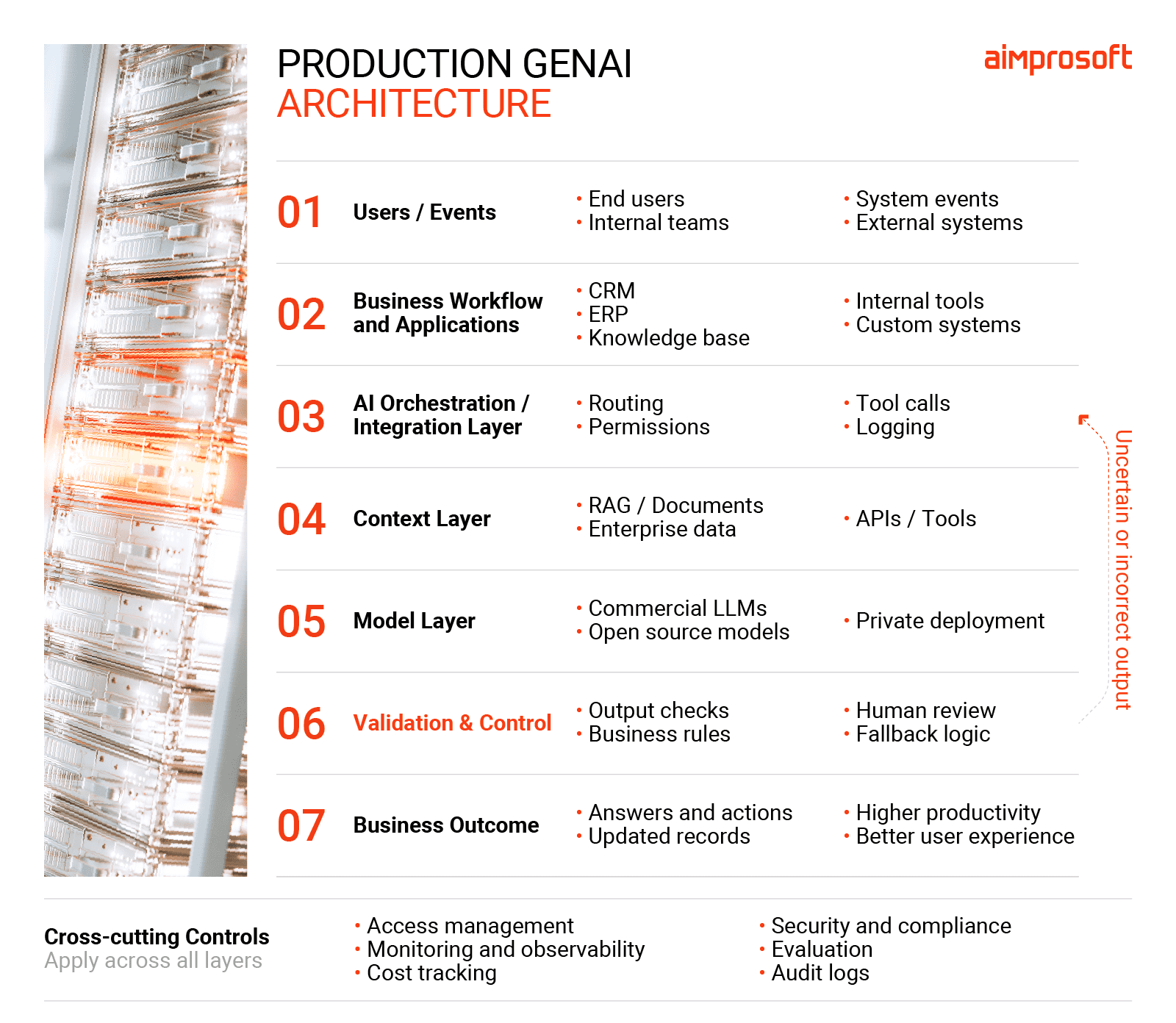
Each component serves its purpose, and the boundaries between them define how the system behaves as usage increases.
In our opening scenario, the leaked pricing wasn’t caused by one failure. Retrieval gave the model access to internal price lists, while the workflow sent the answer to customers with no check in between. And nothing in production flagged an unusual response.
That’s why architecture decisions depend on one another. If an AI workflow emails customers automatically, permissions and validation have to be stricter than for an assistant whose answers an employee reads first.
Some decisions are also harder to reverse than others. Changing permissions and integration boundaries can take months, while adding a fallback model or monitoring alert is less disruptive than changing access controls. Resolve the make-or-break architectural choices as early as possible, so you don’t fix risk flaws mid-build. As our delivery managers often tell clients, problems rarely appear because of unpredicted risks, but from risks nobody discussed in time.
Below, we break down the six decisions that shape the architecture of an LLM integration, what each one costs you, and what goes wrong if you leave them until production.
Decide how AI participates in the business workflow
You have three options:
Synchronous
A user or system sends a request and waits for the answer in the same call.
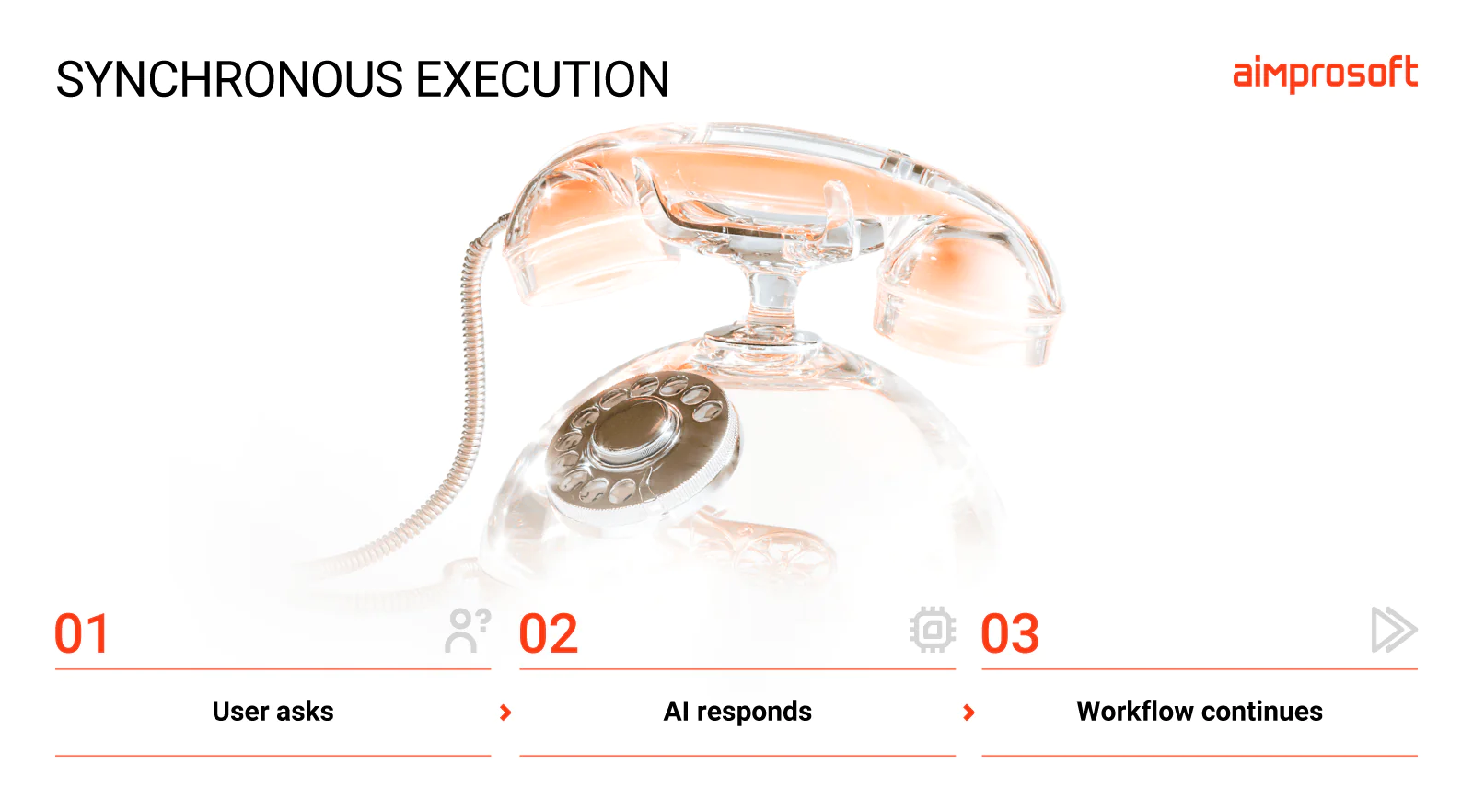
Synchronous execution makes sense when a user needs an answer right away to continue with the task at hand. For example, a request like “Summarize this claim” is a typical synchronous example.
Benefits: The workflow gets results immediately, with no background jobs or task states to manage, so the execution path stays easy to trace and debug.
Drawbacks: Any delay or downtime in your AI API integration may block the calling application, and under heavy load, waiting requests tie up server resources.
Often fits: assistants, search, classification, summarization, recommendations
Asynchronous
An event triggers a background worker via a message queue (e.g., RabbitMQ, Apache Kafka, or AWS SQS), processing the task independently from the calling application.
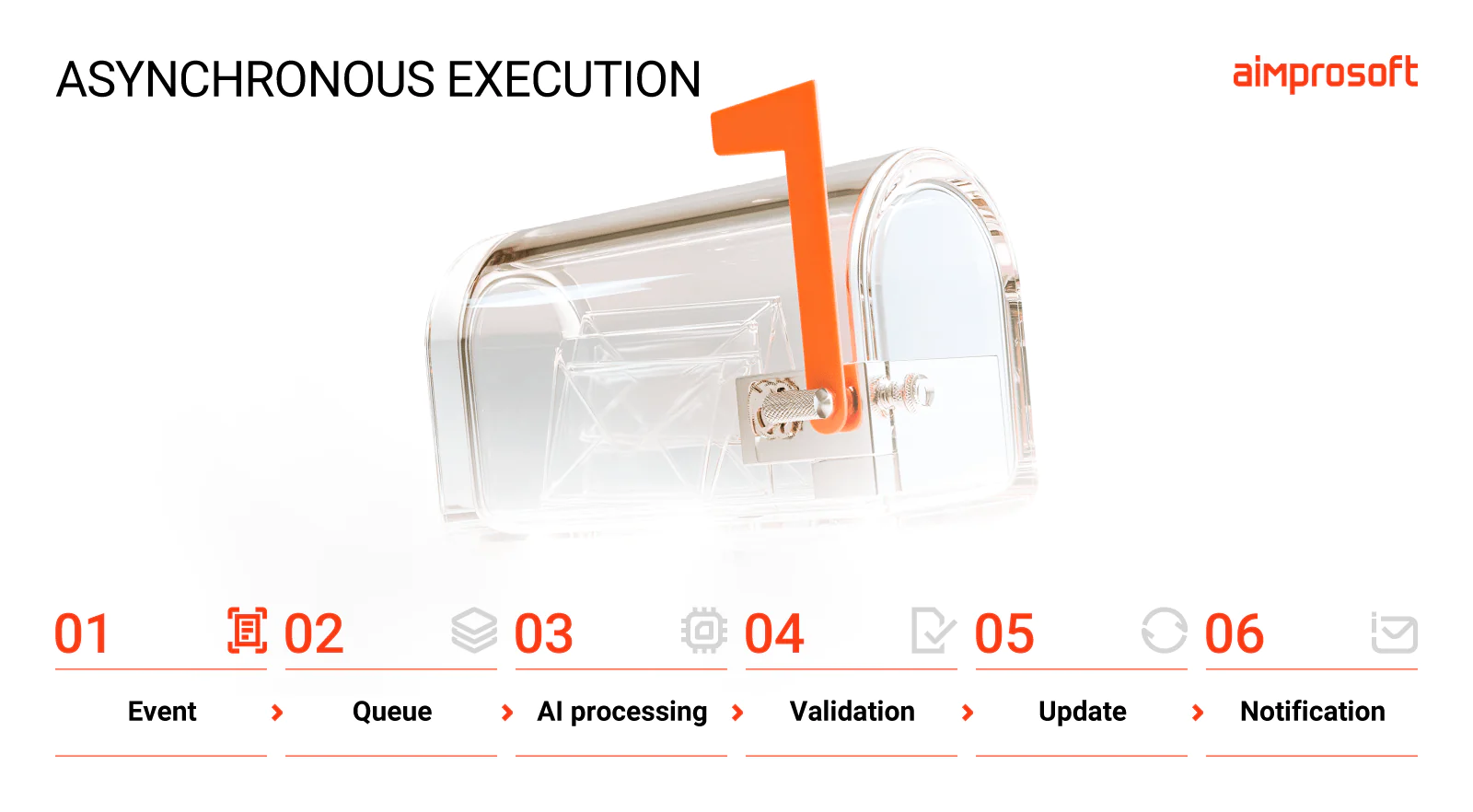
When you need to process all the incoming claims and route them to the appropriate claims management system, a synchronous request quickly hits limits. Claims may arrive non-stop, pass through several different systems, and require human approval on top. This is the classic case for async processing.
Benefits: Background queues decouple processing from the user interaction and help absorb sudden traffic spikes, so users don’t wait on execution failures or retries.
Drawbacks: You need to track each task’s status (queued, running, completed, failed, etc.), which adds development and maintenance costs. Retries need care too. If repeating an API call risks creating duplicate records or actions, idempotency becomes part of the architecture.
Often fits: document processing, workflow automation, background enrichment
We used this approach in the Motive Retail platform. To handle rising request volumes, we added asynchronous processing with AWS SQS and offloaded XML validation into a standalone service. Thus, we prevented heavy, long-running requests from bottlenecking the broader workflow.
Hybrid
A user gets a quick synchronous response, while the heavier work runs in the background.
A hybrid flow splits an operation between synchronous UI feedback and asynchronous processing. For example, a user uploads a 50-page PDF contract to a legal AI tool inside a CRM for risk assessment. The UI confirms receipt and shows the processing status. Under the hood, worker services analyze the documents and write the findings to the database, notifying the user when the task is finished.
Benefits: Instant feedback for the user
Drawbacks: Two execution paths to maintain, and the UI status must stay in sync with background processes.
Often fits: document analysis, report generation, assistants that trigger actions.
Practical rule
List every step that follows the model’s response: who reads the output, which systems it updates, who receives notifications, etc. Choose synchronous or asynchronous processing based on whether the user needs an immediate response. For hard-to-reverse actions, add authorization checks, output validation, duplicate-execution protection, and a recovery plan to stop AI errors from spreading.
Decide how the model gets context
Every generative AI integration solution needs a way to supply your business context to a model to reduce unsupported answers. Let’s look at the variants and how they affect the system’s ability to access the information it needs.
| Mechanism | Role in context provision | Freshness | Upkeep | Trade-off |
| Prompt & context engineering | Instructions, rules, short examples | Updated with each release | Low, but prompts need versioning | Limited by context size and manual upkeep |
| Retrieval-augmented generation (RAG) | Unstructured data (knowledge bases, PDFs) | As fresh as index cadence | Medium: docs must stay clean, current, and permission-tagged | Requires a maintained data pipeline and retrieval layer |
| Tool calls (often connected via MCP) | Structured records and actions in your systems (CRM, ERP, etc.) | Real time | Medium to high: each tool needs auth and error handling. MCP standardizes connections, not the access rules | Adds API dependencies, latency, and failure points |
| Fine-tuning | Internal domain style, formatting, or specialized weights | Static until retrained | High: retraining tied to one base model | Low freshness for factual knowledge and higher maintenance effort |
When assessing context mechanisms, pay attention to the data type and how often it changes. Company policies updated every few months or reports are good candidates for RAG implementation. But duplicates like three versions of the same policy are only the visible part of the problem.
Alexandr Machnev, our Head or R&D, points out that answer quality often suffers when AI encounters gaps that employees have learned to work around without noticing them. People know how things really work, even when that knowledge was never documented. AI doesn’t have that context unless you provide it. Our step-by-step guide to preparing data for RAG reviews how to find and fix them.
You may wonder why not just skip retrieval and paste all your documents into a long context window.
Because longer prompts with raw documents quickly balloon your spend and slow system performance. RAG retrieves only the relevant few passages, helping control both.
Tool calls suit structured data like CRM records or transaction details when you need to fetch up-to-the-second information about a customer’s account balance or to track an order.
You can also combine these mechanisms. For example, a support assistant might use prompts for tone and escalation rules, custom RAG for policy documents, and tool calls to check order status.
Practical rule
Whatever combination you choose, your context layer should strictly respect user identity and permissions to avoid exposing sensitive data to the wrong users.
Decide how much control you need over the model layer
Many AI integration failures result from unclear ownership, so first determine who maintains the system, then pick a model setup.
Managed APIs: the fastest way to start
Most projects begin with commercial models accessed through APIs, and for good reason. You get the latest models available, pay only for tokens you use, and bypass infrastructure setup entirely. For a new LLM integration when you don’t know the volume yet, that’s hard to beat.
But convenience comes with dependencies. Such things as rate limits, pricing, and model versions are up to the provider. Data processing requirements can also complicate the setup, especially when regulations dictate where your data can go.
Managed services like AWS Bedrock offer a middle ground: access to commercial models and extra data security guarantees. We use Bedrock on one project and have had a good experience. Still, some highly regulated industries can’t accept the remaining risk of using externally hosted models despite lower cost and easier setup.
Self-hosted models: when data can’t leave your infrastructure
When internal company policy or industry regulations restrict sharing data with external providers, open-weight models like Llama or Mistral offer an alternative. With private LLM development, you can run models on your infrastructure and apply internal security controls. With self-hosting, data stay within infrastructure you control, as long as the architecture and its integrations are set up that way. You also decide when to update or fine-tune them.
The downside is cost and upkeep. Even a mid-sized model with 13 billion parameters needs at least one GPU with 24 GB of memory, ideally two, plus an MLOps engineer to manage scaling, updates, and monitoring. For narrow tasks, a smaller specialized model often does the job at a fraction of the cost.
Multi-model: the right model for each task
Using one model for every task can be expensive and inefficient. A multi-model setup routes each request to the most suitable model based on several parameters, including task complexity, latency, cost, and data sensitivity.
An orchestration layer separates your app from individual models. It takes care of routing, retry mechanisms, fallback pathways, and vendor-specific formatting, outside your main code. It lets you test alternatives, switch GPT-4 for Llama, or use cheaper specialized small language models (SMLs). Sure, multiple models need more coordination and testing work.
Since nobody can say where models and AI regulation will be in 18 months, keeping the stack model-agnostic is a viable AI business strategy. This allows you to change providers when the economics or performance no longer meets your requirements.
Practical rule
Choose the simplest model setup that meets your privacy, quality, latency, and cost requirements. For business-critical AI implementation, build an orchestration layer so you can change or combine models without rebuilding the whole app. However, each change still requires compatibility checks and evaluation.
Decide what the AI is allowed to access
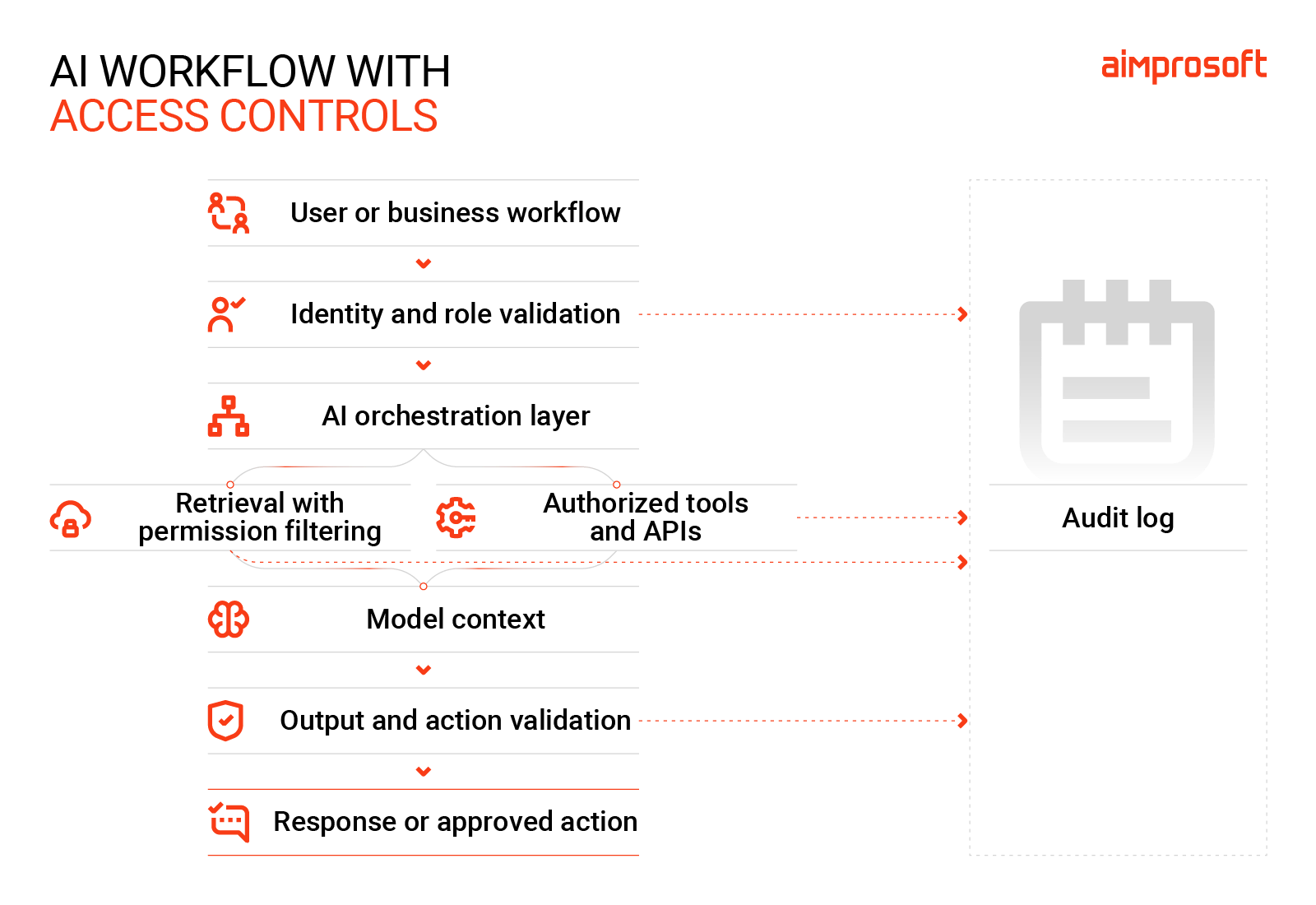
To avoid the risk of confidential information being exposed to unauthorized users, especially in enterprise AI integration projects designed to scale, don’t leave permission checks to the model. Set clear boundaries for what AI can retrieve and act on.
Separate identity from capability
Architecturally, you can handle identity in two ways:
- User identity. The system carries the requesting user’s identity and permissions when retrieving information or calling a tool. It can access what the user has rights to see and do.
- Service identity. A dedicated service account simplifies integration, but should have only permissions the workflow needs. You can use a shared account for simple integrations, yet it’s a gap you’ll need to close anyway before scaling.
Misconfigured permissions pose the biggest risk no matter which identity model you choose. The mistake can sit at the user level or the service level.
In either case, you need a way to apply those permissions. Role-based access control (RBAC) lets you assign who can access what. Retrieval filters and tool-level permissions then enforce the defined rules across data access and actions.
Control what happens next
Let’s take a CRM-connected support assistant answering order inquiries. It needs only order status information, not every contact detail or internal pricing. If retrieval uses a broad service account, the model could share restricted information with the wrong user.
The same principle applies to agents that can take actions. But reading a customer record and issuing a refund are on different risk spectra. The more costly or difficult an action is to reverse, the stronger its authorization requirements should be.
Data boundaries and audit logs
Mask personal data before it enters prompts, especially with external APIs. Output filtering helps catch sensitive information and prevent it from reaching users. But by no means is it a substitute for access controls. It’s also important to decide which data can leave your infrastructure and which needs a private model.
Then log requests, retrieved documents, tool calls, and produced outputs. They help you investigate incidents and comply with regulatory standards.
Practical rule
Before indexing documents or granting tool access, interview people who run the process daily to spot where the real workflow differs from the documented one. Steps that “just work somehow” in that workflow usually hide access misconfigurations. For a safe integration of generative AI, give only permissions each task needs and keep approval for write actions until testing confirms they’re safe to automate.
Planning to connect AI to your CRM and ERP?
Decide what happens when the model is wrong
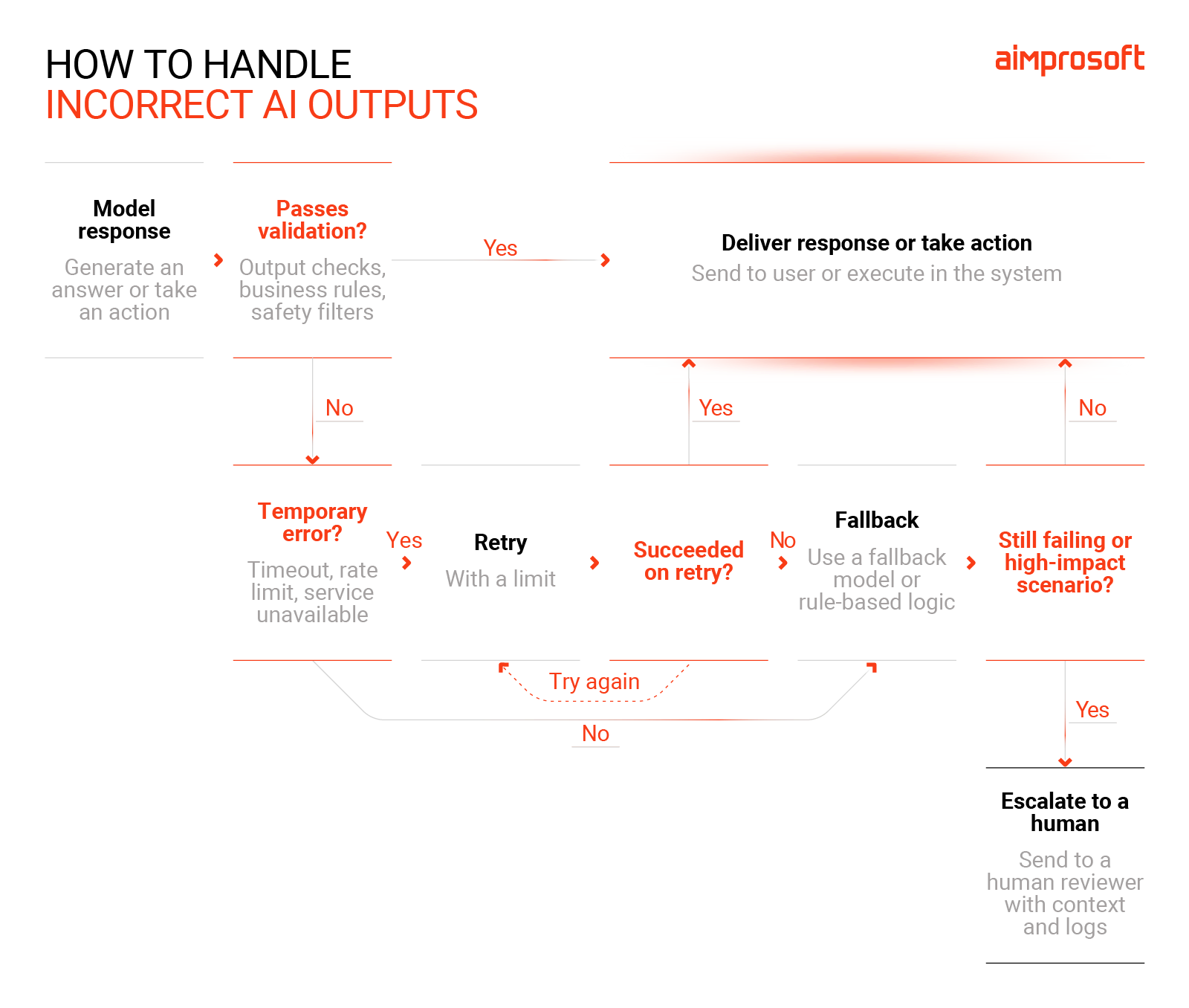
Your model will be wrong sometimes. It will time out or return broken data. You can’t prevent every error, but you can control whether it’s a non-event caught at the validation layer or an incident that affects your business. To do that, your team should design a recovery path for the most common failures.
Specify how to handle uncertain responses
Orient on the severity of a mistake. For drafting product descriptions, retrying a failed request or switching to a fallback model may work out well. If AI deals with financial transactions or influences decisions that affect customers, verify that the response is in line with business rules.
Consider an AI system that correctly formats a refund request but recommends an amount above the permitted limits. A deterministic check should block the request and send it to a human for review. If the model repeatedly returns invalid outputs, stop retrying and escalate the case.
Build a recovery path into the workflow
Retry requests only when the problem is likely to be temporary (e.g., timeout or rate limit) and set a limit on attempts to keep latency and expenses under control. If the main model is down, switch to a fallback model or rule-based logic to keep the workflow running. But any fallback outputs need to pass the same validation checks. When deciding how to integrate AI into a website, for example, provide conventional search or a contact form if AI search fails.
Know when to hand over
Define when AI must defer to a person, and make sure someone owns those decisions. Set escalation rules and test them against real cases. Where possible, build a way to reverse completed actions, and for irreversible actions introduce human approval before they run. Then simulate worst-case failures to make sure recovery works as needed.
Practical rule
Ask the workflow owner two questions: what does a wrong answer cost, and who takes over escalated cases? The first sets the threshold for human review; the second reveals the workload.
In our recent project, an internal HR assistant, the HR manager spends 30 minutes a week reviewing roughly 10 conversations. The bot helps 40-50 employees find information in an 800-page handbook. Since employees can always double-check answers with HR, the risk of wrong answers is low. So, the manager reviews responses weekly after the fact instead of approving each one.
The takeaway is that when evaluating generative AI implementation services, ask how the solution routes flagged answers and who will handle them as usage grows.
Decide how you’ll know the system still works
An AI feature can fail even if every dashboard shows green. The servers respond, latency looks fine, but the outputs continue to get worse. This leads to the need for regular evaluations of enterprise AI integration at different levels to learn about breakdowns earlier than users.
Set a baseline before launch
Build a test suite of realistic user prompts, including edge cases and unsafe requests. Specify what good outputs look like and turn them into rules. This includes setting acceptance criteria for quality, latency, cost per task, and safety. Thus, your team will have real proof of stability and a compass for future iterations.
Monitor what changes in production
Rerun your evaluation tests on a schedule and after model or provider updates to detect regressions. Pay attention to retrieval misses and user feedback, too. They can signal issues much earlier than your metrics do.
Don’t assume a newer model will automatically improve your generative AI integration. On one of our projects, we run the full validation set every time we consider a new model, comparing quality metrics and speed before switching. Most upgrades perform the same or better. But once, a newer version of a model we already used scored worse on our tests, so we stayed with the previous one.
To cover all the bases, distinguish between three types of monitoring to catch different kinds of problems.
| What it tracks | Why it’s important | |
| App monitoring | Uptime, latency, errors, tool failures, cost per request | Shows whether the system is available, responsive, and operating within budget |
| Model monitoring | Changes in output patterns, format errors, model and provider version changes | Helps identify changes in model behavior |
| AI evaluation | Accuracy on test cases, hallucination rate, retrieval misses, user feedback | Checks whether the system still meets your quality and task requirements |
Practical rule
In production, combine automated alerts with periodic expert review and user feedback. Assign an owner to investigate failures and decide when a change needs a fix, rollback, or further testing.
When to build AI in-house vs. work with an integration partner
Getting a prototype to work is one thing. Scaling it safely is a different discipline. Your team might be able to build the integration on their own, but can it do it well and on time, without putting the rest of the roadmap on hold?
1. Does your team have the right experience?
Building in-house is a good idea if:
- your engineers have taken AI to production before
- have experience with AI API integration
- know how to secure, run, and protect AI workflows end-to-end
If your team has only built prototypes, outside specialists can help you get to production without worrying about breaking something. If you already have, they can help with that too.
2. Does your team have the capacity?
If LLM integration would delay other commitments, or your deadline leaves no room for trial and error, an external partner can extend your team with the right skills to keep the project on track.
3. How much risk can you afford?
Mistakes get more expensive when your AI touches regulated data or performs customer-facing actions. In these cases, a generative AI integration company with relevant production experience can apply approaches tested on other projects. So you don’t discover security loopholes or duplicate calls through customer complaints or system logs.
If you consider outside support but have a lot of questions about what to expect and how to choose a partner, in our AI integration consulting guide you can find answers.
You don’t have to pick one approach. You can keep most development in-house and engage a technical partner to harden production or take on the riskiest parts of the implementation.
That’s how we worked with UBIDEX. We took the part they had no experience with: designing the test automation architecture, setting up a multi-agent AI workflow, and connecting automated smoke tests to their release pipeline. This let their team keep product development at the usual pace, and now they can add new tests themselves.
The key is to use outside expertise to get your AI solution to production faster and with fewer surprises, not to substitute the team that will own it after launch.
Already have a prototype? Let’s see what it needs for production.
FAQ
What is generative AI integration?
Generative AI integration connects large language models to your existing applications and workflows, so they can give responses or take actions based on your business context. Most of the work happens around the model itself. Because you need to design the way it ingests the data, accesses other systems, and the rest of the infrastructure behind the scenes.
How do you connect a generative AI model to an existing application?
We architect middleware integration layers that sit between the application and the model to avoid brittle pipelines and messy code dependencies. That layer pulls relevant business data via API, sends the requests to AI, double-checks the transfer for safety, and tracks costs and retry attempts along the way. In a production generative AI integration, this setup also lets you switch models through configuration only, not application rewriting.
How long does a generative AI integration project typically take?
A typical AI implementation takes two to four weeks for discovery and a working prototype, then two to four months to reach production. If the architecture requires heavy data cleanup or strict compliance standards, it can stretch generative AI integration to six months or longer. A short discovery is the fastest way to get a realistic estimate for your case.
What is LLM integration and how does it differ from GenAI integration?
LLM integration connects large language models to your application that can process multimodal inputs but generate text responses. GenAI integration is the broader term and can both process and produce audio, video, text, and images. It also comes with extra architecture work to store and serve large files, filter generated media, and check usage rights for what the model produces.