The Best Way to Move Data for RAG: A Strategic Migration Framework for Business and AI Leaders
Published: – Updated:


Data is the lifeblood of enterprises. Documents, procedures, tickets, reports, and internal guidelines shape daily work. Yet when decisions need to be made, teams often operate with incomplete or hard-to-access information, as critical content remains fragmented across different drives, tools, and legacy systems.
For years, companies have tried to reduce knowledge fragmentation and silos through centralized knowledge bases and governance practices. But teams change, information drifts, and old habits persist – people rely on tribal knowledge or outdated documents, even when better data technically exists.
The rise of AI has made this gap impossible to ignore. AI systems require high-quality, accessible data to perform effectively, but as IBM research states only 26% of organizations are confident, their data can support AI-enabled revenue streams. This reveals a core constraint: The problem isn’t a lack of information but access.
This is why many organizations are considering retrieval-augmented generation (RAG)— not to introduce yet another AI layer, but to unlock the value of their existing, fragmented knowledge.
It helps capture institutional knowledge before it walks out the door, keeps it current as systems evolve, and grounds AI systems in verified enterprise context. However, RAG’s success depends on one unyielding truth: How well teams prepare data for RAG matters more than model itself.
So, in this article, we walk through the best way to move data for RAG — from migrating structured and unstructured sources to avoiding common setup traps. At the end, we also provide a hands-on guide to help you evaluate the effectiveness of your retrieval layer.
Why are enterprises adopting RAG?
RAG is not just another AI chatbot. General-purpose LLMs have their limitations, including hallucinations, limited industry knowledge, and eventual degradation as their training data becomes outdated. In environments where accuracy and compliance matter, such uncontrolled AI outputs bring more risk than value. That is why more and more companies are turning to retrieval-augmented generation (RAG).
Instead of relying on off-the-shelf models trained on generic data, the retrieval layer allows organizations to ground LLM outputs in proprietary knowledge, such as internal documents and historical context. And by using this enterprise data for RAG, companies get better responses without having to retrain the model.
Industry data supports this shift. According to Databricks, 70% of companies using Gen AI augment base models with retrieval systems, vector databases, and supporting tooling, rather than deploying them as-is.
For a deeper dive into how RAG overcomes generative AI’s limitations in enterprise settings, read our full analysis.
As a result, RAG is increasingly adopted across regulated and knowledge-intensive industries such as financial services, healthcare, and legal. It helps them to reduce manual searches, ensure compliance, standardize responses across teams, turning it into not just yet another knowledge base but a decision-making tool.
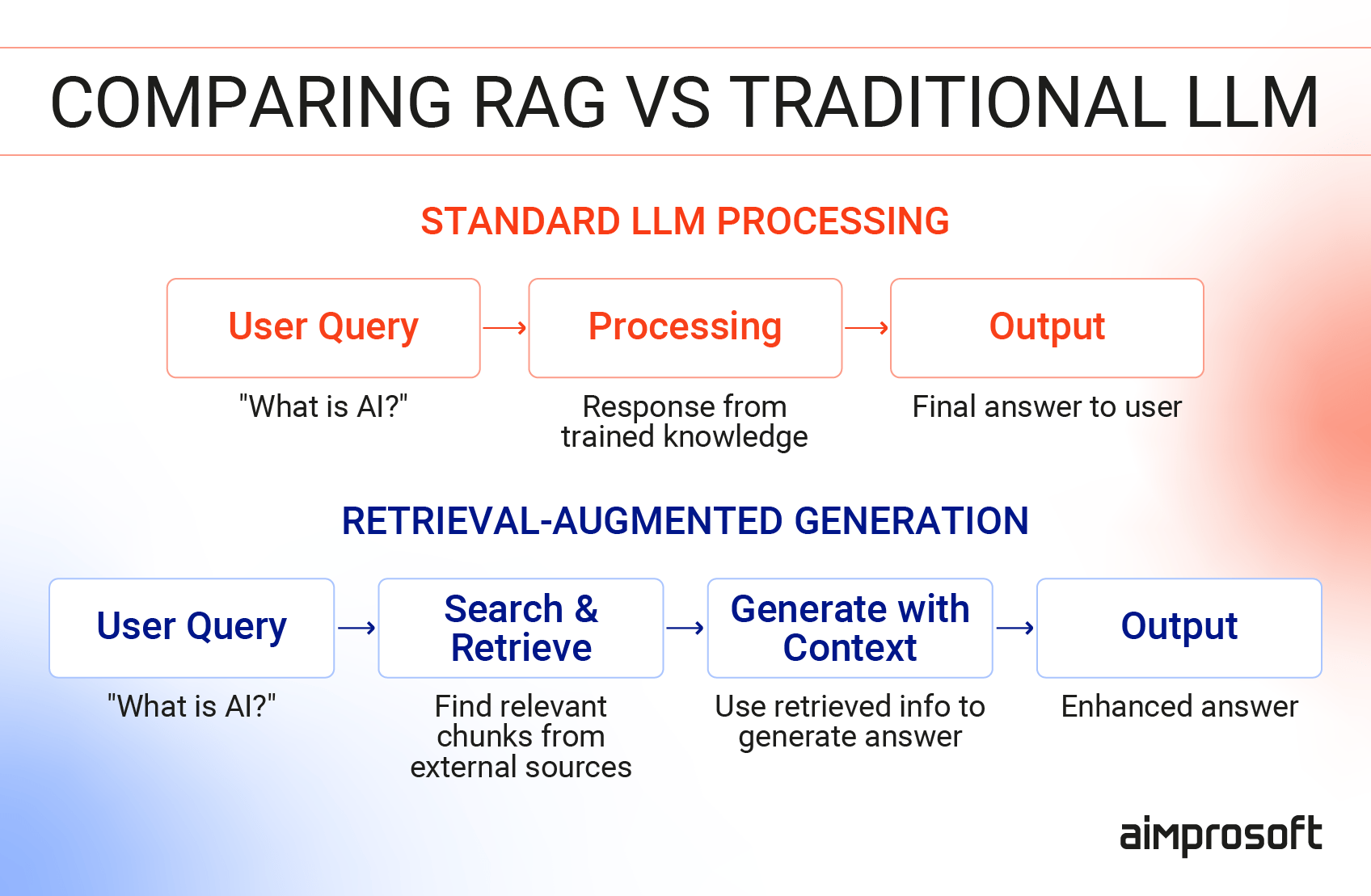
However, this same strength adds new complexity. As organizations move from experimentation to production, model choice no longer becomes a bottleneck. Instead, the key issue becomes how to prepare data for RAG.
This is where many initiatives slow down. The benefits of the retrieval layer are clear, but so are the risks. Without careful data preparation, governance, and cross-team alignment, it can amplify existing data problems rather than fix them.
The good news is that you can address these challenges before they derail your initiative.
A strategic framework for migrating enterprise data to RAG
At a high level, the RAG data pipeline works through four key layers:
- Knowledge sources (documents, databases, tickets, communications)
- Indexing (preparing, embedding, and storing content for retrieval)
- Retrieval (identifying the most relevant context for a query)
- Generation (crafting a response grounded in that context, with quality checks)
On top of these layers, there are access controls and governance policies, as without them, even the best system can become a liability.
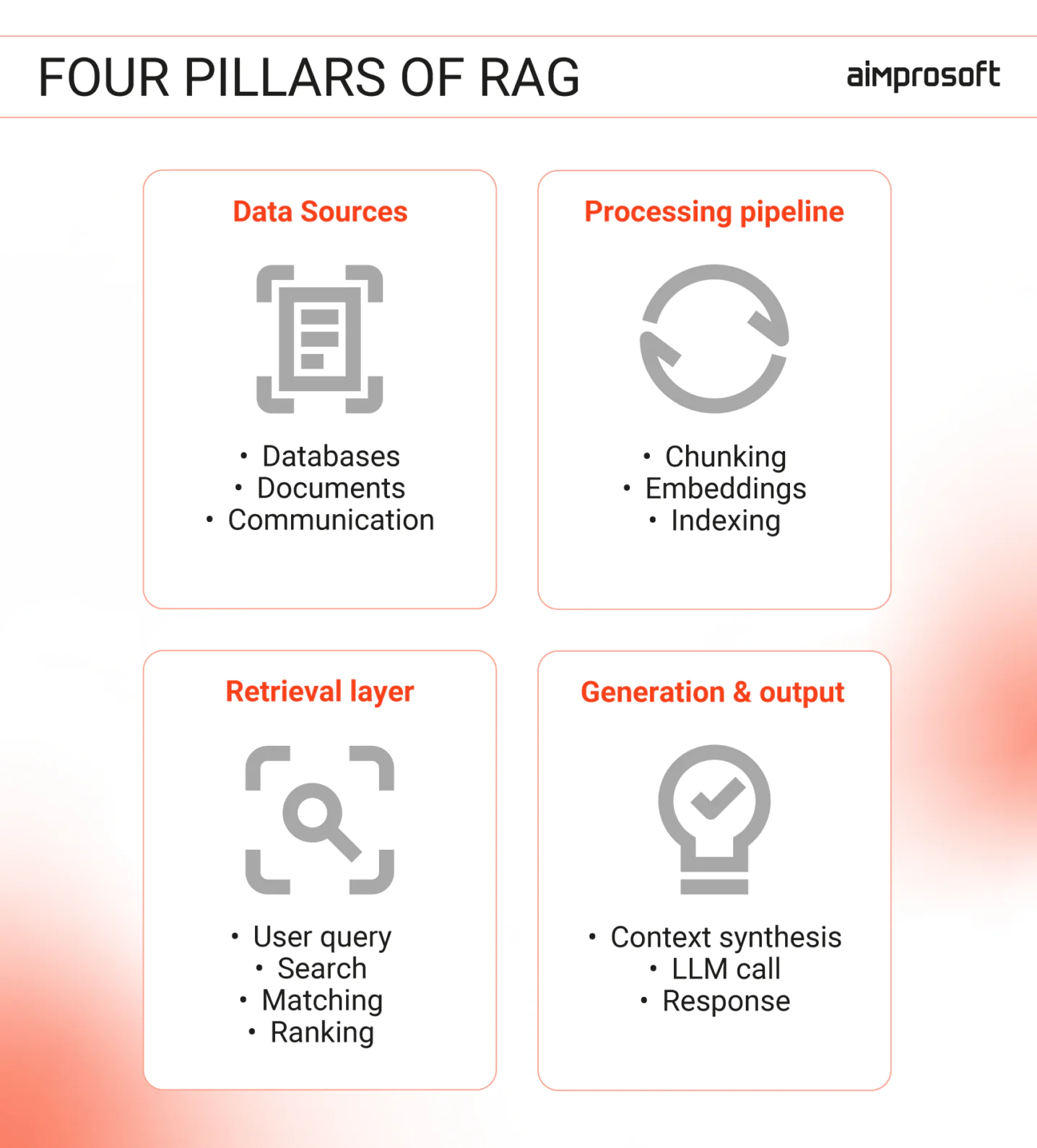
Most teams focus on embeddings and vector databases. Yet success depends on how the very data is prepared, governed, and moved across these layers. This is why RAG data migration isn’t a one-time ingestion task but an ongoing commitment.
To prevent your team from costly errors, we’ve prepared a framework our AI engineers follow when developing RAG solutions.
Step 1: Audit and classify data sources
Before designing retrieval logic, you need to decide what data will power the system and how to categorize it. This is the foundation of how you prepare data for RAG. A common pitfall here is assuming that all enterprise data — from structured databases to messy PDFs — can be indexed and retrieved in the same way. Well, it can’t.
1. Structured data (Systems of Record)
Where it lives: Databases, ERP platforms, CRMs (rows-and-columns data).
Challenge: LLMs struggle with raw rows and columns because they lack narrative context. For example, a “Status_ID: 04” means nothing to an AI without a text description. Plus, if you index raw tables, you might bypass the security layers built into the original app or expose data that users shouldn’t query directly.
Solution: RAG with structured data should expose read-only, descriptive fields (e.g., status explanations, metadata) and preserve access controls. If users can’t see it in the CRM, the retrieval layer shouldn’t either.
2. RAG unstructured and operational data
Where it lives: PDFs, wikis, Jira tickets, emails, Slack logs.
Challenge: RAG unstructured data is harder to govern than structured records, because anyone can edit a wiki or open a ticket. As a result, formats vary, and taxonomies drift over time. Which brings us to “knowledge rot” — outdated instructions or three different versions of the same process. What is worse, in such cases, sensitive details (e.g., passwords in chat logs, private ticket comments) often lurk unnoticed in the text.
Solution: Flag outdated content and define expiration rules. Assign ownership to keep information accurate. Use automated scans to remove duplicates and PII before embedding.
The best way to prepare data for RAG is not to ingest everything, but to review what belongs in the retrieval set. This step helps reduce hallucinations, embed governance, and make RAG viable in production.
Step 2: Define retrieval objectives before designing the system
Retrieval systems are not general-purpose search engines, they’re built for specific workflows. And how people will actually use this system affects its architecture. Use case determines what RAG data sources get indexed, how retrieval is structured, and whether the system optimizes for speed or precision.
In our work with RAG development for enterprises, we see many organizations skip this step and end up with technically sound systems that fail in real-world use. Before you start building, choose one of the three retrieval modes that your workflow needs.
1. Search and reference lookup
Goal: Find the right document, section, or record (e.g., “Where is the file?”). This mode focuses on orientation and traceability, not answer generation.
Pitfalls:
- An overreliance on semantic similarity can show content that looks relevant but links users to the wrong document or section.
- Chunking data for RAG without their source context makes it hard to trace results back to the correct document, policy, or record.
- Missing metadata, such as recency or authority, can put outdated drafts to rank above approved versions.
What to prioritize:
- Strong metadata preservation (source, version, owner)
- Ranking that favors authoritative and current content
- Clear links back to the original document
2. Question answering with grounded responses
Goal: Provide direct, fact-based answers (e.g., “What’s the compliance rule for X?”, “What is the required approval step?”).
Pitfalls:
- Retrieving only part of a policy can result in answers that sound correct but miss critical conditions or exceptions.
- If documentation is incomplete, the model may answer based on general knowledge rather than your organization’s actual rules.
What to prioritize:
- Precise context selection over broad recall
- Clear citation of source material
- The ability to decline or defer when information is missing or ambiguous
3. Summarization and synthesis
Goal: Identify patterns or themes across multiple sources (e.g., “What were the top support issues last month?”, “What risks appeared most often in audits?”).
Pitfalls:
- “Version contamination” when AI blends old and new data into a single summary, leading to incorrect conclusions.
- Loss of traceability leaves users without a clear way to check sources or validate results.
What to prioritize:
- Strict source filtering and time boundaries (time, relevance, version)
- Make aggregation logic transparent
- Clearly label outputs as syntheses, not single-source truths
RAG in production succeeds when the retrieval mode matches the workflow. Misalignment leads to frustration, inaccurate outputs, and wasted effort (even when the underlying system is technically sound).
Step 3: Choose RAG stack components
Technology choices carry hidden assumptions about your data, scale, and security. Most teams fail here by evaluating components in isolation. Meaning picking the “fastest” database or the “smartest” model, without realizing how these choices constrain each other.
The goal is to build a cohesive RAG data pipeline where every part supports the final workflow, not the other way around.
1. Embeddings: Quality vs. Control
Embeddings turn text into numerical “coordinates” based on concepts rather than keywords. This lets a search for “yearly earnings” find “annual revenue” because they’re conceptually linked. The choice of embedding model usually comes down to two competing priorities:
Cloud-based:
- Pros: Superior “conceptual maps,” always up-to-date
- Cons: Data leaves your environment (can be a dealbreaker for regulated industries)
Local/On-Premises:
- Pros: Full data residency, no third-party exposure
- Cons: May require extra tuning for precision; needs your own computing resources
Ensure early on if data sensitivity or retrieval quality is your binding constraint. Teams often choose cloud models for convenience and discover mid-deployment that governance policies block this approach entirely.
2. Vector Databases: Scale and integration
Vector databases store embeddings and enable similarity search. The choice depends on query volume, concurrency (parallel requests), and whether you need advanced filtering.
- Lightweight/Local (e.g., FAISS): Excellent for proofs-of-concept or small, single-user tools. They are fast to set up but difficult to scale or manage across a whole company.
- Enterprise/Distributed (e.g., pgvector, Dedicated Stores): These handle thousands of users and support complex “filtering”, such as searching only for documents from the HR department written in 2024.
Don’t just pick the “fastest” database. Pick the one that integrates with your existing security and audit logs. If you need production-grade access controls, you need a distributed system from day one.
3. Chunking: Matching strategy to content
Chunking determines what the retrieval layer can surface and how much context the model sees. Different content types need different chunking strategies for RAG.
Differences matter, as poor data chunking leads to fragmented answers, missed dependencies, or instructions taken out of sequence.
- Semantic chunking (reports, articles, meeting notes): Groups content by meaning, which works well for narrative or analytical text.
- Structural chunking (manuals, SOPs, procedural guides): Preserves steps, headers, and ordering so instructions aren’t scrambled.
- Hybrid approach (contracts by clause, manuals by procedure): Applies different logic based on document type to avoid breaking legal or technical context.
For example, when working with RAG with structured data, like ERP exports or CRM records, the best working solution here is to preserve relationships between fields rather than treat each value as isolated text. But if you work with scanned PDFs, the quality of text extraction (OCR) sets the ceiling. When extraction is noisy, no amount of tuning will fix retrieval, because chunking data for RAG is only as effective as the underlying text.
Avoid blind automation when chunking. Customize the logic so the system retrieves a complete thought, not a fragmented sentence.
4. Retrieval enhancement: Precision and safety
The first “search” is rarely perfect. Your system might surface 20 potentially relevant documents, but only 3 actually answer the question. This is why reranking becomes essential at this stage. It re-scores candidates using signals beyond semantic similarity, such as metadata, recency, user roles, or domain-specific rules.
As a result, it pushes the most useful documents to the top before they’re passed to the LLM.
To improve both precision and safety, production RAG systems typically add three controls on top of basic retrieval:
- Reranking: Re-score retrieved results using metadata, recency, user role, or domain rules — not semantic similarity alone.
- Confidence thresholds: Allow the system to respond with “I don’t know” when retrieved context is weak or inconclusive.
- Domain filters: Block entire classes of questions before generation (e.g., medical advice, investment guidance).
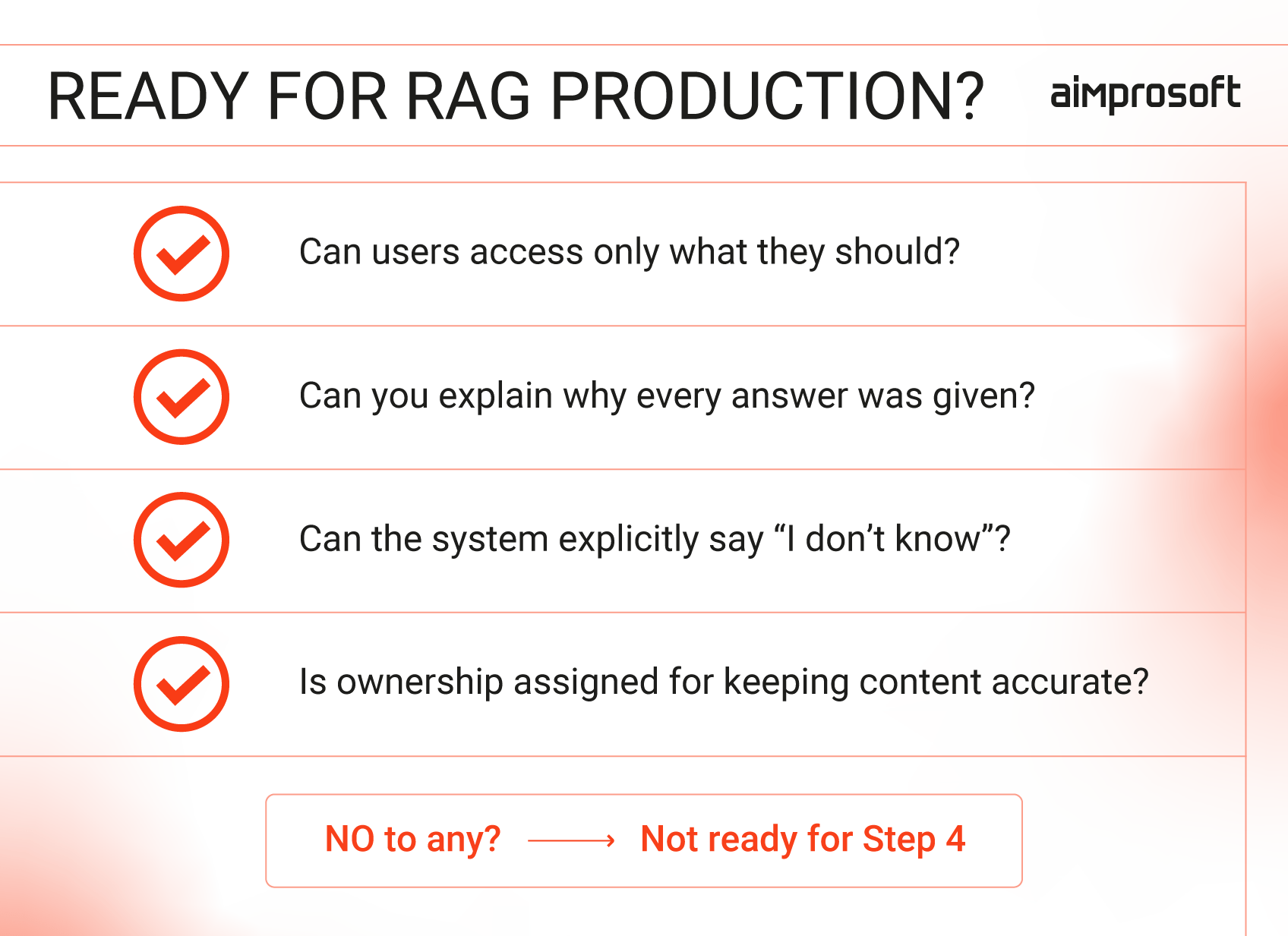
The technical implementation varies, but the principle doesn’t: If your RAG system can’t say “I don’t know” or “That’s outside my scope,” it’s not ready for production.
Step 4: Governance and operational readiness
RAG systems rarely fail at the demo stage. They fail in production, when permissions are inconsistent, audits begin, and users expect correct answers every time. At this point, governance and operational ownership determine whether RAG remains useful or becomes a risk.
- Retrieval-level security: RAG data security must be enforced during search. If a user can’t see a document in the source system, the RAG system must not “see” it either. Every answer must be traceable to a specific document and version for auditability.
- Knowledge lifecycle ownership: Systems decay as content dates. You need clear ownership to remove obsolete files from your retrieval-augmented generation data sources and monitor “I don’t know” signals, which often point to gaps in documentation rather than model failure.
- Explicit compliance boundaries: Domain filters are mandatory governance controls, not just “nice-to-have” features. In regulated fields, the system must be hard-coded to refuse specific classes of questions (e.g., medical or legal advice).
Security and data residency must be verified end-to-end in your RAG architecture for deployment. If you cannot explain why the system produced an answer, it will not pass a professional governance review.
Wrapping up
When we talk about preparing data for RAG, it’s not about moving documents into a vector database. It’s about deciding what data will be used, who will use it, how, who will have access to it, and who will keep it up to date. Not a one-time thing for sure.
But with this article, we hope to do the heavy lifting for you. To keep your future system in check, we also prepared a small guide you can use to verify your retrieval layer. Because documents change, policies update, and new people join, testing your retrieval pipeline for liability.
With this guide, you can always check your team and system. And if you need additional help or consultation from our experts, just pick any suitable time and date.