

How to Manage a Dedicated Development Team Across Time Zones
Published: – Updated:

When teams are spread across several time zones, even simple tasks like reviewing a pull request or aligning on sprint goals can take days. Messages get buried overnight, meetings eat into someone’s evening, and the sense of working “together” slowly fades. Many founders and product managers may see this as the price of working with offshore teams. In reality, it’s a sign of weak structure, not geography.
At Aimprosoft, we’ve managed distributed teams across projects since 2005, working with partners in different time zones, including the US, EU, Canada, and others. Over the years, we’ve seen that distributed work doesn’t have to slow delivery or hurt collaboration. The difference lies in how processes are built, not where people sit. With the right overlap strategy, like async standups and decision frameworks, and strong documentation practices, distributed cooperation can maintain the same release predictability as co-located teams.
This guide covers our practical experience managing dispersed teams for startups and enterprises worldwide. You’ll find how to manage a dedicated development team structure, optimize workflows, and maintain focus when your team members start and end their workdays on opposite sides of the map.
Time zone challenges in global software teams
Time zones do not cause the same problems for every company. The pain looks very different when you are a 5-person startup with a small dedicated team and when you are an enterprise managing dispersed teams and internal departments. Recent research on globally distributed teams finds that coordinating work across time zones remains one of the most pressing challenges for remote-first organizations, impacting productivity, communication, and work-life balance.
According to this research, the results from 150 remote-first companies show that limited overlap, dependency on real-time collaboration, and communication barriers are persistent pain points. The way these challenges show up in day-to-day work depends a lot on your company’s size and maturity.
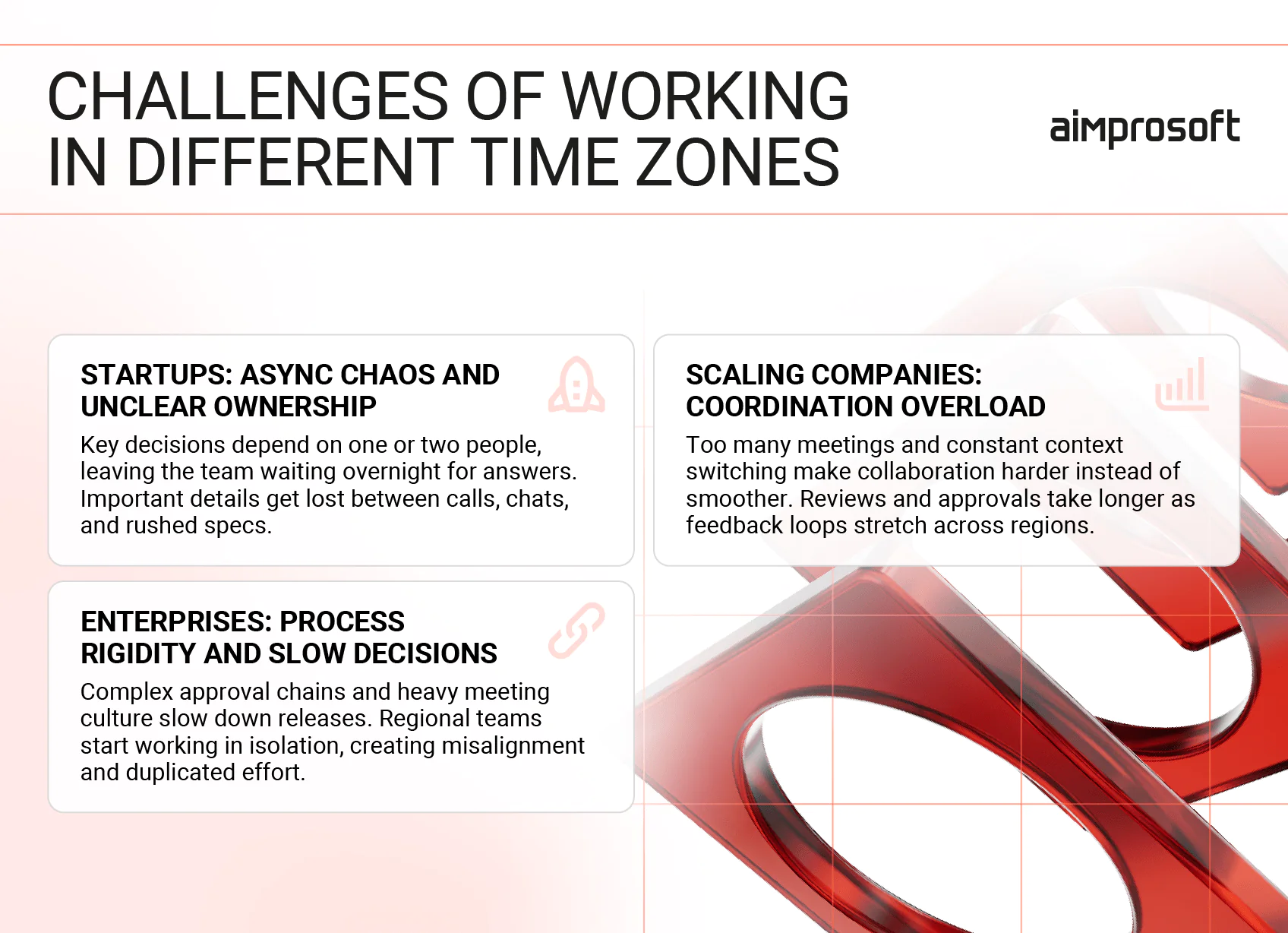
Challenges of working in different time zones
Early-stage startups: async chaos and unclear ownership
Founders often bring in a dedicated team when they already feel behind. With just a few people on the product side, everything goes through one or two decision-makers. Once time zones are added, this creates a few predictable problems:
- Questions waiting overnight because only the founder can make a call
- Decisions get buried in chats or calls with no written trace
- Features start on weak specs because the team cannot get timely clarification
- Standups drift into long status calls because there is no other forum to align
The result is a feeling that offshore work is slow and unpredictable, when in reality the team is operating without clear ownership, expectations, or async habits.
Growing SMBs and scaling product companies: coordination overhead
Mid-sized companies usually have more structure. There is a product manager, sometimes a tech lead, and a QA lead on the client side. That solves the ownership problem but creates coordination overhead:
- Too many standing meetings to keep everyone “aligned”
- Someone on the client or vendor side always joins calls early in the morning or late at night
- Time zone handoffs look good on paper, but fail because context is missing
- Slack or Teams channels host important decisions that never make it into tickets
This is the stage where you start to notice delays caused by time zones: small blockers turn into 24-hour delays, and sprints slip because decisions and reviews bounce between regions.
Enterprises: process rigidity and slow decisions
Large organizations often have the opposite problem. They usually know how to work with vendors and distributed teams, have formal processes, and a defined toolset. Time zones become painful in other ways:
- Long approval chains for changes and releases stretch further with non-overlapping hours
- Strict security or compliance workflows require several regions to sign off
- Local “sub-teams” optimize for their own time zone and diverge from the shared roadmap
- Heavy meeting culture does not translate well when teams span continents
Here, the risk is that work gets stuck in the process rather than in implementation, and teams quietly build parallel, unofficial workflows to get things done faster.
These challenges evolve as your company grows. Hence, the goal is not to avoid time zone differences but to manage them through clear structure, the right tools, and a delivery culture that treats async work as the default rather than a fallback.
Remote team structure: choosing your overlap model
Before choosing tools for managing a software development team, it’s important to define how the workday is structured across regions. The real impact on productivity comes from how teams plan overlaps and organize roles around those time differences.
Below are the main overlap models we use in real projects. Each works well if you’re honest about its tradeoffs and pick the one that fits your product stage and geography.
Shared core hours
This is the simplest and most common setup. The team agrees on 2–4 hours of overlap when everyone is online for planning, standups, and decisions. Outside that window, people work independently and treat communication as async by default.
When it works
- The time difference is up to 7–8 hours.
- You need regular discussions, but not constant live collaboration.
Typical risks
- The same people always handle the early-morning or late-evening calls.
- Core hours slowly fill with meetings, leaving little time for deep work. Many teams solve this by rotating meeting times or limiting which events must be live.
Follow-the-sun model
In a follow-the-sun model, work moves between regions as each office ends its day and another one starts. The goal is near-continuous progress while everyone still works their normal local hours. This approach is common in support and operations and can be adapted for development and testing when speed is critical.
When it works
- You have teams in at least two very different time zones.
- Tasks can be clearly documented, handed over, and picked up without long discussions.
Typical risks
- Poor handoffs create rework or conflicting changes.
- Nobody feels fully responsible for a feature if responsibility shifts too often. For development teams, this model usually needs strict handoff routines and solid documentation, otherwise the apparent 24-hour progress turns into slow correction loops.
Split by function or stream
Another option is to keep related roles in the same or similar time zone and connect them to other groups through planned overlaps. For example, product and UX stay close to business stakeholders while development and QA work from another region, or each feature team is mostly co-located with only a few cross-time zone dependencies.
When it works
- You want quick decisions between product and business.
- You need developers and QA to have long shared blocks of time.
Typical risks
- Cross-functional tasks wait for the next overlap window.
- Informal discussions stay inside local groups and never reach the rest of the team.
Anchor team with flexible overlap windows
Some companies pick an anchor team that has partial overlap with all other locations. Instead of strict core hours, they use flexible windows: people choose earlier or later start times so that every region has at least a couple of shared hours with the anchor.
When it works
- You work across three or more time zones, and full team overlap is unrealistic.
- The anchor team has clear ownership of the roadmap and can coordinate decisions.
Typical risks
- The anchor team becomes a bottleneck if priorities or questions always wait for them.
- Team members in non-anchor zones feel like second-class participants because key decisions happen when they’re offline, and they’re left reacting to outcomes rather than shaping them.
The best way to manage a remote team is to establish the right structure during onboarding. Once the structure is in place, the next step is choosing the right tools to support async communication, documentation, and knowledge sharing across those time zones.
Best tools for managing a remote development team
Working across time zones changes how teams rely on tools. When colleagues do not share the same working hours, software becomes how work gets done. Tools to manage a remote team carry decisions forward, preserve context, and make progress visible long after someone has logged off. The most effective stacks are not large or complex. They’re minimal and purpose-built. Each category serves a specific purpose in keeping work moving without constant synchronization.
What follows are the core tools for managing a development team. Each tool category addresses a different gap created by limited overlap and helps teams maintain clarity, accountability, and continuity.
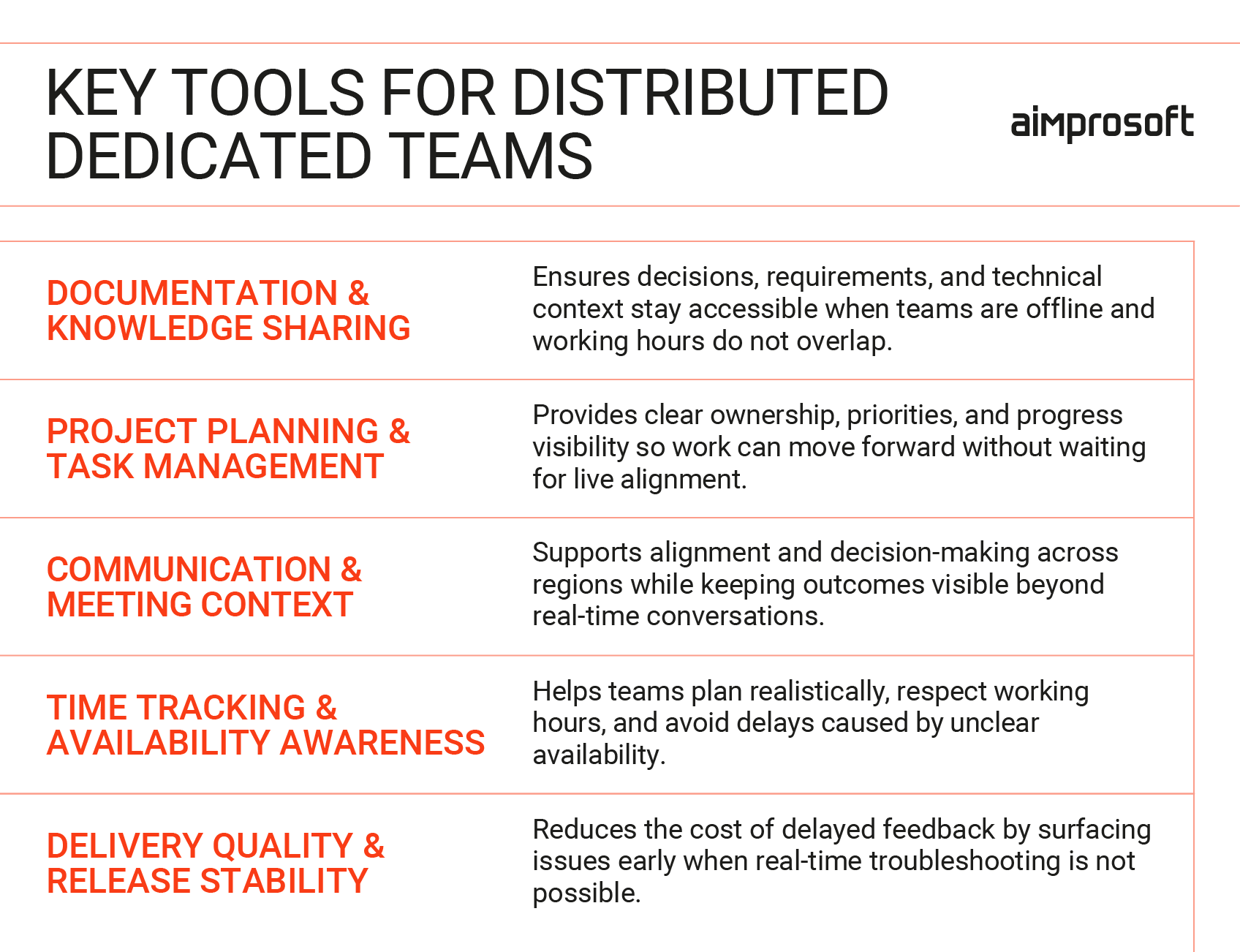
Tools to manage dedicated teams
Documentation and knowledge sharing
When you manage a distributed team, documentation replaces memory. When decisions live only in meetings or private chats, time zone gaps quickly turn into blockers. A shared knowledge base gives every team member access to the same context, regardless of when they work.
Strong documentation tools support structured writing, easy navigation, and long-term maintenance. They are used for product requirements, technical decisions, onboarding materials, and post-release notes. Over time, they become the backbone of async collaboration.
| Tool | Key features | Pros | Cons | Primary use case |
|---|---|---|---|---|
| Notion | Structured pages, databases, AI-assisted drafting, comments | Flexible for evolving specs and early ideas, easy for mixed tech and non-tech teams | Needs conventions to stay organized as content grows | Product requirements, planning docs, internal knowledge |
| Confluence | Page hierarchies, permissions, and integrations with Jira | Strong structure for large teams, clear ownership, and access control | Manual updates required; Steep learning curve and slow interface for small teams | Centralized documentation in growing or enterprise teams |
| Mintlify | Automatic docs generation from code, developer-first format | Keeps documentation aligned with code changes with minimal effort | Only covers code documentation, not business logic or workflows | Developer-facing technical documentation |
| DocuWriter.ai | Codebase analysis, API and dependency mapping | Automatically maps the structure and dependencies of legacy codebases without manual code exploration | Business intent still needs manual explanation | Undocumented or complex legacy systems |
Project planning and task management
Remote team management tools for planning give distributed teams a shared understanding of priorities and ownership. They answer basic questions without meetings: what is being built, who owns it, and what comes next. In cross-time-zone setups, this clarity prevents delays caused by waiting for confirmation.
Effective team workload management tools balance structure with flexibility. This type of software to manage team tasks supports sprint planning, backlog refinement, and progress tracking while remaining readable for non-technical stakeholders.
| Tool | Key features | Pros | Cans | Primary use case |
|---|---|---|---|---|
| Jira | Backlogs, sprints, roadmaps, dependency tracking | Handles complex workflows and long-term planning across teams | Steep learning curve and requires constant maintenance to avoid clutter | Medium to large development teams |
| Asana | Task hierarchies, timelines, and cross-team visibility | Easy for non-technical stakeholders to understand task status | Less suited for deep technical workflows | Product and cross-functional coordination |
| Trello | Boards, lists, simple task tracking | Very easy to adopt and maintain | No sprint planning, reporting, or dependency tracking for larger projects | Small teams or early-stage projects |
| Redmine | Issue tracking, time tracking, self-hosting | Full control over data and configuration | Interface feels dated, limited UX | Teams with compliance or hosting constraints |
Communication and meeting context
Remote team management tools remain important in distributed teams, but their role shifts. They support alignment and discussion rather than constant coordination. Meetings work best when they are purposeful, and their outcomes are recorded elsewhere.
Reliable communication platforms allow teams to connect across regions without friction. The focus is on accessibility, call quality, and ease of scheduling rather than message volume.
| Tool | Key features | Pros | Cans | Primary use case |
|---|---|---|---|---|
| Slack | Channels, threads, integrations | Fast async communication, easy to organize by topic | Important info gets lost in high-volume channels | Daily team communication |
| Microsoft Teams | Chat, video calls, file sharing | Strong integration with the Microsoft ecosystem | Confusing navigation between chats, channels, and files | Enterprise environments |
| Google Meet | Browser-based video calls, calendar integration | Low-friction access for distributed teams | Limited support for structured follow-ups | Internal syncs and quick check-ins |
| Zoom | Stable video conferencing, breakout rooms | Reliable for large or external meetings | Needs external tools for notes and decisions | Formal meetings with external stakeholders or large groups |
Time tracking
Time tracking tools help distributed teams plan capacity realistically and understand how work is distributed across regions. They connect time spent to specific tasks and projects, making it easier to estimate, bill, and balance workload when teams don’t share the same hours.
| Tool | Key features | Pros | Cans | Primary use case |
|---|---|---|---|---|
| Tempo Timesheets | Jira integration, reporting, planning | Connects time data directly to backlog and sprints | Requires Jira license, adding cost | Agile teams using Jira |
| Timely | Automatic activity tracking, timelines | Reduces manual input and context switching | Can’t customize project/task categories as granularly | Knowledge-based teams |
| Clockify | Manual tracking, reports, and team dashboards | Simple setup and clear reporting | Limited planning features | Small or mixed teams |
| 7pace | Azure DevOps integration, developer focus | Fits naturally into Microsoft-based workflows | Only works with Azure DevOps | Teams on Azure DevOps |
Continuous integration and monitoring
As products grow, time zone gaps amplify the cost of late feedback. Issues discovered after a release can stall progress for an entire day or more. Tools in this category help teams detect problems early and reduce reliance on real-time troubleshooting.
Not every project needs this layer at the start. Teams without frequent releases or dedicated DevOps roles may adopt these tools later. Their value becomes clear as systems grow and coordination costs increase.
| Tool | Key features | Pros | Cans | Primary use case |
|---|---|---|---|---|
| SonarQube | Code quality checks, security analysis | Catches issues early and enforces standards | Requires CI/CD setup and initial rule configuration | Long-term code health; catches issues before they reach reviewers in other time zones |
| Harness | Deployment verification, anomaly detection | Reduces manual release checks across environments | Requires a consistent pipeline setup | Complex deployment flows; verifies releases automatically without waiting for manual checks |
| Dynatrace | Performance monitoring, root cause analysis | Deep visibility into production behavior | Needs tuning to avoid noise | Multi-service systems; detects production issues immediately, not hours later when the team wakes up |
| GitHub Actions | CI workflows, automation | Easy to automate builds and checks | Complex workflows can become hard to debug across time zones. | CI and automation tasks; runs tests and checks while developers are offline |
Our teams come with PMs and tech leads who've managed cross-timezone delivery for years. No learning curve, no process gaps.
The best remote team management tools create the structure for distributed work, but they do not define how teams collaborate day to day. To keep delivery predictable across time zones, teams also need clear rituals, shared expectations, and consistent feedback loops. This is where Agile practices for distributed teams become essential.
How to optimize workflows across time zones to manage a dedicated software development team
Structure and tools set the foundation, but daily execution determines whether distributed teams actually deliver. Knowing how to manage a remote team means establishing workflows that keep work moving when overlap is limited. The practices below turn time zone differences from a coordination problem into a predictable part of delivery.
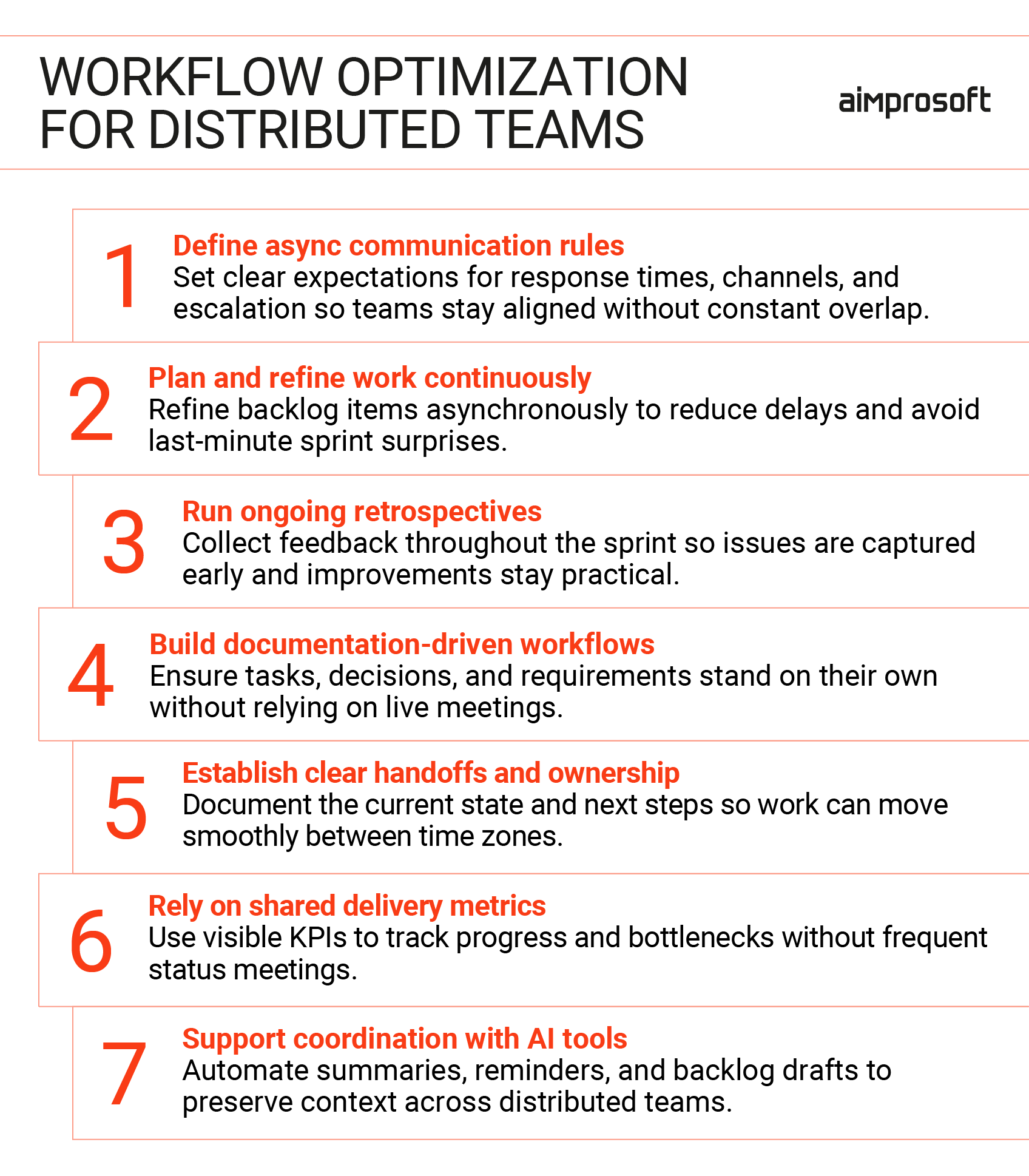
Workflow optimization for dedicated teams
Define clear async communication rules
Async communication only works when expectations are explicit. One of the most practical tips to manage a remote team is to establish shared rules for how and when communication happens, otherwise every delay feels like a problem. Effective teams usually agree on response-time expectations across channels, when to use threads instead of new messages, and how to flag and escalate blockers. These rules reduce noise and prevent important messages from disappearing in chat history. They also protect focus time, since not every message is treated as urgent by default.
Continuous sprint planning and backlog refinement
Sprint planning works best as a continuous process rather than a single long meeting. One practical answer to how to manage a remote team is to refine backlog items asynchronously through comments, clarifications, and estimates added over time. Live discussions are used only to resolve open questions or confirm decisions. This approach reduces delays caused by limited overlap and improves the quality of planning inputs, leading to smoother sprint starts and fewer last-minute surprises.
Rolling retrospectives instead of single sessions
Traditional retrospectives assume everyone can reflect together at the same time. Distributed teams often replace this with ongoing retrospectives, where feedback is collected throughout the sprint in a shared space. Team members add observations when issues are fresh, not weeks later in a meeting. The benefit is more honest and detailed feedback, especially from people who may be quieter in live discussions.
For teams learning how to manage a software development team across time zones, this approach surfaces real issues faster than scheduled meetings ever could. When reviewed regularly, these inputs lead to smaller, more actionable improvements rather than abstract conclusions.
Documentation-driven workflows
In cross-time-zone teams, meetings should support work, not enable it. A core principle of how to manage a software development team in a distributed environment is ensuring that every task, feature, or decision exists independently of live discussion. Tickets need enough context to start work without a call, acceptance criteria and constraints should be written rather than implied, and decisions made in meetings must be documented immediately with clear links to the work they affect. This reduces delays caused by missed discussions and allows teams to work confidently during their own hours, while also improving onboarding and reducing repeated clarification cycles over time.
Clear handoff routines and visible ownership
When teams work in different time zones, unfinished work must be easy for someone else to pick up. Clear handoff routines define what information is passed along at the end of a workday: current state, next steps, and open questions. Equally important is visible ownership. Teams need clear answers to who owns a task at each stage, who can make decisions while others are offline, and who picks up work after a handoff. This clarity allows progress to continue without pauses and reduces dependency on specific individuals being online at the right moment.
Shared metrics that reflect time zone reality
Distributed teams cannot rely on frequent status meetings to stay aligned. An important part of how to manage a remote development team is using delivery metrics that reveal how work actually moves across time zones. Traditional metrics often hide inefficiencies, so teams need KPIs such as lead time from task start to completion, handoff time between roles or regions, and sprint predictability and spillover. When these metrics are visible, teams can spot where delays occur, shift conversations from opinions to evidence, and gain clarity without micromanagement, allowing teams to focus on outcomes rather than activity.
AI-supported delivery routines
AI tools increasingly support distributed workflows by handling routine coordination tasks. They can summarize meetings, extract action items, draft backlog entries, and highlight overdue reviews. Used carefully, they reduce manual effort and preserve context across time zones.
The benefit is not speed for its own sake, but consistency. Teams spend less time reconstructing information and more time acting on it, even when collaboration happens asynchronously.
We build teams with documented handoffs, clear ownership, and async-first habits already in place. You skip the trial-and-error phase and start with workflows that actually work.
Communication and culture building
Time zone challenges rarely break teams through missed messages or delayed replies. They break teams through interpretation. Silence is misread. Delays feel personal. Decisions made while someone is offline can quietly undermine trust. Over time, these small frictions turn into disengagement, even when delivery still looks stable on paper. For leaders responsible for distributed teams, understanding how to manage remote developers on your team means recognizing that communication and culture shape how work is experienced, not just how it is delivered.
What leaders should focus on in cross-time-zone teams
- Predictability builds trust
When teams know what to expect around responses, decisions, and follow-ups, uncertainty has less impact on morale. Delays are less likely to be interpreted as neglect, and trust remains intact even when collaboration happens across time zones. - Fairness affects retention
When the same people repeatedly adjust their working hours or miss important discussions, frustration builds quietly. Teams that surface and rebalance these patterns early avoid burnout that usually appears long before delivery problems become visible. - Context loss is a leadership risk
Culture weakens when planning and decision-making are concentrated in one region, and others only execute. Shared ownership and visible decision trails help teams stay connected to the product and reduce disengagement across locations. - Recognition must travel across time zones
Progress often happens while part of the team is offline. Without deliberate visibility, effort becomes invisible. If you acknowledge contributions asynchronously, you can protect motivation and long-term commitment. - Psychological safety needs active support
Written communication, delayed feedback, and cultural differences make it harder to raise concerns. Teams speak up more consistently when you normalize questions, uncertainty, and early feedback rather than rewarding only polished outcomes.
Distributed teams with clear communication norms and a healthy culture scale more reliably. Expectations feel fair, effort is visible, and collaboration stays human despite distance. When this foundation is missing, time zones are often blamed for problems that are cultural and managerial at their core.
Wrapping up
Understanding how to manage a dedicated development team across time zones is about designing work so that it does not depend on constant overlap. Clear structure, thoughtful tool choices, and adapted practices help teams stay aligned even when their workdays barely overlap. When communication is predictable, ownership is visible, and decisions are documented, time zones stop being a daily obstacle and become just another parameter of delivery.
Teams that get this right spend less time waiting and more time building. If you are planning to scale with a dedicated team and want clear, time-zone-ready processes from day one, we are always open to a focused conversation about how to set that up.
FAQ
How many overlapping working hours are actually needed to manage a dedicated team effectively?
Most distributed teams operate well with two to four hours of daily overlap. This window is usually enough for alignment, clarifying blockers, and making decisions, which is why it works well when you manage a nearshore development team or an offshore squad. The rest of the workday can remain asynchronous if tasks, documentation, and ownership are clearly defined and consistently maintained.
Do distributed teams really work more slowly because of time zones?
Our experience shows that understanding how to manage a remote software dedicated team is more important than time zone proximity. When workflows do not rely on constant real-time input and async processes are clearly defined, work continues across regions, feedback loops stay predictable, and delivery does not pause simply because someone is offline.
Should all team coordination be asynchronous in cross-time-zone setups?
Effective remote team management tools make it possible to handle much of the day-to-day coordination asynchronously, which helps teams stay aligned without relying on constant overlap. When considering how to manage remote developers on your team, a mixed approach usually works best: routine updates and progress tracking can happen async, while complex planning or sensitive discussions are handled in focused live sessions scheduled around limited shared hours.
What is the most common mistake companies make when managing teams across time zones?
Many teams assume communication habits will adjust on their own once a distributed setup is in place. A key lesson in how to manage a global team is setting explicit rules for documentation, response expectations, and ownership early on. Without these, teams lose time to waiting and repeated explanations, and the resulting friction is often mistaken for unavoidable time zone problems rather than fixable process gaps.