Custom RAG for Enterprise Knowledge Bases: Architecture, Trade-offs, and When It Makes Sense
Published: – Updated:


You need the recent onboarding policy. You open Confluence and find 3 documents named “ONBOARDING_HR_FINAL.” But instead of rechecking all of them, you do the most natural thing in this case: go to Slack, ask Bob — the guy who knows everything. He sends the right link. Problem solved.
Until next month, when Bob quits and everything he knew goes with him.
So, now you’re staring at the same three documents, wondering what this situation says about your enterprise knowledge management system?
You’re not alone.
Many organizations invest in knowledge management platforms and, more recently, AI-powered assistants. But storing knowledge is not the same as making it accessible, contextual, or trustworthy. And in this article, we’ll talk about how to change that.
Why an enterprise knowledge management system struggles with or without AI
Enterprise knowledge management failures don’t appear in isolation — they trigger a chain reaction. When systems fragment, search breaks. When search breaks, content stagnates. This staleness doesn’t just annoy users, it erodes their trust, eventually revealing how much vital knowledge was never documented in the first place.
AI could be an answer. But adding AI on top of a broken knowledge foundation doesn’t solve the underlying problems. In many cases, it makes things worse, because now the wrong answer sounds confident.
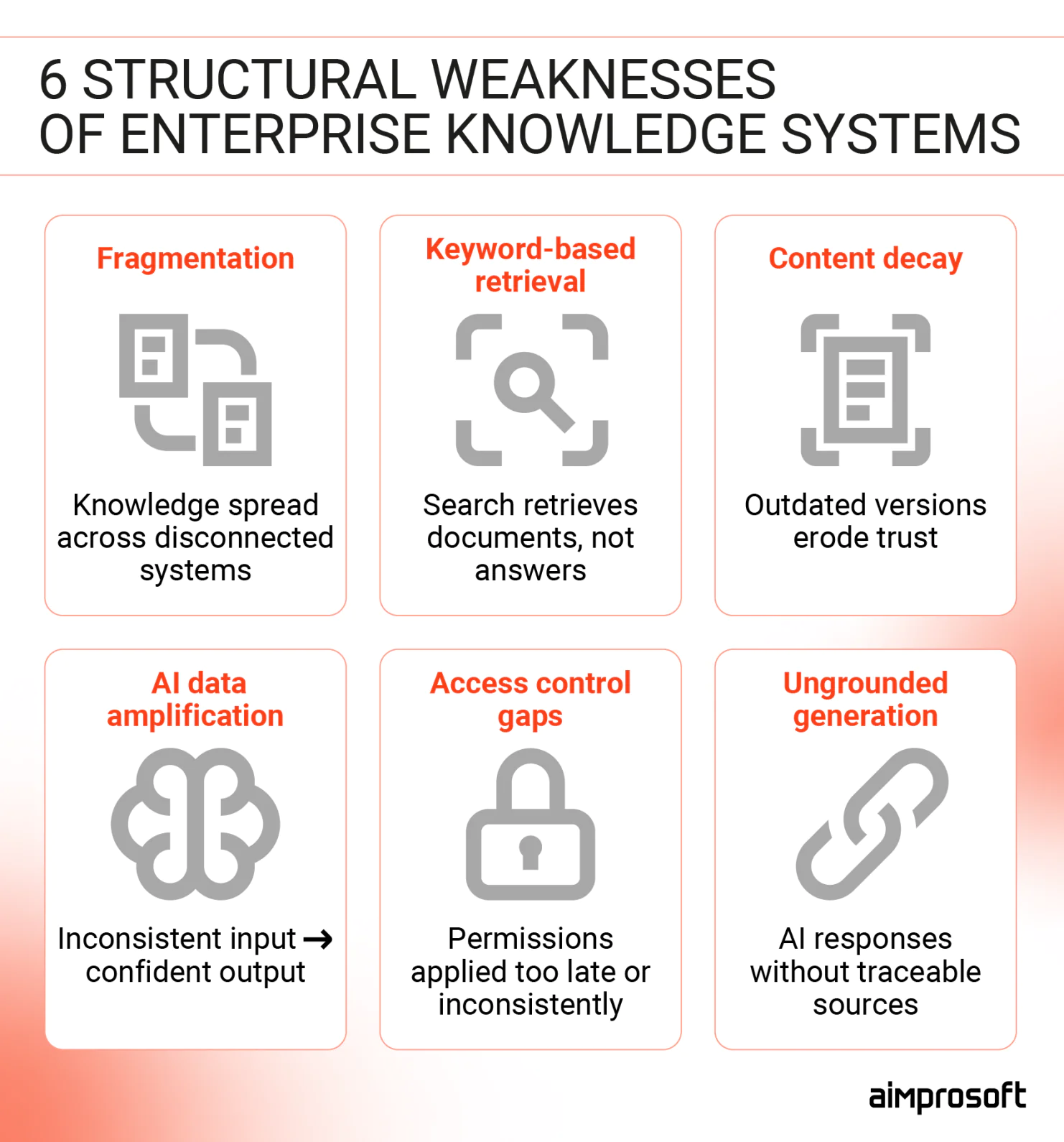
Fragmentation
The average enterprise runs knowledge across 6 to 12 separate systems. They can have Confluence for engineering docs, SharePoint for HR policies, Notion for product specs, a CRM for customer context, and a ticketing system for support history. Each does its job impeccably.
The problem starts when someone needs knowledge that lives outside their usual system. For example, an HR manager won’t think about checking Confluence. They don’t have a map. So they ask someone who does. At that point, the enterprise knowledge management system is still very much present, but it no longer functions as a reliable source of truth.
Keyword search limitations
People think in questions. Traditional search systems require them to think in queries. When an engineer asks, “Why did we move away from the monolith?” — the answer isn’t in one document. It’s spread across an architecture decision record, a Slack thread where tradeoffs were debated, and a migration postmortem written six months later.
Keyword search finds documents. It doesn’t connect them. That works fine when your team is small, and institutional memory is accessible. But the moment organization grows it stops working, as they passed the point where everyone knows everyone.
Stale content
Your GDPR data handling policy was updated last week, but the 2021 version is still indexed, still appearing in search results, still being cited in customer calls. Someone finds it and makes a decision based on that outdated guidance. Over time, the enterprise knowledge management system doesn’t simply lose credibility, it introduces exposure: Regulatory. Contractual. Reputational.
AI amplifies poor data
If your documentation is duplicated, outdated, or poorly structured, an AI assistant will mash them together anyway. It’s not a bug — it’s how these systems work. AI is designed to give you an answer based on available context, not to audit the quality of that context.
It won’t point out that you have two different onboarding guides or tell you which one is the “real” one. Instead, it will give you a confident-sounding answer that blends both. And that’s even worse than no answer, because a “confident” mistake is much harder to spot.
No access control awareness
Enterprise knowledge is permission-sensitive. Salaries, HR files, or the company’s future plans aren’t meant for everyone’s eyes. In many cases, intelligent knowledge management systems handle retrieval as a simple process. Access control often comes later, not as a key part of the design.
The result is a system that may expose sensitive information to the wrong people. Or even break role-based access controls and create a security headache. If this happens even once, the system becomes a compliance risk leadership can’t afford to ignore.
Hallucination without grounding
Some AI tools create responses without strict grounding. They paraphrase internal policies, make educated guesses, and present approximations as answers. In consumer contexts, that’s an inconvenience, but in enterprise environments, it becomes a liability.
What makes this particularly dangerous is the absence of a feedback loop. Without source citations, accuracy benchmarks, and clear ownership, the system can be quietly wrong for weeks before anyone notices. And by then, the damage is already downstream.
How RAG changes the concept
Most enterprise search systems are document-centric. You type a query, and the system retrieves and ranks likely relevant documents. But even with modern semantic ranking, the output is still a list of pages or snippets. What you do with those results — read, compare, piece together — is 100% your problem.
AI based knowledge management systems seem like the obvious fix. Ask a question, get an answer — no document shuffling is required. Some AI assistants even let you upload your documentation directly, offering more grounded answers than just training data. But this approach breaks at an enterprise scale.
Context windows of such Large Language Models are somewhat limited. Typically, they cover 100-200 pages worth of text. If your knowledge base is larger than that, you’ll have to choose which documents are most relevant before asking the question. And even within that limit, accuracy degrades when the AI has to search through dozens of uploaded files to find the right detail. Most importantly, assistants don’t cite their sources.
So, when an answer is wrong, accountability remains vague. Did the system fail, or did the employee fail to verify?
With the custom RAG, every answer is tied to a specific document and timestamp. The employee can see what the system retrieved, verify its status, and decide whether to act on it. The system doesn’t eliminate human judgment but makes judgment possible.
What makes it work?
RAG is not just “AI over documents.” It acts as a safety net that keeps your enterprise knowledge management system aligned with internal rules. The system links to your proprietary data and fetches relevant content when you ask a question. It uses permission filters while retrieving. Then, it creates an answer based solely on that content.
The order matters.
Without retrieval discipline, AI guesses. Without permission to filter, AI exposes. Without citation, AI cannot be verified. RAG acts as a safety net that keeps the AI aligned with your internal rules. This means you can always verify the answers. Sensitive files are kept safe. The system only uses your verified knowledge base.
However, RAG alone does not create governance.
Governance emerges only when retrieval is supported by clear metadata, document ownership, lifecycle management, versioning, and indexing policies. RAG provides the technical mechanism — organizational processes provide control.
When both are in place, answers become traceable, access-aware, and grounded in approved knowledge rather than model assumptions.
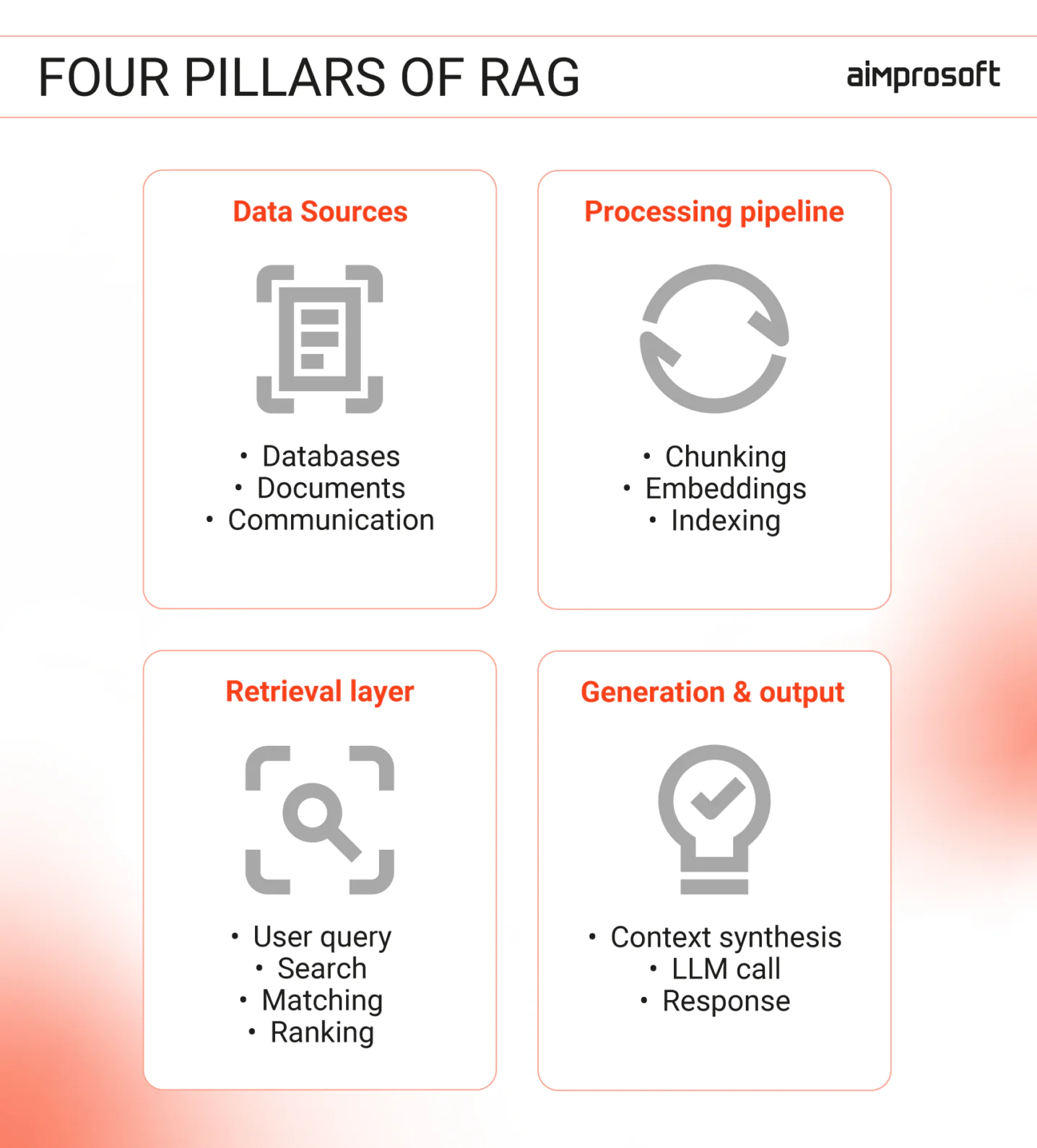
Want to learn more about RAG’s architecture and how to prepare data for it? Read our article.
When does custom RAG make sense?
1. Knowledge lives across too many systems
If your knowledge is spread across six systems, and to answer a non-trivial question properly, a person needs to know which specific system to check. Congrats, you’re paying daily tax. It costs you time and leads to repeated errors and eventually turns employees like Bob into a single point of failure.
At that point, unified retrieval is not about mere convenience but about making sure they don’t waste time switching between sources.
2. Search failure has a measurable impact
When the same questions keep appearing in Slack, or onboarding drags on for months, or support teams keep solving problems that were already solved (manually) — it’s no longer a culture problem. It’s a retrieval problem. Employees aren’t bypassing your enterprise knowledge management system out of habit. They’re bypassing it because it has failed them enough times that asking a colleague is faster and more reliable.
Better documentation won’t fix that, but reliable retrieval will.
3. Compliance risk increases with scale
In fintech, insurance, healthcare, and other regulated fields, knowledge is more than just reference material. It can also be a liability.
Policies change, regulations update, and interpretations evolve, often faster than documentation does. When an auditor asks where an answer came from, “the AI said so” is not the best defense. RAG solves this issue by tying every response to a specific source document and timestamp, which users can review, challenge, and log. That’s what makes it suitable for environments where decisions have to be explained after the fact.
Want to see how these principles play out in a real support workflow? Check out our guide on building a RAG-powered customer service knowledge base.
When a custom RAG is overkill
Going RAG means making key architectural choices for your organization. It involves data prep, tuning retrieval, maintaining the vector database, and ensuring ongoing governance. That’s not an argument against it. It’s a filter. Some organizations have the scale, complexity, and internal capacity to make that investment worthwhile. Others don’t — and for them, a simpler approach will deliver more value with less risk.
These are the situations where RAG isn’t the right fit.
- Your library is small and static. If you have only a few hundred documents that rarely change, you don’t need a heavy-duty retrieval engine. A large context window and well-structured prompts can handle that volume on their own.
- People just need to find the right page. If your users are looking for a specific file rather than a summary of its contents, better organization and search settings will outperform AI every time.
- The questions are narrow and predictable. If 20 to 50 recurring questions cover the vast majority of what people ask, a curated FAQ or a simple decision tree is the better move. It’s more reliable, easier to verify, and much cheaper to maintain than a generative system that might hallucinate a simple answer.
- No one is in the driver’s seat. RAG system isn’t “set it and forget it”, it needs active maintenance. If there isn’t a dedicated owner to prune the data and check the results, the system will eventually fail.
How to make the right call
The decision between a custom RAG architecture and a simpler knowledge management for enterprise services isn’t just a technical one. It’s a business question: What is the actual cost of your current retrieval failures? What compliance exposure exists today? How much of your knowledge is unstructured, distributed, and permission-sensitive?
In our experience working on enterprise knowledge management software, the most common mistake is skipping the diagnostic step. The right solution looks very different depending on whether the root cause is fragmentation, content decay, or access control. Sometimes that leads to RAG. And sometimes to a better-structured documentation layer or a simpler AI integration.
If you’re making this decision now, start with a diagnostic call. Our team is here to help you determine whether RAG is justified or unnecessary.