

How to Build a Customer Service Knowledge Base Using RAG Technology
Published: – Updated:

Most people don’t remember great customer support — but they’ll never forget the agent who rushed them off with canned responses or the hours they spent on hold. For some companies, this feels like a minor inconvenience. Customers move on. New ones arrive.
That assumption is both wrong and expensive.
Poor customer experiences put $3.7 trillion in revenue at risk globally each year, according to the Qualtrics XM Institute. Desperate to stem these losses, organizations are racing toward what seems like the perfect solution: AI in customer support.
The appeal is obvious. AI works 24/7, spans every time zone, handles thousands of conversations at once, and can even sound human.
But most companies overlook one critical detail — generative AI for customer support answers from memory that has an expiration date. Without access to a reliable, up-to-date customer support knowledge base, even the most advanced AI systems resort to guessing. And they guess wrong more often than you’d think.
Retrieval-Augmented Generation (RAG) solves this by doing something fundamentally different: instead of answering from memory, it searches your actual documentation in real-time, then uses that current information to generate accurate responses.
And today, we’ll talk about RAG in customer service in detail.
Let’s get started.
What is a customer service knowledge base?
A knowledge base for customer support is a centralized repository of information that support teams use to resolve issues. Support agents rely on it to answer customer questions, while customers can access its online version through help centers, chatbots, or self-service portals.
At its core, a knowledge base exists to solve three business problems:
- Reduce time to resolution.
- Ensure consistent answers across channels.
- Lower support costs by deflecting repetitive tickets.
When it works well, customers get faster answers, agents spend less time searching for information, and support teams scale without proportional headcount growth.
For RAG applications, this knowledge base for customer service becomes even more critical. It’s the backbone — the single source of truth the system uses to generate accurate answers.
New to RAG? Start here: our beginner-friendly article on Retrieval-Augmented Generation
What defines a proper customer service knowledge base structure
In our experience building RAG systems, a proper customer service knowledge base structure includes:
- Product and feature documentation
- Help center articles and FAQs
- Internal support guides and playbooks
- Troubleshooting checklists
- Policies related to billing, returns, cancellations, and compliance
- Release notes and change logs
- Historical ticket resolutions and internal notes
- Training materials for support agents
Some of this content is customer-facing. Some are strictly internal. The importance of a customer support knowledge base can’t be overstated, and yet this knowledge remains scattered across tools, environments, and departments. How-to guides are scattered across drives, the escalation path lives in an old Slack thread, and a critical document is locked to the account of an employee who’s left.
Humans can work around this by asking follow-up questions, but that takes time. And customers don’t wait. Salesforce found that 83% of customers expect immediate interaction when contacting a company.
That’s why having a customer service knowledge base that is well-structured, properly formatted, and consistently tagged is essential — especially when AI is part of the support workflow.
But adding RAG on top of a traditional knowledge base doesn’t make existing problems disappear. On the contrary, it often makes them more visible. The real difference lies in how knowledge is retrieved and applied during support interactions.
The table below shows how a traditional customer service knowledge base compares to a RAG-powered one at a system level:
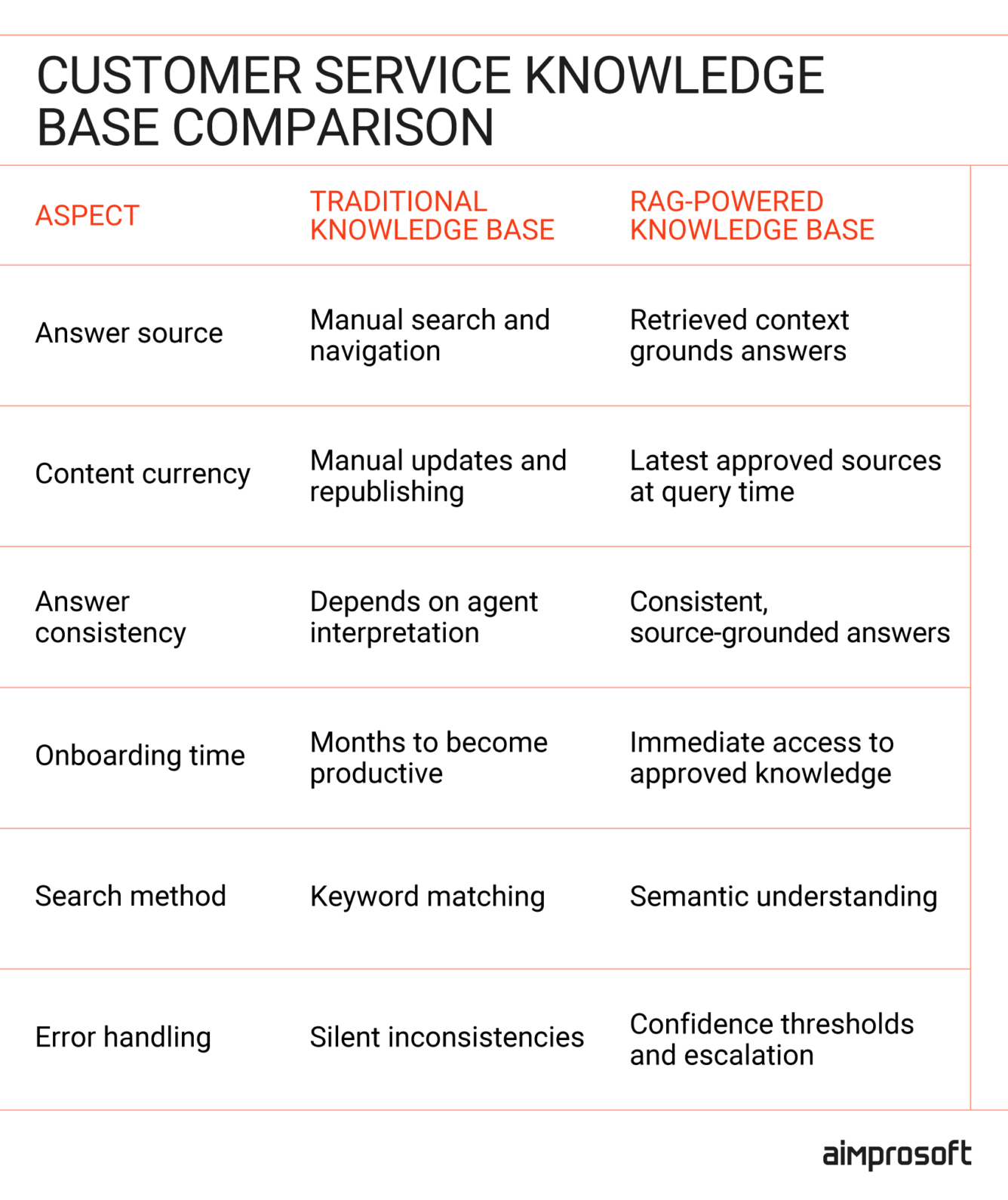
How RAG in customer service addresses common pain points
RAG doesn’t replace your customer support knowledge base — it changes how that knowledge is accessed and applied in real-time support scenarios.
With RAG for customer support automation, long-standing challenges shift from organizational and human bottlenecks into solvable technical problems: retrieval and context. So, instead of forcing agents or customers to navigate knowledge sprawl, RAG brings the correct information into the conversation when it’s needed.
Here’s how a RAG-enabled knowledge base helps address the top 4 customer support challenges.
1. Breaking down fragmented knowledge silos
According to Salesforce, 70% of customer experience professionals and executives view silo mentality as the biggest obstacle to effective customer service. And it’s not surprising. Even with company-wide policies and shared platforms like SharePoint, Google Drive, or Dropbox, critical knowledge still ends up scattered across systems and formats, making it hard to see the true benefits of a knowledge base for customer support.
For support agents, this fragmentation leads to constant searching, cross-checking, and context switching — stealing time and draining focus from actual customer problem-solving.
RAG creates a unified retrieval layer that sits on top of all your existing systems. Instead of replacing your scattered documentation, it indexes content from multiple sources into a single searchable vector database. And when a query comes in, RAG searches across all connected sources simultaneously and retrieves the most relevant information — regardless of where it’s stored.
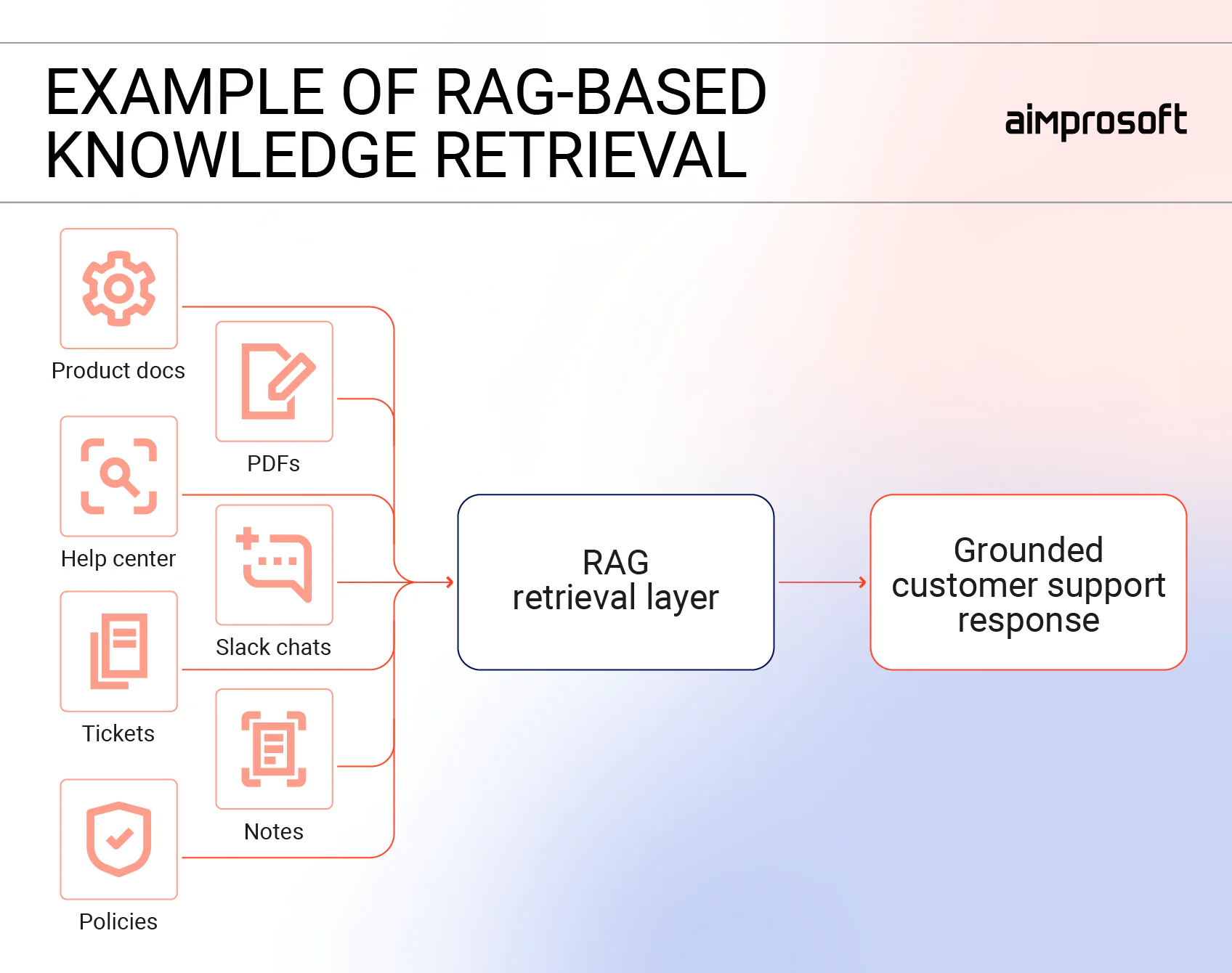
When fragmented knowledge is no longer a barrier, the results for business become immediate and measurable. LinkedIn’s customer service team, for example, reduced median resolution time by 28.6% after six months of using RAG with knowledge graphs. By preserving the structure of historical tickets and their relationships, agents could quickly find relevant resolutions without manually searching across disconnected systems.
2. Time wasted in search and context switching
Unified knowledge solves the “where is that info?” problem. But knowing where to look doesn’t solve another critical challenge: the time agents waste actually finding and retrieving that information across multiple systems.
Asana’s Anatomy of Work Index 2022 discovered that employees use about 10 different applications per day, switching between them 25 times per day on average. Each switch breaks focus, adds minutes, and compounds into hours of lost productivity each week. For customer support, this inefficiency has direct consequences: 33% of customers abandon live chat after waiting just 2-3 minutes, often resulting in brand avoidance.
RAG for customer support automation changes this workflow by retrieving only the most relevant context instead of entire documents. This directly translates into faster resolution: companies report 20-50% improvements in response times (Squirro).
Ready to unify your knowledge sources? Our RAG development services help customer support teams build retrieval systems that work across your existing tools.
3. Onboarding of newcomers
Traditional onboarding relies heavily on shadowing, informal handovers, and knowledge that lives only in the heads of experienced agents — a process that typically takes months before new hires can handle tickets independently.
The problem is that this kind of knowledge doesn’t scale, and it doesn’t stay. When experienced agents change roles or leave, that context leaves with them. New hires are forced to relearn the same lessons through trial, error, and repeated escalations, while senior agents are constantly interrupted to “explain how things really work.” Sales ramp-up time measures how long it takes new sales representatives to reach full productivity, typically averaging 3.2 months in SaaS.
RAG addresses this by making implicit knowledge explicit. By retrieving information from historical tickets, internal notes, and approved internal documentation, RAG surfaces patterns and prior resolutions, including edge cases and exceptions that never get formally documented.
For growing teams, this becomes a practical example of how to use a knowledge base for customer support to reduce onboarding time and dependency on individual experts.
4. Mixed permissions and governance
Customer support knowledge is not uniformly accessible, and it shouldn’t be. But this fact often creates friction. Support agents must navigate what they can say, what they should say, and what they’re allowed to access, often under time pressure. When permissions are unclear or inconsistently enforced, agents either hesitate, escalate unnecessarily, or share more than they should.
RAG helps address governance challenges by enforcing access control at the point of retrieval. Instead of pulling from a flat pool of information, RAG systems can be configured to retrieve only the content a given user or channel is authorized to access.
When an agent submits a query, the system automatically filters out internal-only or restricted documents from customer-facing responses, ensuring that sensitive policies, account details, or internal guidance are never exposed unintentionally. At the same time, internal users can safely access deeper context when their role allows it.
Because RAG technology in intelligent customer service makes retrieval explicit and traceable, it’s much easier to maintain audit trails. You can record exactly which sources were used to generate a response and confirm they were accessed under the correct permission levels.
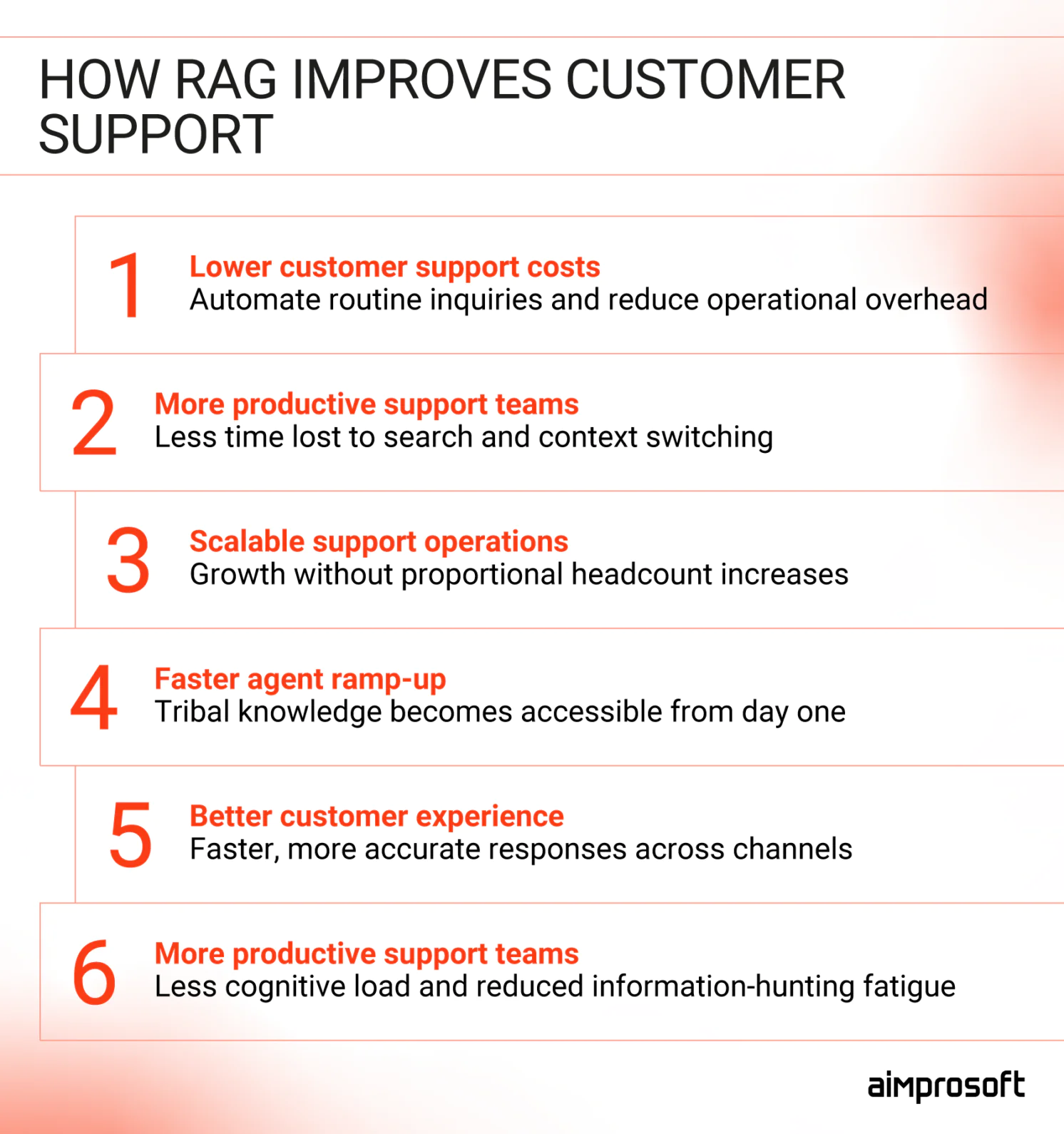
How to build a knowledge base with RAG
Building a RAG-powered knowledge base doesn’t require replacing your current documentation or migrating systems. Instead of swapping out existing knowledge base software for customer support, RAG connects to the tools you already use and changes how knowledge is retrieved and applied.
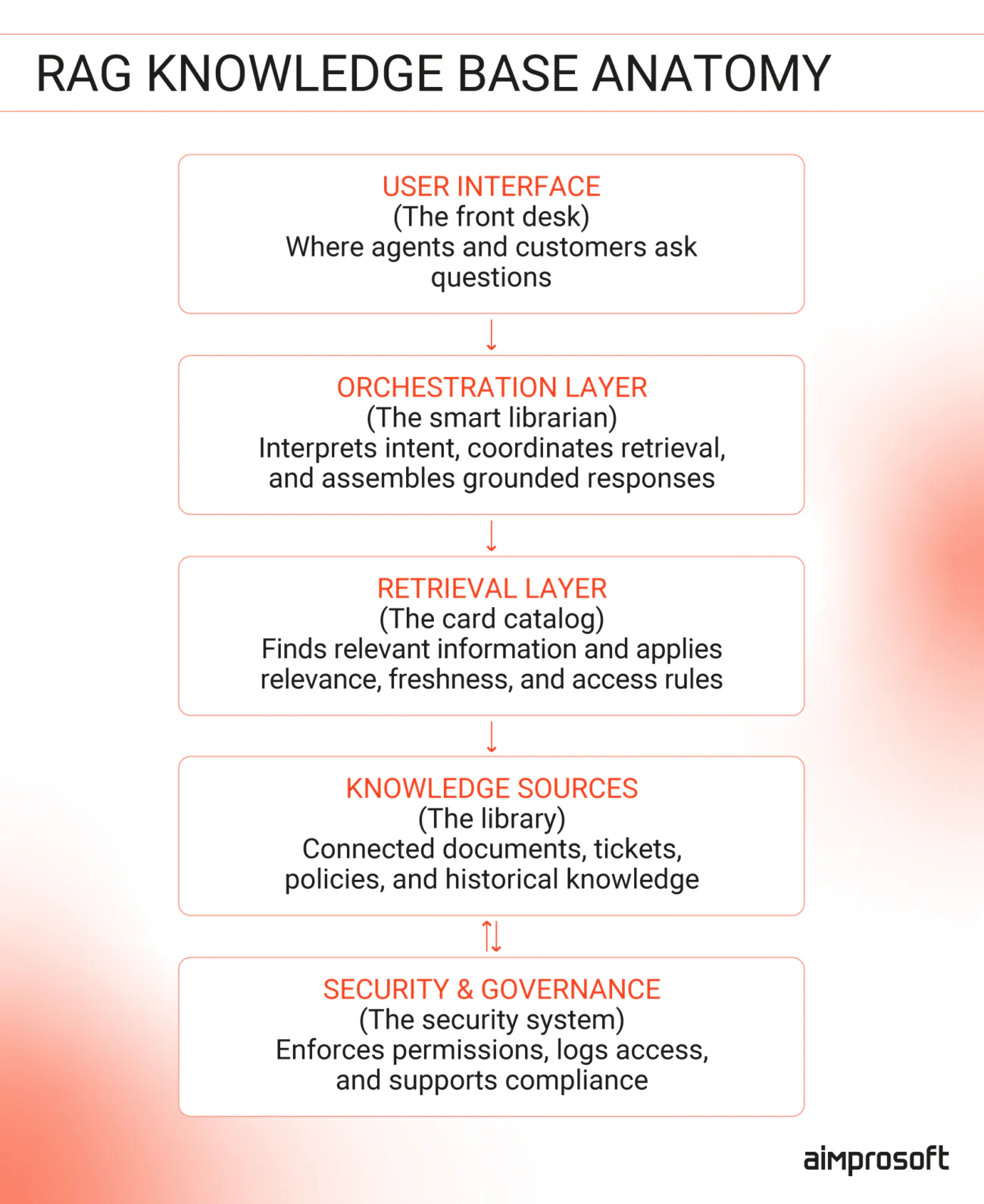
Step 1: Identify and scope your knowledge sources
Start by mapping where your existing customer support knowledge lives today — across the documentation, systems, and workflows your teams already rely on. At this stage, focus on coverage, not cleanup.
You need to identify:
- Authoritative sources — Which documents represent current, official information?
- Outdated content — What needs to be deprecated or archived?
- Scenario-specific knowledge — Which sources are required for particular support cases?
Next, add basic metadata tags to each source: status (active/deprecated), audience (internal/external), and authority level. This is the foundation for a reliable RAG for customer support automation, as it retrieves whatever you give it access to. Without proper classification, RAG will confidently surface outdated or incorrect information. Tagging documents upfront prevents having to fix incorrect answers after deployment.
Step 2: Define access rules and governance early
Before connecting any knowledge sources to your RAG system, define who can access what and in which situations. This step prevents security issues and compliance violations that are difficult to fix after deployment.
Your task here is to map out your governance structure:
- Customer-facing vs. internal-only content — Which documents can customers see vs. internal troubleshooting guides?
- Role-based access — Do Tier 1 agents have different access than Tier 2 or team leads?
- Channel restrictions — Should a customer chatbot retrieve different content than an agent assist tool?
- Compliance requirements — What must be logged, restricted, or retained for regulatory purposes?
RAG enforces governance at retrieval time, not as an afterthought. If rules are unclear or inconsistent, you’ll either create security gaps (exposing internal information to customers) or build an overly restrictive system that blocks legitimate queries and frustrates agents.
Step 3: Prepare documents for retrieval
RAG systems are only as good as the data you feed them. If you upload raw, unorganized files, the AI will struggle to find the right ‘needle in the haystack.’ These tips are what enable reliable RAG-based enterprise search:
- Chunk logically — Split into paragraphs, sections, or complete thoughts (not arbitrary character limits)
- Add metadata — Include source, last updated date, category, and permission level
- Remove duplicates — Mark deprecated content clearly to prevent retrieval
This step often reveals hidden complexity. Balancing structure, governance, and existing workflows without disrupting documentation processes requires careful planning. Many teams bring in external specialists to design chunking strategies and metadata models aligned with their specific support scenarios.
Let's talk now
Step 4: Implement retrieval and ranking
This is where the actual ‘Search’ happens. The retrieval layer acts as a bridge: before the AI drafts a response, this step scans your knowledge base to find and rank the most relevant information. To get high-quality results, you need to configure these three core components:
- Indexing — Make all knowledge sources searchable in one unified system
- Query matching — Set up how the system interprets customer questions (understanding intent, not just matching keywords)
- Ranking rules — Define what makes one source more relevant than another: freshness, authority level, or specificity to the query
- Access filtering — Ensure results automatically respect user permissions set in Step 2
Test retrieval with real support queries from your ticket history. The goal is to ensure the same issues link to the same official sources every time, and that the system doesn’t miss relevant info on edge cases just because the wording is different.
Many teams start with basic ranking, then refine their RAG for enterprise response based on which sources agents actually find helpful in practice.
Step 5: Connect generation to retrieved context
This is the final hand-off. This step is the core of your RAG for customer experience strategy— it’s where you set the guardrails that ensure the AI stays on-brand, cites its sources, and provides a helpful response every time.
Define your generation rules:
- Response boundaries — Answers must be grounded strictly in retrieved content, not AI’s general knowledge
- Citation requirements — Should responses reference specific sources? How should multiple sources be handled?
- Confidence thresholds — At what confidence level does the system say “I don’t know” and escalate to humans?
- Tone and formatting — Match your brand voice and support standards
Test generation with edge cases: What happens when sources conflict? When information is incomplete? When the query is ambiguous? This is the difference when you build an AI chatbot with a custom knowledge base — answers from your verified content, not AI’s best guess.
Step 6: Test, monitor, and improve continuously
Launch is only the starting point. RAG systems require ongoing maintenance to stay accurate as your product evolves and user behavior shifts. To prevent performance from degrading, you need to establish a consistent feedback loop.
- Weekly — Check which sources are being retrieved most, and are they still accurate and relevant?
- Bi-weekly — Analyze unanswered queries to identify documentation gaps
- Monthly — Review agent feedback and adjust retrieval/ranking logic
- Ongoing — Update indexed content immediately when policies or products change
Assign ownership for each monitoring task. Without clear responsibility, RAG quality degrades as your business evolves.
Ready to build RAG for your support team? We handle the complexity — from data structure to RAG architecture to production.
What happens when conditions aren’t perfect?
RAG architectures don’t require perfect conditions to work. While many implementations run primarily in the cloud, the same principles apply in environments with limited or intermittent connectivity.
In our practice, we’ve worked on solutions that combine local and cloud capabilities. For example, in field support scenarios where technicians may work offline, RAG in customer service can run with a locally packaged knowledge base and model, retrieving and answering questions entirely on-device. When connectivity is available, the system can route requests to a more powerful cloud-based model for higher-accuracy reasoning.
In both cases, the retrieval logic remains the same: relevant information is fetched first, responses are generated only from that context, and low-confidence cases are escalated to human support instead of forcing an answer. Documentation updates are handled through a controlled sync process, ensuring local and cloud knowledge stay aligned over time.
This flexibility allows customer support knowledge base to remain reliable in all conditions — while still optimizing accuracy, governance, and continuous improvement when connectivity allows.
Summing up
RAG itself doesn’t eliminate the challenges of customer support like fragmented and scattered info. But when implemented correctly, RAG in customer service turns this scattered documentation into an operational system that actively improves response quality, speed, and consistency.
The companies seeing real results aren’t waiting for perfect documentation or fully centralized systems. They start with what they have, focus on the highest-impact use cases, and continuously improve RAG as part of their support operations.
If you’re considering RAG for customer support, the most important step is planning your knowledge base architecture deliberately, and our team is ready to help you. All it takes is to contact us.